
Headphones that feel acceptable for one song can become distracting during a film, a work session, or an afternoon of calls. Pressure around glasses, a headband hotspot, a warm ear cushion, and a cable pulling against your chair are different problems. Buying the largest cushion or the longest battery specification does not solve all of them.
This guide compares four existing options by how you would actually use them: sitting away from a TV, listening wirelessly, avoiding a headband with wired earbuds, or making computer calls with one ear uncovered. They are candidates for different routines rather than a measured comfort ranking. We have not worn these models for an all-day comparison, and seller descriptions cannot establish that a particular shape will suit your head or ears.
Start with the discomfort you want to avoid
Before looking at products, describe what bothers you about your current pair. That turns a vague search for comfortable headphones into a useful buying decision. If you keep loosening the headband, pressure may matter more than battery life. If the headphones slide when you look down, choosing an even looser design may introduce a different problem.
- Pressure on your ears: check whether the cushion surrounds the ear or rests on it; a product labeled over-ear can still have an opening too small for you.
- A hotspot on top: examine the headband contact area and adjustment range rather than assuming thick padding distributes the load evenly.
- Warmth: consider cushion material and your room, with time out of the headphones built into your routine.
- Cable tug: measure the seated route to the source, including slack for turning and reaching.
- Earbud discomfort: review tip sizes and how the housing rests against the outer ear; eliminating a headband does not eliminate pressure.
- Call fatigue: check microphone placement, mute access, and whether you need stereo playback or a single earpiece.
Try to change the feature that causes the problem, rather than buying every comfort feature mentioned in a listing. For example, extra cord length is useful across a living room but can be cumbersome beside a laptop. A one-ear headset suits spoken conversation, while someone following stereo music may prefer a different form.
Four options for different listening routines
YUEBAITU: a long cable for a fixed TV seat
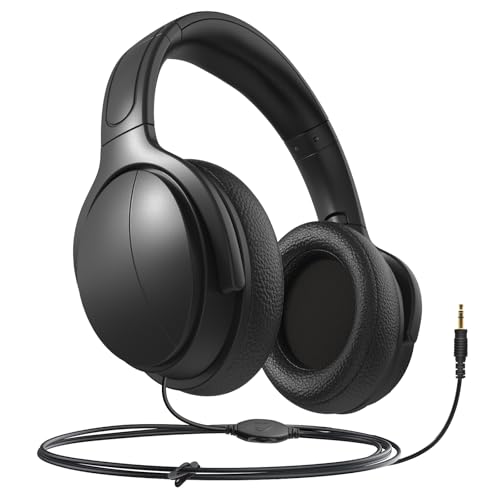
The selected YUEBAITU listing is the black, 19.6-foot version without a microphone. It uses a 3.5mm connection and includes volume control. Its practical appeal is reach from a fixed seat: a long lead can let you keep the source beside the television while listening from the sofa. The seller describes padded ear cushions and an adjustable headband; those features justify considering it, but they do not establish a pressure-free fit.
Consider it if your TV or another source has a working analog headphone output and you prefer not to charge a headset. Measure the actual cable route before ordering, with enough slack for normal movement. Look elsewhere if you need a microphone for calls, want to walk around freely, or cannot keep the lead away from a walkway. An optical output or a USB socket on a TV is not a direct substitute for the required headphone output.
Uliptz: wireless over-ear listening with a wired alternative
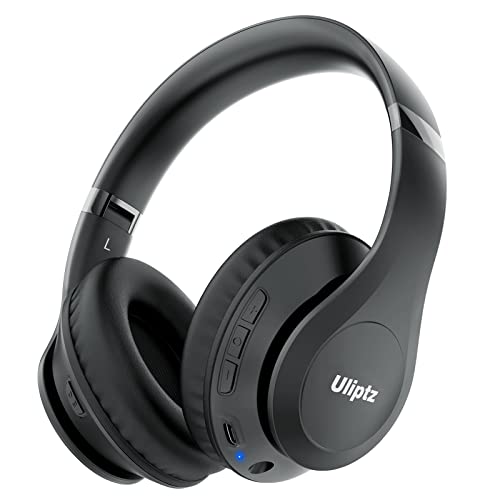
Uliptz offers a black Bluetooth over-ear option with adjustable positioning and a 3.5mm wired listening alternative. The listing describes padded cups and several EQ settings. That combination suits someone who changes between a desk and another seat, and wants a cable option rather than depending entirely on wireless listening. EQ settings change the presentation of sound; they cannot correct a cup opening that presses on your ears.
Consider it if your main source supports Bluetooth audio and you want to remove cable drag during stationary listening. The advertised battery figure is an upper-limit claim, not a guaranteed working week; volume, use, and charging routine matter. Check before buying whether the wired mode supports the functions you need. The Bluetooth microphone claim does not establish microphone operation through its analog cable. Active noise cancellation and low-latency gaming performance should not be inferred from the wireless label.
Accessonico: long-cable in-ear listening
Accessonico’s exact product listing identifies black LE10Bm in-ear earbuds with a 10-foot cable and a 3.5mm plug. These are a different fit proposition from padded over-ear headphones. An in-ear design removes headband contact and avoids placing a large cushion against glasses, which may make it worth considering when those are your specific complaints.
Consider it if you already tolerate in-ear tips and need extra reach from an analog audio source. Do not choose it simply because a listing uses an all-day comfort phrase: tip fit, housing pressure, and the weight of the hanging cable still need checking. The identity evidence supports wired earbuds, not an active noise-cancellation system or a hearing assistance device. Confirm the tip options, return conditions, and source output before ordering. A long wire also needs support so it does not pull on the earbuds whenever you turn your head.
Arama: a one-ear USB headset for conversations
The Arama option is a monaural, on-ear USB office headset with a microphone. The exact-ASIN retailer information describes inline volume and microphone mute controls. Its role here is conversation: leaving one ear uncovered and keeping a microphone near the mouth can fit a desk-based calling routine. It should not be treated as a stereo music alternative or an over-ear design.
Consider it if you spend time in computer meetings and want accessible audio controls. Check before buying the selected USB-A connection, any adapter required by your computer, and support for the controls in your actual calling app. Retailer descriptions differ on model suffix and bundled accessories, so do not assume a USB-C adapter is included. Claims about a noise-reducing microphone also do not mean the earpiece has active noise cancellation. The cushion rests on one ear, so pressure remains a personal fit question.
Compare the fit, not just the category name
Over-ear openings and glasses
For an over-ear pair, look for usable internal cushion dimensions rather than only the outside diameter. Your ear needs room inside the opening without being folded against the cushion. A large external cup can contain a narrow opening, while photographs do not reliably show the depth available between the ear and the driver covering.
Glasses create another contact point. Wear your normal frames when assessing fit, and notice whether the cushion presses the arms against the side of your head. Shift the cup position gently within the intended adjustment range. If you need to place the headset in an awkward position to relieve the pressure, that is useful evidence against keeping it.
Do not stretch a headband overnight or force it into a new shape as a default fix. Such changes are outside normal adjustment and may damage the product or affect the return. Start with the controls designed for adjustment and the fit instructions supplied with the model.
On-ear pressure and a single earpiece
On-ear designs contact the ear itself. That can suit someone who dislikes a large enclosure, but the contact area is different from an over-ear cushion. Evaluate the pressure where the cushion touches, rather than assuming a small headset must be comfortable because it looks light.
A mono headset is a purposeful choice for calls, not a lesser version of stereo headphones. Ask whether your work involves mostly voices or whether you regularly edit or listen to stereo material. Also consider who shares your room: an uncovered ear does not make incoming call audio inaudible to others, and it does not guarantee awareness of every surrounding sound.
Earbuds and cable weight
With in-ear products, the usable tip range matters more than headband adjustment. A tip should not require uncomfortable force to stay seated. Check whether replacement tips are available for the exact model, especially if you already know that standard sizes do not suit you.
Route excess cable toward the desk or chair without fastening it tightly around your body. When the cable hangs from the earbuds over a long distance, the pull may matter more than the weight of the earpieces. Avoid sleeping with a long loose cable or treating extra length as permission to move through a room without watching its route.
Build a connection plan before choosing wired or wireless
For a TV seat, inspect the television’s manual for the actual audio output and the way its volume is controlled. A 3.5mm socket can have different purposes on different equipment. Confirm that it is an output intended for headphones and that your preferred listening level is adjustable. A socket marked input does not send TV sound to wired headphones.
Also find out what happens to the television speakers when you connect headphones. If two people are watching together, automatic speaker muting may be a bigger issue than the headset itself. The relevant answer comes from the TV’s settings and manual, not the headphone listing. If additional equipment would be required, include that cost before deciding a wired option is simpler.
For a computer, keep analog listening and USB audio separate. A USB headset communicates through the computer’s audio system, while 3.5mm headphones use an analog output. A physical adapter must support the function needed; an adapter intended only for charging cannot create a missing audio signal.
For wireless listening, check the actual source rather than its age or price. Some televisions accept Bluetooth accessories for controls but have different provisions for audio output. Consider pairing, reconnecting after sleep, and whether another device can unexpectedly take over the connection. A battery specification cannot answer those everyday workflow questions.
If video or interactive gaming is your main use, test sound synchronization in that activity. Bluetooth version alone does not establish an end-to-end delay figure. The source, playback mode, and headset all contribute to the experience. If lip movement and speech are distracting, assess the available wired route before committing to wireless use.
Make an ordinary-session trial useful
A short fit check is more informative when it resembles your real routine. Use your normal chair, glasses, hairstyle, and source, and keep the packaging intact while you check the return terms. Begin with the headset adjusted according to its instructions, not with maximum headband extension or excessive volume.
- Listen to familiar spoken material so you can judge whether voices are understandable without repeatedly reaching for the controls.
- Turn your head, look down at a book, and lean back normally to reveal slipping or cable pull.
- Locate volume and mute controls without repeatedly removing the headset; small or similarly shaped buttons may be inconvenient for you.
- Notice where contact develops, including the top of the head, the edge of the ear, and the arms of your glasses.
- For calls, make a brief ordinary conversation and check both the microphone input and the listening output in the app.
- Take the headset off when it becomes uncomfortable. A product described for long use does not create an obligation to keep wearing it.
Write down the problem rather than a general verdict. “Left cup presses my glasses when I read” helps you decide what to change; “not comfortable enough” may send you back to the same type of product. Do not turn the trial into an endurance test. Padding and connection features are purchasing considerations, not a guarantee of safe or comfortable continuous wear.
For wireless models, include a normal charging cycle and a session after the computer wakes from sleep. For wired models, try the full route from source to seat rather than a quick check next to the source. These checks address the practical reason for buying each type without pretending to measure laboratory performance.
Choose for the routine you have most often
A fixed sofa seat
Prioritize the correct TV output, a manageable cable route, and controls you can reach. The YUEBAITU long-cable option fits that decision path when an analog headphone output is available. Accessonico provides a different in-ear form for the same general connection type, but its shorter stated cable and tip fit need separate consideration. Neither solves a TV that lacks the required output.
Moving between a desk and a chair
A wireless over-ear option such as Uliptz may reduce the amount of cable you manage. Decide how you will charge it and what you will do if the battery is low. If calls matter, confirm the microphone behavior in the mode you plan to use rather than assuming the same functions remain available through the analog connection.
Computer conversations
Arama’s single earpiece and microphone are more directly aimed at calls than a no-microphone TV model. Check the app’s mute behavior and whether you prefer a headset control or the software control. The two may behave differently. A call-oriented shape still needs a fit trial; a microphone and a USB plug do not establish comfort across an entire shift.
Glasses or headband sensitivity
First identify whether the problem is pressure from the cushion, contact at the top of the head, or both. An in-ear design changes those contact points but introduces ear-tip fit. A looser headset may slide, and a firmer seal may press on glasses. There is no single product category that resolves those competing needs for everyone.
Questions to settle before ordering
Does softer padding always mean better comfort?
No. The shape, contact area, and fit matter alongside softness. Very soft cushions can still press the ear against another surface, and thick cushions can make a cup opening feel smaller. Use seller dimensions and an ordinary fit check instead of treating a material name as a comfort score.
Can noise isolation make a headset suitable for noisy work?
A listening headset and workplace hearing protection serve different purposes. None of the recommendations here should be treated as certified protection for a hazardous noise environment. Likewise, microphone noise reduction describes a call feature; it does not establish protection for the listener or active cancellation at the earpiece.
Will a USB-C adapter make every headset work?
Only when the adapter supports the required connection and the computer supports the device. A USB-A headset needs a suitable data connection. An analog 3.5mm headphone needs an analog audio output or compatible audio conversion. Check both ends of the connection and any microphone requirements; matching the shape of the plug is insufficient.
Should I buy the longest cable available?
Buy enough reach for the seated route, with slack, while avoiding unnecessary excess. Long cables can snag on furniture and pull when someone passes. Measure the path you can safely manage, not just the straight-line distance between the television and sofa.
What should I check about returns and replacement parts?
Look at the selected seller’s return window and any restrictions for opened in-ear products. Ask whether pads, tips, or a damaged detachable cable can be replaced for that exact model. Keep accessories and packaging until you have checked fit and normal operation. A low purchase price can be less attractive when the part that touches your ears cannot be replaced.
A final pre-purchase check
Shortlist the form that addresses your main pressure or cable problem, then confirm the selected variant and your source connection. Check the package contents rather than assuming an adapter, microphone, or spare tips are included. Finally, make sure the return policy leaves you a reasonable opportunity to assess normal fit. The right choice is the one whose contact points, controls, and connection suit your routine; a comfort claim in a product title is only the start of that decision.