
Best MP3 Converter for Car Audio: Turn Tapes Into Digital Tunes
Answering the need for modernizing a car’s audio without losing vintage charm, this guide highlights top MP3 converter options for car audio systems. Each product is chosen for practical use, whether you’re upgrading a classic tape deck, digitizing old tapes, or adding Bluetooth and USB playback. The top picks cater to different buyer types: retro-car enthusiasts who want seamless tape-to-digital transitions, busy commuters needing quick conversion, and drivers seeking wired reliability or hands-free calling. Below is a concise buying table and a focused look at five standout offerings.
| Product | Brand |
|---|---|
| arsvita Car Audio Cassette to Aux Adapter | arsvita |
| DIGITNOW USB Cassette Player BR607 | DIGITNOW |
| Arsvita Car Audio Bluetooth Wireless Cassette Adapter | arsvita |
| Cassette Tape Player by Tinxumb | Tinxumb |
| Arsvita Car Audio Bluetooth Cassette Receiver | arsvita |
arsvita Car Audio Cassette to Aux Adapter

The Arsvita cassette-to-aux adapter is designed for vintage car setups with a traditional tape deck. It enables streaming from modern devices via a standard 3.5 mm jack. The product emphasizes premium sound quality with dual shielding and gold-plated plugs to minimize signal loss. Best for classic cars where preserving original interiors matters and a wired connection suffices for daily listening.
Who it’s best for: drivers with a tape-based system who want to preserve the car’s classic look while gaining wired mobile compatibility. Why chosen: strong build for reliable audio transmission and compatibility with a wide range of devices with standard 3.5 mm jacks.
Caution: May require equalizer adjustments on the source device to optimize sound texture; not a Bluetooth solution.
DIGITNOW USB Cassette Player BR607
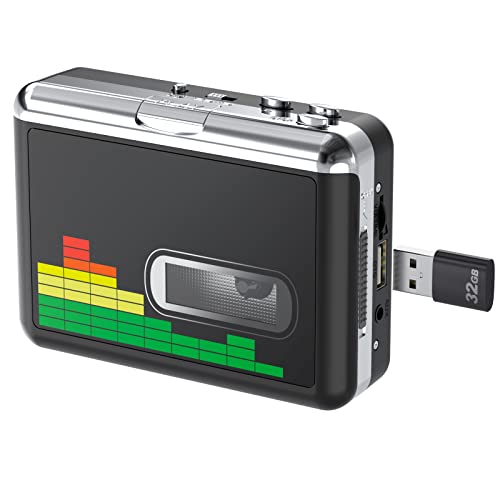
The DIGITNOW device converts cassette music to MP3 files directly to a USB drive, with no PC required. It supports auto-reverse playback, has a built-in volume control, and works with USB drives up to 128 GB (FAT32). This option is best for quick digitization and portable listening, especially for users who want to archive tapes and play through USB-enabled car stereos or portable speakers.
Who it’s best for: anyone prioritizing straightforward tape-to-MP3 conversion without a computer. Why chosen: includes automatic reversal and a simple interface for efficient archiving.
Caution: File format and bit rate are fixed; ensure USB drive formatting and MP3 support match your car stereo requirements.
Arsvita Car Audio Bluetooth Wireless Cassette Adapter

This Arsvita Bluetooth cassette receiver converts a vintage tape deck into a Bluetooth-enabled system. It is compatible with most smartphones and supports stereo audio streaming, making it suitable for hands-free listening and simple wireless playback in a retro cabin. Best for drivers who prefer wireless convenience while maintaining the classic car aesthetic.
Who it’s best for: Bluetooth-enabled streaming without cables. Why chosen: box-type design is easy to install and pairs quickly with common devices.
Caution: It does not list a built-in microphone or call controls on all models; verify feature set if hands-free calling is important to you.
Cassette Tape Player by Tinxumb

The Tinxumb cassette-to-MP3 converter emphasizes affordability and ease of use, with a USB-connected workflow to digitize tapes and store MP3s for playback on modern devices or CD burning. It highlights flexibility with home and car stereo setups through 3.5 mm AUX input. Best for budget-conscious buyers who still want reliable digitization.
Who it’s best for: cost-conscious users looking to digitize a library without complex features. Why chosen: broad compatibility with USB and 3.5 mm input, good value for basic digitization.
Caution: Build quality and audio fidelity may vary with lower-cost hardware; test with a few tapes first.
Arsvita Car Audio Bluetooth Cassette Receiver

This Arsvita Bluetooth Cassette Receiver offers Bluetooth 5.0 connectivity, allowing wireless music streaming to a vintage cassette deck. It supports phone call control and general playback features, making it suitable for drivers who want a modern wireless link while preserving the tape deck’s look.
Who it’s best for: drivers seeking robust Bluetooth range and straightforward control. Why chosen: latest Bluetooth standard improves pairing stability and audio quality.
Caution: No explicit mention of built-in microphone in all models; confirm microphone support if hands-free calls are essential for you.
Buying Guide
What should you consider when choosing an MP3 converter for car audio?
Interface and compatibility: Decide between wired (AUX/USB) and wireless (Bluetooth) options based on your car’s existing inputs and your device ecosystem. For classic cars, wired adapters that maintain original aesthetics may be preferred.
Digitization needs: If you want to convert tapes to MP3, USB cassette players and USB-to-MD options provide straightforward archiving. For ongoing listening, Bluetooth adapters offer hands-free controls and wireless streaming.
Sound quality and stability: Look for devices with shielding, high-quality plugs, and stable streaming or recording capabilities. Features like auto-reverse, volume control during recording, and selective companding can influence the listening experience.
Ease of use: If you want quick setup, plug-and-play devices with simple interfaces are ideal. Advanced models may add call controls or EQ adjustments, but could require more familiarity.
Reliability and durability: For long-term use, metal housings, gold-plated contacts, and robust construction reduce signal loss and wear. Consider the environment inside a car, such as heat exposure and vibration.
FAQ
- Can I convert old cassette tapes to MP3 without a computer? Yes. Some USB cassette players store MP3 files directly on a USB drive.
- Is Bluetooth a good option for car use? Bluetooth offers wireless convenience but may introduce slight latency and potential pairing issues in some environments.
- Will these adapters ruin my vintage car’s aesthetics? Many models maintain the classic look and feel while adding modern functionality, making them suitable for preserving visual authenticity.
- Do I need special software to digitize tapes? Not necessarily. Several units handle MP3 capturing directly to USB; others may require simple computer-based software depending on the model.
- What is the best choice for hands-free calling? Look for a cassette receiver with built-in microphone and call controls designed for hands-free operation.
- Are there any limits on USB drive capacity? Some devices support up to 128 GB or similar limits; verify compatibility with your chosen model.