
Best Noise Cancelling Microphones for Meetings in 2026
Looking for a noise cancelling microphone for meetings? This guide highlights five top USB and wired mics that reduce background noise and improve voice clarity for virtual meetings, online classes, and small team calls. Each pick suits different setups—from desktop desks to laptop-only workstations and hybrid home offices. Whether you need a simple plug-and-play USB mic or a headset with a built-in mic, these options help keep conversations crisp and focused.
The following table summarizes the five selected products, highlighting who they’re best for and where they excel.
| Product | Best For | Why It Stands Out |
|---|---|---|
| CMTECK USB Computer Microphone G009 | Personal desk setup, online classrooms | Active noise cancelling with cardioid pattern and a mute button with LED status |
| Logitech H390 Wired Headset | Calls and meetings in noisy environments | Rotating noise cancelling mic and inline controls for quick adjustments |
| AIRHUG Conference USB Microphone | Small group video conferences and classes | 360° pickup, magnetic design, and LED mute/status indicators |
| Yealink SP92 Conference Speakerphone | Small meeting rooms and Teams/Zoom calls | AI noise cancellation and 360° coverage for multiple participants |
| Waxop Wireless Headset with Mic | Mobile or mixed desk setups with long wireless range | AI noise cancellation, USB dongle, long battery life, and charging dock |
CMTECK USB Computer Microphone G009

The CMTECK G009 uses a cardioid condenser capsule to focus on your voice and minimize ambient noise. It includes a CCS2.0 smart chip with active noise-cancelling, and a pop filter to reduce plosives. A dedicated mute button with a green/red LED indicates status. This mic is best for users who want a compact desktop solution with straightforward controls and clear voice capture for dictation, online classes, or casual podcasting. Best for solo desk setups and home studios where a clear, direct voice is critical. A limitation is that the mic relies on USB A connections and may require a quiet desk to prevent surface noise from registering.
Why choose this for meetings? It emphasizes voice clarity with minimal background noise in a compact form, making it suitable for one-on-one or small-team calls where setup simplicity matters. The LED status helps you confirm mute/active modes at a glance.
Key considerations: USB-A compatibility, cardioid pattern, built-in mute, LED indicator, pop filter.
Logitech H390 Wired Headset

The Logitech H390 is a wired headset featuring a noise-cancelling microphone and in-line controls for volume and mute. The digital stereo drivers deliver clear sound for meetings, while the boom mic reduces background noise. The inline controls enable quick on-the-fly adjustments without disrupting your focus. Best for users who need a ready-to-use headset for long conference calls, especially in busy offices or home environments. A potential drawback is that wearing a headset may be less comfortable for extended sessions for some users.
Who it’s for: Individuals who value simple plug-and-play audio with a dedicated mic and quick controls, particularly in noisy spaces.
Limitations: Wired connection limits mobility; needs space for a comfortable headset fit.
AIRHUG Conference USB Microphone

The AIRHUG USB microphone offers a 360° pickup pattern suitable for video conferences, gaming, and online classes. It uses a noise-reduction setup via a smart design and includes a mute button with a three-color LED to indicate status. Its magnetic design supports flexible placement—lay flat, clip on clothing, or attach to metal surfaces—making it a versatile choice for mixed environments. Best for small group calls where you need everyone’s voice captured evenly. A caveat is that omnidirectional mics may pick up more room noise in very lively spaces.
Best for: Collaborative sessions where multiple voices must be heard clearly in a 6–8 foot radius. Choose this if you want flexible placement and clear attendee coverage.
Watch out for: Room acoustics can influence clarity; consider a quiet meeting room for best results.
Yealink SP92 Conference Speaker and Microphone

The Yealink SP92 is a conference speakerphone designed for small meeting rooms. It features AI noise cancellation to filter out common distractions (keyboard taps, HVAC hum) and provides 360° pickup with a 13-foot radius. Real-time full-duplex microphones and echo cancellation enhance multi-person conversations, while the built-in 50 mm speaker supports natural audio playback. Best for teams in small rooms requiring a dedicated speakerphone setup. Limitation: may require an external USB power source or room with moderate acoustics for optimal echo control.
Best for small meeting rooms with multiple participants needing even pickup and robust noise handling. This is a strong option when software-powered noise cancellation and room coverage matter most.
Waxop Wireless Headset With Mic
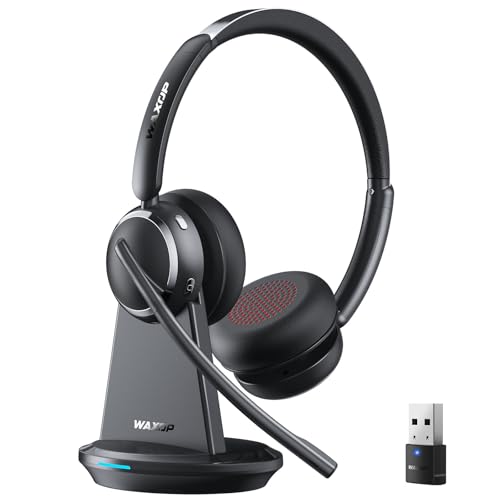
The Waxop wireless headset combines noise cancellation with a long-range USB dongle. It supports up to 65 hours of battery life and includes a charging dock for easy storage. Bluetooth 6.0 delivers stable connections with reduced latency. This setup is best for professionals who move around a workspace or work from different rooms, needing uninterrupted calls. A consideration is that wireless interference or battery management could affect performance in some environments.
Best for: Mobile or flexible desk setups where long range and battery life matter most in meetings or classes. Choose this if you need walking-room freedom during calls.
Buying Guide: Key Purchase Considerations
- : Cardioid mics excel for single-speaker clarity, while omnidirectional mics capture group voices but may pick up room noise. Choose based on room size and typical call format.
- : USB mics offer easy plug-and-play on most systems. USB-C and adapters improve cross-device compatibility. Wired headsets provide reliable latency-free audio but limit mobility.
- : Look for AI-based or dedicated noise cancelling features to reduce keyboard noises, fans, or HVAC hum. Consider the trade-off between natural voice and processed noise reduction.
- : Mute buttons with LED indicators help prevent accidental transmissions. Inline controls reduce disruption during meetings.
- : If you wear headsets long-term, prioritize comfort and weight. For desk setups, a compact desktop mic with a mute switch can be preferable.
- : In echo-prone spaces, a directional mic with echo cancellation can improve speech clarity. In small rooms, a tabletop mic with a pop filter helps reduce plosives.
- : Ensure compatibility with your meeting platform (Zoom, Teams, Webex) and your computer OS. Some mics include adapters for iPhone or Android devices for cross-platform use.
Frequently Asked Questions
What is a noise cancelling microphone best for in meetings?
It reduces background sounds so your voice remains clear, improving comprehension in busy or echo-prone environments.
Should I choose a headset or a desktop mic for meetings?
Headsets are ideal for noisy environments and mobility. Desktop mics suit stationary desks with minimal movement.
Do USB microphones require drivers?
Most USB microphones are plug-and-play and do not require drivers, making setup quick and straightforward.
Is AI noise cancellation easy to enable?
Many models offer a dedicated mode or software toggle; some have an LED indicator or mute button for status clarity.
Can these mics be used with laptops and desktops alike?
Yes, most listed options are compatible with both Windows and macOS and support common conferencing platforms.
Do I need a quiet room to use these mics?
Better acoustics enhance performance, but many models effectively reduce background noise even in modest spaces.