
Best Ways to Convert Old Cassette Tapes to CDs or Digital Files
If you’re looking to preserve vintage tapes by converting them to CDs or digital formats, you’ll find dedicated cassette-to-digital players that also offer CD or USB outputs. These devices are best suited for collectors who want a simple, all-in-one solution without a computer. The top picks below emphasize portability, ease of use, and straightforward file creation, making them ideal for casual listeners, students, or households with mixed media players.
Summary table of selected products
| Product | Brand | Best For | Notes |
|---|---|---|---|
| KLIM K7 Cassette Tape Player | KLIM | On-the-go digitization with built-in mic and speaker | Includes 16GB SD card; portable |
| DigitNow Cassette Tape To MP3 CD Converter | DIGITNOW | Desktop digitization to MP3/CD | USB-powered; PC-compatible |
| Reshow Cassette Tape Player | Reshow | Compact, laptop-friendly conversion | USB-based MP3 output |
| Mersoco Car Cassette Adapter | Mersoco | In-car cassette-to-digital or hands-free | 3.5mm AUX; built-in mic |
| Tinxumb Cassette Tape Player | Tinxumb | Home converter with reliable MP3 output | USB-based conversion |
KLIM K7 Cassette Tape Player

Best for portable, all-in-one cassette-to-MP3 conversion. The KLIM K7 combines a cassette player with a built-in microphone and speaker, plus a 16GB SD card for easy MP3 storage. It also functions as an SD card music player, simplifying on-the-go digitization without external software. The 3.5mm headphone jack and included earphones support private listening during or after transfers. Caution: It does not support recording onto cassette tapes when using its recorder function; it records directly to the SD card.
- Key benefit: Simple, battery-powered digitization with stand-alone operation.
- Best for: Anyone who wants a compact device for quick cassette-to-MP3 transfers on the move.
DigitNow Cassette Tape To MP3 CD Converter
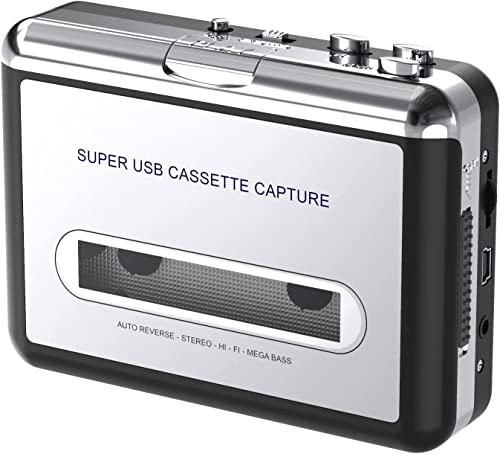
Best for desktop digitization and CD burning in one setup. The DigitNow converter connects via USB to create MP3 files from cassette tapes and supports software-assisted conversion. It can export to MP3 for portable players, with optional use of Audacity or similar software for editing. It’s suited for users who want a traditional computer-centric workflow and the ability to burn CDs from converted files. Caution: Requires a PC or laptop to run the software-assisted workflow; no standalone recording to CD without computer.
- Key benefit: Clear path from cassette to MP3 with optional CD burning.
- Best for: Home enthusiasts who want a computer-based conversion experience.
Reshow Cassette Tape Player

Best for laptop-friendly, plug-and-play digital conversion. The Reshow player emphasizes USB-based MP3 output and a compact form factor, making it convenient for transferring old tapes to digital formats without specialized equipment. It supports standard headphones via a 3.5mm jack, enabling private listening during or after transfer. Caution: Focuses on USB-to-MP3 conversion; additional CD burning would require an external USB drive or computer steps.
- Key benefit: Lightweight and easy to connect to a laptop for quick digitization.
- Best for: Students or travelers who want a portable conversion tool.
Mersoco Car Cassette Audio Adapter

Best for converting in-car cassettes to digital sound and enabling hands-free calling. This adapter works with any device via a 3.5mm jack, offering a built-in microphone for calls while driving. It’s ideal for drivers who want to modernize a vintage car setup without a dedicated cassette deck. Caution: Primarily an auxiliary adapter; true CD or MP3 burning would require separate hardware or a computer workflow.
- Key benefit: Turns a vintage car stereo into a connected audio hub with hands-free calling.
- Best for: Car owners preserving cassette play while accessing digital playback.
Tinxumb Cassette Tape Player

Best for affordable home digitization with MP3 output. The Tinxumb cassette player supports converting tapes to MP3 via USB, enabling easy transfer to modern devices or CD burning with a laptop. It highlights Hi-Fi quality and flexible 3.5mm AUX compatibility, making it compatible with headphones, car stereos, or home speakers. Caution: Data on the MP3 files should be managed with standard media software on a computer for editing or organization.
- Key benefit: Combines USB conversion with broad compatibility and good sound quality.
- Best for: Budget-conscious buyers who want simple, reliable home digitization.
Buying Guide: How To Choose The Right Cassette-To-CD Or MP3 Converter
- Purpose: Decide whether you want portable on-the-go transfers, in-car conversion, or home/computer-based digitization.
- Output needs: If you want MP3 files only, prioritize USB/SD card options. For CD burning, look for models that explicitly support CD-R or PC-based workflows.
- Power and portability: Battery-powered devices are ideal for travel; USB-powered units suit desktop setups.
- Connectivity: Ensure the device provides a 3.5mm headphone jack for private listening and a reliable USB or SD card path for file transfer.
- Playback quality: Look for clear analog-to-digital conversion capabilities and minimal background noise in the target device price range.
- Software needs: Some models require software like Audacity for advanced editing; others are standalone for quick MP3 capture.
FAQ
- Can I burn cassette recordings directly to a CD without a computer?
- Is a built-in microphone necessary for conversion?
- Do these devices work with all cassette tapes?
- What file formats are commonly produced?
- Are these devices compatible with car stereos?
- What is the typical best use case for each type?
Some units support direct USB-to-CD workflows via a connected computer, but most require a PC or laptop to burn CDs from MP3 files.
No. A microphone is useful for voice notes or on-device recording, but converting tapes to MP3 typically uses the line-out or USB input from the cassette device to a computer or SD card.
Yes, standard cassette tapes are supported, though reliability varies by device and tape condition.
MP3 is the most common format; some units also support direct WAV or AAC outputs depending on the model.
Many models offer 3.5mm AUX output or direct line-out, making them compatible with car audio systems via adapters or direct connections.
Portable units: on-the-go digitization. Desktop/converter kits: thorough, software-assisted transfer and archiving. In-car adapters: modernize vintage playback during driving.