
Best Optical Audio Out Speakers for Crystal-Clear TV and Home Theater Audio
Direct, clear guide to the best optical audio out speakers and accessories for American homes. This article highlights products best suited for delivering high-quality digital-to-analog sound via Toslink/optical connections, whether you’re upgrading a TV, gaming console, or AV receiver. The top picks include compact sound bars, optical splitters for multi-room setups, and powered bookshelf speakers with optical inputs. The list favors options that are easy to install, widely compatible, and provide clear, reliable sound. Buyers will learn who each product is best for and why it’s a strong optical-out choice.
| Product | Best For | Why It Stands Out |
|---|---|---|
| Saiyin 11.7-inch Sound Bar | Small spaces, under-screen TV setups | Compact, 48W peak, dedicated sub-out for expanding bass |
| NEWCARE Digital Optical Splitter 1 in 2 Out | Sharing optical audio across two devices | Balanced signal, ESD protection, plug-and-play |
| Wlep Sound Bar for Smart TV | 2-in-1 sound with detachable design | 2.2-channel, 180W, DSP with EQ presets |
| NEWCARE Digital Optical Splitter 1 in 3 Out | 3-device optical output distribution | Low-latency split, stable signal, broad compatibility |
| Saiyin Sound Bar with Subwoofer | Enhanced TV audio with dedicated bass | Deep bass, three EQ modes, LED indicators |
Note: This buying guide prioritizes optical audio compatibility, ease of setup, and reliable performance for typical home theater environments. The included products cover both direct optical sound delivery and accessories that expand how optical audio is shared across devices.
Saiyin 11.7-Inch Sound Bar
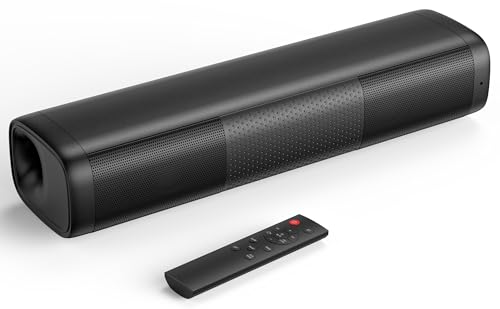
Best for small TV areas where space is at a premium. This compact sound bar delivers balanced audio with 48W peak power and tuned bass and treble for clear dialogue and immersive sound without harsh highs. It includes Bluetooth, optical, and 3.5mm AUX connections, plus a dedicated sub out for upgrading with a powered subwoofer. Ideal for dorm rooms, apartments, or secondary TVs where optical output is needed without bulk. Caution: The integrated sub out requires an external powered sub for deeper bass in larger rooms.
NEWCARE Digital Optical Splitter 1 in 2 Out

This optical splitter is best when you want to send one Toslink signal to two devices, such as a TV soundbar and a DAC or AV receiver. It supports standard digital formats and includes an automatic balance system and ESD protection. Choose this if you need to share optical audio from a single source without noticeable delay. Limitation: It distributes the signal but does not convert formats or amplify the signal.
Wlep Sound Bar for Smart TV

Best for users seeking a flexible, two-in-one soundbar. It delivers a 2.2-channel setup with dual 2.25-inch drivers and a total of 180W, plus DSP and adjustable EQ presets to optimize clarity for movies, music, or gaming. It supports HDMI ARC, Optical, and AUX, and can be split into two towers for a wider stereo field. Caution: The detachable towers may be less stable on narrow shelves in some layouts.
NEWCARE Digital Optical Splitter 1 in 3 Out

This 1-in-3 optical splitter is ideal when you need to route optical audio to three devices, such as a TV soundbar, a streaming box, and a gaming console. It maintains signal integrity with a built-in balance system and ESD protection. Choose this model for multi-device setups that rely on a single optical source. Limitation: It does not provide amplification or decoding; you still need compatible receiving devices at each end.
Saiyin Sound Bar With Subwoofer

Best for a complete TV audio upgrade in mid to large rooms. The sound bar emphasizes deep bass through a dedicated subwoofer and offers three EQ modes to tailor sound to news, movies, or music. It includes an LED indicator and a soft lighting feature to minimize distractions while watching. Caution: Remote control compatibility is limited to the device’s own remote, not universal remotes.
Buying Guide: Key Purchase Considerations
- What is your primary usage? Opt for compact bars for small rooms or a bar with a subwoofer for cinematic sound in larger spaces.
- Do you need to share a single optical source with multiple devices? Consider one-in-two or one-in-three optical splitters with reliable signal balance.
- What inputs do you require? Ensure the device supports Optical Toslink along with HDMI ARC or AUX if you plan to use multiple sources.
- Is you setup space a constraint? Choose compact, wall-mountable, or detachable designs that fit your TV stand or shelf.
- What about ease of use? Look for devices with simple plug-and-play operation and clear LED indicators for quick setup.
Additional Considerations
- Compatibility: Optical splitters are source-agnostic but do not decode formats; ensure your output device can handle DTS or PCM as needed.
- Sound tuning: DSP and EQ presets help optimize dialogue clarity and overall balance, especially in multi-purpose rooms.
- Physical design: Consider cabinet depth and whether detachable speakers suit your layout.
- Future-proofing: A splitter with multiple outputs provides flexibility for expanding a system without replacing components.
FAQ
- What is an optical audio splitter used for? It distributes a Toslink signal from one source to multiple receivers or devices.
- Do optical splitters degrade audio quality? High-quality splitters preserve the signal with balanced outputs and protections; lower-quality units may introduce latency or noise.
- Can I use an optical splitter with a TV’s built-in apps? Yes, as long as the TV provides an optical output and the connected devices support the formats.
- Is it necessary to use a subwoofer with a sound bar? Not always, but a subwoofer enhances bass for movies and games if depth is desired.
- Will these products work with Blu-ray players? Yes, many optical devices and sound bars support standard digital formats common to Blu-ray players.
- Do I need a decoder or amplifier with an optical splitter? Usually not; the splitter distributes the signal to devices that decode and amplify on their own.