
Best Optical Audio PC Speakers You Can Buy Today for Clear Desk Sound
Looking for great-sounding PC speakers with flexible connectivity? This guide highlights five strong options that pair well with desktops, laptops, and monitors. The selections emphasize clear stereo, easy setup, and practical features for work, gaming, and multimedia. Best for power users, compact desks, or anyone wanting better-than-monitor-speaker audio without complicated gear. Below is a quick summary of the selected products to help you compare at a glance.
| Product | Best For | Key Benefit |
|---|---|---|
| IBALL·BOX H1 | Creative listeners who want robust 2.0 sound | 60W power with 24-bit DAC, optical input |
| Edifier R1280DBs | Home office and media setup | 42W RMS, optical input, soundfield options |
| NSY Audio Powered Speakers | Room-filling bass on a budget | Up to 60W, Bluetooth 5.3, multiple wired options |
| XKX Computer Speakers | USB-C and USB users on modern devices | USB-C compatible, adaptive-channel-switching |
| Logitech S150 | Simple plug-and-play USB setup | USB-powered with straightforward controls |
IBALL·BOX H1 Computer Speakers

Best For: Desktop setups that require powerful, balanced sound with flexible inputs. Why selected: H1 delivers 60W total power from dual 3-inch woofers and dual 1-inch tweeters. It supports 24-bit wired playback via USB-C DAC and includes optical input for clean digital audio from compatible devices. The rear bass reflex port helps extend low-end performance, making it a solid choice for work, streaming, and casual gaming.
What to know: The inclusion of optical input is a key advantage for PC-to-speaker clarity. The system is best used with a desktop that can route audio through USB-C or optical lines. Limitation: The setup may require cautions around cable routing for a clean desk look, especially if using multiple devices.
Edifier R1280DBs Active Bluetooth Bookshelf Speakers
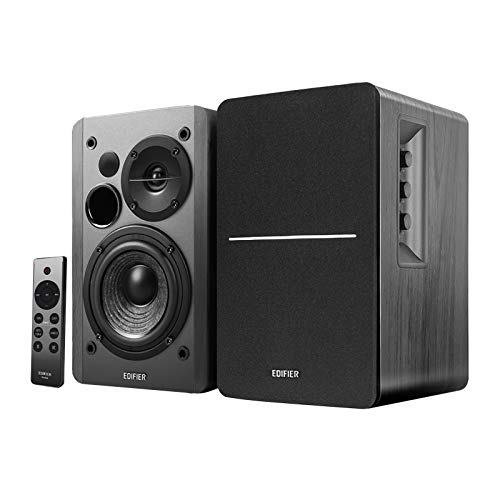
Best For: Home offices and multimedia desks needing a compact 2.0 setup with multiple input options. Why selected: 42W RMS continuous power, 13mm silk-dome tweeters, and a 4-inch woofer deliver clear highs and a punchy midrange. It supports optical and coaxial inputs for lossless connections to TVs or PCs, plus Bluetooth for wireless listening.
What to know: Edifier includes a Soundfield Spatializer for a more expansive listening experience. Caution: While Bluetooth is convenient, wired connections are often preferred for lower latency in gaming or video editing.
NSY Audio Powered Computer Speakers

Best For: Budget-conscious users who still want room-filling stereo sound and versatile connections. Why selected: These 60W active speakers use 3″ drivers with MDF enclosures to minimize resonance and deliver distortion-free audio for gaming, movies, or music. Bluetooth 5.3 and multiple wired options (RCA, USB-C, 3.5mm) broaden compatibility with various devices.
What to know: The design emphasizes compact desks, but the bass can be noticeable; placement near walls will affect response. Caution: Real-world performance depends on room acoustics, and the absence of a dedicated subwoofer means tighter bass might be less impactful for some users.
XKX Computer Speakers for Desktop PC Monitor

Best For: USB-C compatible setups and modern devices needing easy plug-and-play audio. Why selected: XKX speakers emphasize USB compatibility, including USB-C, making them a practical choice for newer laptops and MacBooks. They offer dual drivers and passive radiators for richer stereo sound, which helps describe a fuller listening experience on a compact desktop.
What to know: They focus on convenient connectivity and loud overall output. Caution: The lack of dedicated audiophile features means they are best for general use rather than critical listening or home theater.
Logitech S150 USB speakers with Digital Sound

Best For: Quick, simple USB audio for a clean plug-and-play experience. Why selected: The S150 offers a straightforward USB connection with an orange power LED and easy front-panel controls. It’s a compact option when you want minimal setup with reliable USB-powered audio for daily tasks and video calls.
What to know: It is a basic 2W peak/1.2W RMS system, which means it won’t deliver room-filling bass or high-end detail. Caution: For immersive gaming or home theater, consider higher wattage models with dedicated bass support.
Buying Guide: Choosing the Right Optical Audio PC Speakers
What counts as optical audio for PC speakers? Some desktops and laptops include optical (TOSLINK) outputs, while certain external speakers support optical inputs directly. If you need the purest digital audio from a computer or gaming console, prioritize models that offer optical input or a high-quality DAC with USB-C or USB-B connections.
Key considerations:
- Input options: Optical input, USB-C DAC, Bluetooth, and AUX. Opt for optical if your PC or console supports digital audio output.
- Power and drivers: Look for a system with enough wattage and appropriately sized drivers to fit your desk space and room acoustics.
- Size and placement: Shelf or desktop-friendly enclosures plus a subwoofer option can influence bass extension and imaging.
- Wired vs wireless: USB-C or optical wired connections often provide lower latency than Bluetooth, important for gaming and editing.
- Remote control and controls: Some models include convenient knobs or wireless remotes; others prioritize compact form and simple front-panel controls.
FAQ
- Do optical inputs improve computer sound quality? Yes, when the source and DAC support high-quality digital audio, an optical input can provide cleaner data transfer than some analog paths.
- Is Bluetooth suitable for gaming? Bluetooth can introduce latency; for gaming, wired connections (USB-C, optical, or 3.5mm) are generally better.
- What is a DAC, and do I need one? A DAC converts digital audio to analog. Built-in DACs inside the speakers or an external DAC can impact clarity and detail.
- Are bookshelf speakers good for a desk? Yes, compact bookshelf designs with proper positioning can deliver excellent sound without occupying much space.
- Should I get a subwoofer? If you want deeper bass for movies or gaming, a separate subwoofer expands the low end beyond typical 2.0 setups.
- What is “passive radiator” in speakers? It’s a design element that helps extend bass response by using the enclosure’s internal air movement to enhance low frequencies.