
Best Optical and Coaxial Digital to Analog Converters for Home Theater and Music
Short answer: these DACs convert digital optical or coaxial signals into analog L/R or 3.5mm audio, ideal for improving sound from TVs, Blu-ray players, game consoles, and home theater receivers. This guide highlights five reliable options, detailing who they’re best for and why they stand out. Use this to pick a model that matches your gear and listening goals.
Buyer types and recommendations at a glance:
| Product | Best For | Why It Stands Out |
|---|---|---|
| PROZOR B088T8KW1C | Traveling setups and budget-conscious users | High 192 kHz sampling, multi-input options, 5.1-ready output |
| Musou B01HGHNCMW | Two-channel stereo setups | Simple RCA output with PCM/LPCM support; includes optical cable |
| Rybozen B07XC42GZR | Home theater with PCM/LPCM sources | Multiple sampling rates up to 192 kHz; convenient 3.5mm jack |
| VPFET B09Y9CGT56 | TV soundbars and aux-to-digital needs | Analog to digital path, easy auto-encoding; no volume control built-in |
| DigitConvert B0CKYWFQ65 | PS4/HD setups with high-res audio | 192 kHz support; stable, synchronized sound |
PROZOR 192kHz Digital To Analog Converter
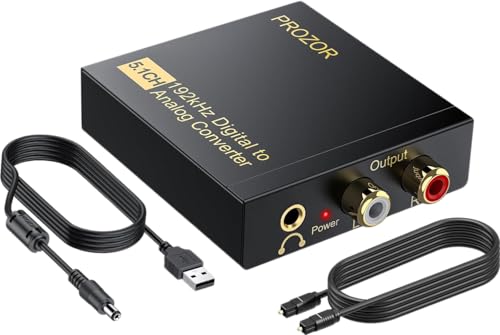
This PROZOR device converts digital optical or coaxial audio into analog L/R, with 192 kHz sampling and 24-bit SPDIF bitstream. It supports 5.1 channel capable formats via the digital input and outputs to RCA, plus a 3.5mm headphone jack. It’s best for users who want flexible connections for HDTVs, Blu-ray players, or gaming consoles, and who value high-resolution PCM support. Caution: the optical output is not explicitly described as providing 5.1 decoding; if 5.1 is required, verify your source’s encoding and downstream gear compatibility.
Musou RCA Analog To Digital Optical Toslink Coaxial Converter

Musou focuses on turning analog RCA into digital coaxial or Toslink simultaneously, making it ideal when you want to digitize an existing analog source for a modern audio system. It outputs uncompressed 2-channel LPCM. Best for stereo setups or when you need a simple path from a legacy player to a digital receiver. Limitation: it does not support 5.1-channel output from analog inputs.
Rybozen Digital to Analog Converter 192KHz

Rybozen offers a compact DAC that converts coaxial or Toslink digital PCM to analog RCA L/R and a 3.5mm jack. It supports sampling rates up to 192 kHz and 24-bit SPDIF input. Best for users who want a straightforward, high-sample-rate option for PS4, Blu-ray players, or home theater systems. Note: not designed for 5.1-channel output from a single digital source; those needing surround sound should ensure their source and receiver support PCM/LPCM configurations.
VPFET Analog To Digital Audio Converter With Cable

VPFET emphasizes converting analog RCA or 3.5mm AUX input to digital Coaxial and Toslink outputs. It’s particularly suitable for soundbar or TV voice clarity improvements where you need a quick bridge from analog signals to digital formats. Caution: this is not a true digital-to-analog converter; use cases require native digital input to downstream DACs. It’s best when the source is analog and you want to feed a digital-capable device with minimal fuss.
DigitConvert DAC 192kHz Digital To Analog Converter

DigitConvert’s DAC handles coaxial or Toslink digital PCM to analog L/R and 3.5mm outputs, supporting up to 192 kHz and 24-bit SPDIF input. It’s a solid choice for PS4 or Blu-ray setups requiring high-resolution stereo audio with reliable synchronization. Best for users who want a straightforward device with broad compatibility across home cinema components. Limitation: primarily stereo output unless combined with a separate decoder for surround sound.
XPTSFDU HDMI ARC To RCA 3 In 1 Converter

Note: This product appears in the list but is not in the top five for our selection. It provides three inputs (HDMI ARC, Toslink, coaxial) and multiple outputs, including 4-channel digital outputs. Best considered for users who require flexible ARC integration with a TV-based sound setup. Caution: HDMI ARC behavior can vary by TV, and some users may need to set PCM output manually.
Buying Guide: Key Purchase Considerations
- What formats do you need? If you want 5.1 surround via optical, ensure the source and receiver support the format (DTS/Dolby AC-3) and that the DAC can pass through or decode as needed.
- Are you converting from analog to digital, or digital to analog? This guide focuses on digital-to-analog conversions, but some models also offer reverse paths. Confirm the direction you need before purchasing.
- Which inputs and outputs matter? Optical (Toslink) and coaxial are common; check if you also need a 3.5mm jack or RCA outputs for your speakers or headphones.
- Sampling rate and bit depth: Look for 192 kHz / 24-bit support for future-proof audio fidelity, especially if you have high-quality PCM sources.
- Compatibility with your source: Some devices require PCM/LPCM output from the player. If the source only outputs Dolby or DTS in a specific mode, verify how the DAC handles it.
Frequently Asked Questions
- What does a DAC in this category do exactly? It converts digital audio signals from optical or coaxial inputs into analog signals that can drive RCA or 3.5mm outputs.
- Can these DACs decode Dolby Digital or DTS? Many do not decode surround formats themselves; they pass PCM signals to analog outputs. Ensure your source can deliver the appropriate PCM/LPCM stream if you need stereo output or add a separate decoder for surround.
- Is 192 kHz important for casual listening? It can improve fidelity with high-resolution sources, but practical benefits depend on the source material and playback chain.
- Do I need an amplifier with these DACs? Yes, since the DAC outputs line-level analog signals, you’ll typically need an amplifier or powered speakers to drive the sound.
- Will these work with a soundbar? Some devices can feed a soundbar via RCA or 3.5mm outputs, but exact compatibility depends on the soundbar’s input options and required formats.
- Are there latency concerns? Some DACs have negligible latency for playback, but gaming or real-time applications may benefit from dedicated game console or receiver configurations.