
Best Optical to 3.5mm Analog Converters for Crisp TV and PC Audio
Direct answer: Optical to 3.5mm analog converters are ideal for users who want to connect digital Toslink or coaxial sources to legacy or portable analog audio devices. They’re best for home theaters, gaming setups, and PCs where you need clean, amplified stereo output without changing inputs on your equipment. Below are five top options chosen for broad compatibility, clear audio transfer, and practical features. Use this guide to compare which adapter fits your device, budget, and use case.
| Product | Best For | Key Benefit |
|---|---|---|
| PROZOR 192kHz Digital to Analog Converter (B08DY1PMPR) | HD TVs, Blu-ray players, set-top boxes | Integrated amplifier for clearer sound |
| LiNKFOR 3.5mm to SPDIF Converter (B0CJXNDLMW) | Preserving 2-channel PCM audio | Simple 3.5mm to Toslink conversion with optical output |
| DIGITConvert DAC 192kHz (B0CKYWFQ65) | Home theater systems and gaming consoles | Simultaneous analog L/R and 3.5mm outputs |
| PROZOR 192kHz Optical to Analog RCA/3.5mm (B0FFMS7J2H) | PS3/PS4 setups and Apple TV | Supports high-resolution PCM; 192kHz capable |
| PROZOR 192kHz 5.1CH Optical to RCA (B088T8KW1C) | 5.1-capable home systems | 5.1 channel compatible with optical/coax inputs |
PROZOR 192kHz Digital to Analog Converter – SPDIF to 3.5mm

Best for: HD TVs and Blu-ray players needing a clean analog output with a built‑in amplifier. The built-in amplifier helps drive 3.5mm headphones or small speakers with clearer sound. This model is chosen for broad compatibility with Toslink sources and ease of use.
Caution: Ensure your source outputs PCM; some setups can misinterpret output format and cause distortion if the TV is set to a non-PCM mode.
LiNKFOR 3.5mm to SPDIF Converter – Analog to Digital

Best for: Systems that want to preserve uncompressed 2-channel PCM with a simple 3.5mm to Toslink path. This adapter is ideal when you need a straightforward conversion from analog to digital without extra processing.
Caution: It is not a digital-to-analog converter; it only converts 3.5mm analog to SPDIF digital output. Use this when your goal is to feed a digital input from an analog source.
DAC 192kHz Digital to Analog — Optical to RCA

Best for: PS4, Blu-ray players, and home cinema setups needing both RCA and 3.5mm outputs. It supports a wide sampling rate range and emphasizes synchronized, delay-free audio transfer for clean multi‑device listening.
Caution: Optical output should be PCM to avoid distortion; verify your device’s output format to match this requirement.
PROZOR 192kHz Optical to Analog RCA/3.5mm

Best for: Apple TV and HDTV setups that require 5.1-capable analog output from optical input. It handles 192kHz/24‑bit PCM faithfully and can route signals to both RCA and 3.5mm devices.
Caution: Optical output may require PCM/LPCM settings on the source; check your TV or player settings to ensure proper decoding.
PROZOR 192Khz 5.1CH Optical To RCA Converter
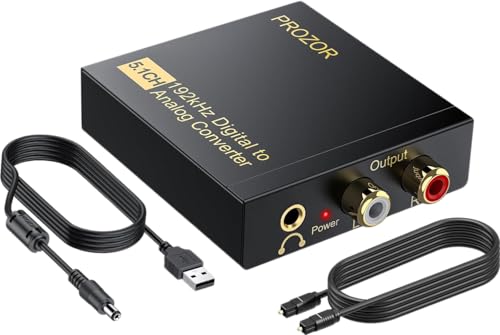
Best for: Systems supporting DTS/Dolby AC-3 or LPCM in 5.1 audio. This model offers 5.1-capable output with 192kHz sampling, suitable for home theater enthusiasts seeking richer surround-capable analog output.
Caution: To realize 5.1 output, verify that your source provides compatible 5.1 data and that you’re using a compatible amplifier or speaker setup.
Buying Guide
What’s the right input and output format for you?
Identify whether your devices provide Toslink (optical) or coaxial digital outputs and what kind of analog input you need (RCA left/right or 3.5mm). Choose a converter that matches the source’s digital interface and provides the desired analog outputs without unnecessary adapters.
Do you need a built‑in amplifier?
Converters with a built‑in amplifier are helpful when you’re driving small speakers or headphones directly from the adapter. If you already have a powered amplifier or AV receiver with sufficient input sensitivity, you can select a passive converter without extra amplification.
What sampling rate and bit depth matter?
Common target ranges include 32–192 kHz sampling rates with 16–24-bit depth. A higher maximum sampling rate supports more detailed sound, but verify that your source and destination can handle it. PCM/LPCM is typically simpler to implement for stereo playback.
What about 5.1 and surround formats?
If you want 5.1-channel output from optical or coaxial sources, choose a converter that explicitly supports 5.1 formats and ensures compatibility with your AV receiver or speaker setup. Some devices state 5.1 compatibility, while others are strictly stereo.
Quality and reliability considerations
Look for metal housings and integrated shielding to reduce EMI. A stable power supply, and clear labeling of input/output formats, help prevent distortion or misconfiguration. Ensure your TV or player’s audio output is set to PCM or LPCM when required.
Compatibility notes
The listed products cover common configurations found in HDTVs, game consoles, Blu-ray players, and PCs. If you upgrade devices, confirm that the converter’s supported formats align with the new source capabilities to avoid silent audio malfunctions.
FAQ
- Q: Do I need a converter if my TV already outputs analog audio?
A: If your TV only has an optical output and your speakers accept analog input, a converter is needed to bridge the format gap. - Q: Will this work with a gaming console?
A: Yes, as long as the console provides a digital optical or coaxial output and your console’s audio is set to PCM/LPCM for best compatibility. - Q: Can I connect headphones directly?
A: Some converters include a built-in amplifier for headphones, but larger speakers or AV receivers typically require dedicated amplification for best sound. - Q: Is 192kHz always audible?
A: Higher sampling rates can offer more detail, but the audible benefit depends on source content, playback chain, and listener sensitivity. - Q: What’s the difference between Toslink and coaxial inputs?
A: Toslink is an optical interface using light signals; coaxial uses electrical signals. Both carry PCM audio, but compatibility depends on the device inputs and the converter’s support. - Q: Can I use these with a PC?
A: Yes, PCs with optical or coaxial output can route digital audio to analog outputs via these converters, enabling better headset or speaker connections.