
Best Optical to RCA 5.1 Converter Options for Home Theater
Answering the common buyer question: which optical-to-RCA 5.1 converter best suits your setup? This guide compares five reliable options suitable for upgrading older speakers or amplifiers to modern TVs, Blu-ray players, and gaming consoles. The top picks vary by input options, audio formats, and built‑in amplification. The right choice depends on whether you need native 5.1 decoding, simple PCM downmixing, or a compact, cable‑integrated solution. The table below highlights each product’s core strengths at a glance.
| Product | Best For | Key Benefit |
|---|---|---|
| PROZOR 192Khz Digital to Analog Audio Converter (B088T8KW1C) | Movie lovers with HDTVs and game consoles | Supports 5.1 channel via Dolby/DTS/PCM and 192 kHz sampling |
| SOUTHSKY 5.1/2.1 Audio Rush (B08KD9NVXY) | Older AV receivers needing 5.1 or 2.1 output | Dual input options with 6 RCA outputs |
| AUTOUTLET 192kHz DAC Optical to RCA (B0BRFVMCJV) | Compact setups needing built‑in amplification | Built‑in amplifier and long cable |
| eSynic 192KHZ Optical to RCA Adapter (B0H6JKG5HC) | Streaming and gaming with automatic 5.1 downmix | Native Dolby AC-3/DTS 5.1 downmix to 2.0 stereo |
| PROZOR 192KHz DAC with 7ft Cable (B0F83SMRXS) | Quality-focused setups needing high sampling rates | High‑resolution 192 kHz/24‑bit support with built‑in amp |
PROZOR 192Khz Optical To RCA Converter
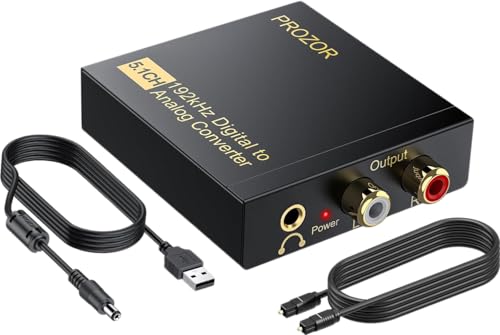
The PROZOR unit converts optical and coaxial digital audio to L/R RCA and 3.5 mm analog outputs. It supports 5.1 channel formats including Dolby Digital and DTS, as well as PCM playback, making it suitable for home theaters that include HDTVs, Blu‑ray players, PS3/PS4, and gaming consoles. Best for buyers who want a straightforward adapter with up to 192 kHz sampling and a simple add‑on to existing speakers or amplifiers. Caution: optical output should be set to PCM on some TVs for compatibility with 5.1 downmix. The data shows 24‑bit SPDIF input with 192 kHz potential, delivering high‑fidelity audio when paired with compatible source material.
SOUTHSKY 5.1/2.1 Audio Rush Converter
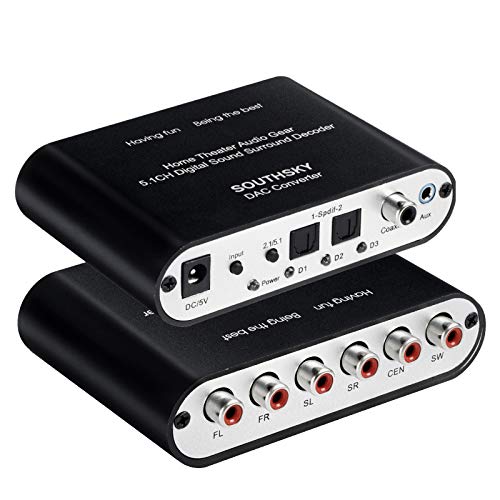
This device handles both 5.1 and 2.1 configurations by converting digital optical or coaxial audio to six RCA outputs. It accepts two SPDIF inputs plus coaxial and 3.5 mm AUX, with a one‑button switch to change between 5.1 and 2.1 modes. Best for older AV receivers needing flexible channel output. Limitation: automatic signal recovery may not reselect all inputs after power cycles, so verify input settings after restart.
AUTOUTLET 192kHz DAC Optical to RCA

Designed as a compact, long‑cable solution, this AUTOUTLET unit uses a built‑in DAC and professional audio amplifier to convert optical to RCA with up to 192 kHz/24‑bit support. Best for users who want a ready‑to‑use cable kit that reduces clutter and provides strong RCA output to powered speakers or stereo amps. Caution: the unit is a cable style adapter and may not suit setups needing separate DAC boxes or more than 2 RCA outputs in some configurations.
eSynic 192KHZ Optical to RCA Adapter

eSynic emphasizes native 5.1 downmix capability, decoding Dolby AC‑3 and DTS for straightforward 2.0 output. The device is aimed at movie buffs and gamers who want seamless compatibility with Netflix, YouTube, and other streaming services without adjusting TV audio settings. It includes an integrated DAC/amp and a compact 7 ft cable so placement behind a TV or entertainment stand is simple. Limitation: PCM only is supported on some models; ensure your content uses Dolby or DTS when you require 5.1 downmix to stereo.
PROZOR 192KHz DAC With 7ft Cable

This PROZOR model features a built‑in amplifier and DAC capable of 192 kHz/24‑bit processing with SPDIF Toslink to RCA conversion. It emphasizes high‑fidelity output to amplifiers and HDTV systems, and offers a note about setting TV output to PCM to ensure compatibility. Best for buyers who want improved RCA output volume and a high‑resolution audio path. Caution: optical output is not universally supported on all TV models; verify TV compatibility with PCM settings.
Buying Guide: Key Purchase Considerations
What should you look for when choosing an optical to RCA 5.1 converter?
- Audio formats supported: If you need true 5.1 decoding, ensure the device supports Dolby Digital and DTS in addition to PCM. Some units downmix 5.1 to 2.0 without native decoding; choose accordingly.
- Output configuration: Determine how many RCA channels you need. Some models provide 2.0 stereo, others offer 5.1 or 2.1 with six RCA outputs. Consider compatibility with your speakers or receiver.
- Built‑in amplification: If your RCA outputs are weak, a model with a built‑in amplifier helps. If you already have a powerful receiver, you may prefer a pure DAC path without extra amplification.
- Cable length and form factor: A long built‑in cable reduces setup clutter but may limit placement. A compact box with a separate cable can be easier to hide behind a TV.
- Power requirements: Some adapters draw power from the optical port; others require an external power source. Check power needs for your installation.
- TV and content compatibility: Some devices require PCM output from the TV. If you frequently switch content (streaming apps vs. Blu‑ray), ensure the unit handles automatic downmix or supports simple manual settings.
Frequently Asked Questions
- Do optical to RCA converters support 5.1 audio?
– Many do, but some only downmix to stereo. Check for Dolby Digital or DTS support to ensure 5.1 decoding or downmix as needed. - Will these work with any TV or Blu‑ray player?
– They are generally compatible with devices with optical or coaxial outputs, but TV models may require PCM settings to match the converter’s capabilities. - Is a built‑in amplifier necessary?
– If your speakers or receiver have strong amplification, a converter without extra amplification may suffice. Built‑in amps can help with low‑level RCA outputs. - Do I need extra drivers?
– No drivers are typically required; these are plug‑and‑play DACs designed for immediate use with consumer devices. - Can I use these with gaming consoles?
– Yes, many models are suitable for PS3/PS4/Xbox and similar devices, enabling better playback through older sound systems. - What is the best choice for streaming video?
– If you need seamless support across Netflix, YouTube, and other apps, choose a converter that explicitly supports Dolby/DTS 5.1 downmix and PCM compatibility.