
Best Optical Toslink to Analog Audio Converters for Clear Home Theater Sound
Most buyers searching for an optical Toslink to analog converter want reliable, plug-and-play devices that preserve audio fidelity for TVs, game consoles, and Blu-ray players. This guide highlights five top options, explaining who each is best for and why. Use the summary table to compare key points at a glance, then read detailed sections to pick the right match for your setup.
Summary table of selected products:
| Product | Best For | Key Benefit | Limitations |
|---|---|---|---|
| YGiTK 192kHz DAC Digital to Analog Converter | Users needing high-resolution audio with RCA output | 192 kHz DAC, compact, built-in amplification | Volume control on output device required |
| PROZOR 192Khz Digital to Analog Converter | Home theater fans with 5.1 channel needs | Supports 5.1 (Dolby/DTS) and 192 kHz | Optical/Coax input only; some setups require 5.1 to 2.0 downmix |
| DigitConvert DAC 192KHz Optical to RCA | HD home cinema and gaming rigs | Wide sampling, RCA and 3.5mm outputs | Not a digital-to-analog converter for multi-channel audio |
| Rybozen Digital to Analog Audio Converter | PCM-focused setups with PCM/LPCM sources | Multiple sampling rates up to 192 kHz, 24-bit | Not suitable for 5.1 channel audio |
| PROZOR 192KHz Optical to RCA with Built-in Amplifier | TVs and soundbars needing extra gain | Built-in amplifier; high-resolution up to 192 kHz | Optical output not supported in some models; PCM setting needed |
Below are the five chosen products, with details to help you decide which model fits your equipment and listening preferences.
YGiTK 192kHz DAC Digital to Analog Converter

Best for users seeking high-resolution analog output from optical input. This converter uses a 192 kHz DAC to translate Toslink signals into RCA analog audio. It includes an integrated amplification stage to boost the RCA signal, helping louder, clearer results on standard amplifiers. Best for stereo setups where high fidelity is the priority and the user will adjust volume on the output device. A caution: users must configure volume on the connected audio source or amplifier for proper levels.
PROZOR 192Khz Digital to Analog Converter
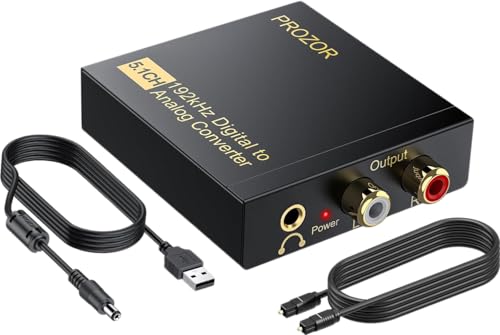
Better for home theater fans who need 5.1-channel compatibility in a converter. It accepts optical or coaxial input and outputs L/R RCA, plus 3.5mm where needed. It supports 192 kHz sampling and 24-bit SPDIF streams. Choose this if your system expects Dolby Digital, DTS, or PCM audio and you want flexible connections. Limitation: some users may require separate downmix to 2.0 channels depending on the source and amplifier.
DigitConvert DAC 192KHz Optical to RCA

Best for PS4/HD cinema setups requiring synchronized output across RCA and 3.5mm jacks. The model supports PCM streams up to 192 kHz and 24-bit depth, and it emphasizes stable, low-latency digital-to-analog conversion without added delays. It is a solid choice where multiple analog outputs are valued. Caution: Not designed for downmixing multi-channel formats; ensure your source outputs PCM/LPCM stereo if needed.
Rybozen 192KHz Digital to Analog Converter

Best for PCM-focused listening with a straightforward setup. It provides 192 kHz/24-bit support across analog RCA and 3.5mm outputs, ensuring detailed, noise-free sound when feeding left and right channels. Use this if your source outputs PCM LPCM and you want a reliable, compact unit. Limitation: Not ideal for systems requiring surround sound or Dolby/DTS decoding within the converter itself.
PROZOR 192KHz Optical to RCA With Built-In Amplifier

Best for TVs and soundbars that need extra gain. This model includes a built-in amplifier chip to boost RCA output, reducing the need for a separate amplifier. It supports high-resolution audio up to 192 kHz and 24-bit depth. A caution: Optical output may require PCM configuration in some TVs; verify your TV’s audio output settings and ensure correct PCM mode for best results.
Buying Guide: Key Purchase Considerations
What to look for when choosing an optical Toslink to analog converter:
- Output format and channels: Check whether the device outputs RCA stereo or adds 3.5mm. If you have a stereo system, stereo RCA is typically sufficient; for PCs or headsets, 3.5mm may be helpful.
- Supported sampling rate and bit depth: Higher rates (up to 192 kHz) and 24-bit depth provide greater detail, especially for music and high-definition video audio.
- Amplification needs: Some models include a built-in amplifier; others rely on your amplifier or receiver. Built-in amplification is useful if your TV’s output is weak.
- Input compatibility: Optical (Toslink) and/or coaxial inputs vary by model. If you have only Toslink, ensure the adapter accepts optical input only or dual inputs as needed.
- Dolby/DTS support: If your content uses multichannel audio, ensure the converter correctly handles PCM or downmix as required by your system.
FAQ
- What is the main purpose of an optical Toslink to analog converter? – To convert digital optical audio signals into analog RCA or 3.5mm outputs for older receivers, soundbars, or amplifiers that lack digital inputs.
- Do all converters support 5.1 channel audio? – Not all do. Some support PCM stereo or downmixed 5.1; verify the product’s channel output capabilities and your source’s audio format.
- Is a built-in amplifier necessary? – It helps when your amplifier input is limited or output levels are low. If your receiver already produces strong output, a model without a built-in amp may suffice.
- Will these work with gaming consoles? – Yes, many models work with consoles that output optical or coaxial digital audio and require analog stereo output for headphones or older speakers.
- How do I set the correct audio format on my TV? – Typically set to PCM/LPCM in the TV’s audio settings to ensure stable stereo output compatible with most adapters.
- What cables come with these devices? – Some include optical cables; others require you to provide your own Toslink or RCA cables depending on the model.