Best Over Ear Office Headset Options for Clear Calls and Comfortable All‑Day Wearing
Looking for an over‑ear headset that keeps calls clear and comfort high during long workdays? This guide covers five solid choices ideal for office workers, remote teammates, and call‑center staff. Each option highlights who it’s best for, plus practical trade‑offs to help you decide quickly. Below, a quick summary table shows the key strengths of each selected headset to compare at a glance.
| Product | Best For | Why Pick It |
|---|---|---|
| Logitech Zone Vibe 100 | Hybrid workers and video meetings | Great noise cancellation and multipoint Bluetooth for Teams/Meet/Zoom |
| AOC USB Headset with Mic (Black) | Office commuters and remote workers | Balanced audio with 40mm drivers and all‑day comfort |
| EKSA H8 USB Headset | Teams and video calls | Clear mic with ENC noise reduction and wide compatibility |
| Lenovo Wireless VoIP Headset | Muli‑device offices | Teams certified with multipoint Bluetooth and long talk time |
| COSMUSIS Trucker Bluetooth Headset | On‑the‑go professionals | Long battery life and dual‑mode operation for busy environments |
Logitech Zone Vibe 100 Lightweight Wireless Over Ear Headphones

Best for hybrid workers who need reliable video meeting performance and easy switching between devices. The Zone Vibe 100 uses beamforming microphone technology and digital signal processing to minimize background noise while capturing your voice clearly, making it suitable for Microsoft Teams, Google Meet, and Zoom calls. It offers advanced multipoint Bluetooth so you can stay connected to multiple devices without swapping headsets.
Who it’s best for: professionals who frequently video conference and want a lightweight, comfortable headset that works well with both work and personal devices. Why selected: strong noise reduction for desk calls and flexible compatibility with major meeting platforms.
Caution: As a wireless headset, battery life and Bluetooth range may vary with device and usage. Ensure USB‑C or USB‑A adapters are available if your computer has limited ports.
AOC USB Headset with Microphone for PC (Black)

Best for all‑day office use where clear voice capture is essential. The 90° adjustable boom mic focuses on your voice and filters out background noise, helping keep conversations crisp on Teams, Zoom, and customer calls. The 40mm drivers deliver balanced audio for calls and training videos, and the lightweight design supports long wear.
Who it’s best for: workers needing dependable wired USB audio with straightforward plug‑and‑play setup. Why selected: proven mic clarity and comfort for extended meetings.
Caution: While wired headsets eliminate wireless dropouts, the 3.5mm or USB connection limits flexibility if you use multiple devices outside the desk setup.
AOC USB Headset with Microphone for PC (Black) – 270° Mic
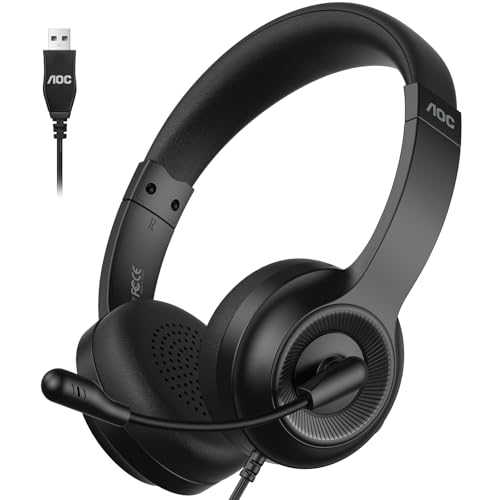
Best for teams looking for a compact wired headset with flexible mic positioning. The 270° rotatable mic focuses on your voice, reduces surrounding chatter, and remains effective during long days of calls. It pairs with Zoom and Teams and supports extended listening with 40mm drivers for clear call and multimedia audio.
Who it’s best for: users who want a lightweight, affordable wired headset with easy mic positioning. Why selected: strong mic control and reliable performance across common collaboration tools.
Caution: The 270° mic design may require adjustment to get optimal pickup in very loud environments; mic sensitivity varies with movement.
Lenovo Wireless VoIP Headset Teams Certified

Best for hybrid offices needing a Teams‑certified, UC‑optimized wireless solution. With Bluetooth 5.3 and multipoint, it can switch between devices while staying connected to a USB‑A receiver for reliable plug‑and‑play. Three‑microphone noise suppression enhances call clarity in busy spaces.
Who it’s best for: teams using multiple devices and Microsoft Teams Open Office environments. Why selected: certified compatibility and extended talk time support productive calls throughout the workday.
Caution: Wireless performance depends on environment; interference from nearby wireless networks can affect range and stability.
COSMUSIS Trucker Bluetooth Headset

Best for professionals who need long battery life and flexible wearing modes. This dual‑mode headset supports single‑ear and dual‑ear operation, making it suitable for driving or busy office settings. It features advanced noise cancellation for clear calls and a long standby time to suit mobile workstyles.
Who it’s best for: on‑the‑go users and drivers who require background noise reduction and versatile wearing options. Why selected: extended battery and dual‑mode design add practical flexibility.
Caution: Battery life estimates vary with usage; heavy multimedia playback can reduce talk time more quickly than calls alone.
Buying Guide: Key Purchase Considerations
What platform will you use most often?
If you frequently join video meetings on Zoom, Teams, or Google Meet, prioritize headsets with platform‑specific compatibility and noise suppression. USB wired options typically work universally, while Bluetooth models excel for switching between devices.
Is all‑day comfort a must?
Look for soft memory‑foam ear cushions, lightweight frames, and adjustable headbands. If you wear glasses, check for anti‑fog or soft cushions to avoid discomfort during long sessions.
How important is microphone quality?
Headsets with noise‑cancelling or ENC microphones reduce background chatter. For noisy environments, prefer beamforming or multi‑mic arrays to keep your voice clear.
What about battery life and charging?
Wireless options should offer all‑day talk time with a comfortable charging cadence. Consider quick‑charge features if you need a fast top‑up between meetings.
What connectivity do you require?
Wired USB headsets are reliable for desk setups. Bluetooth headsets offer flexibility for multi‑device use but may encounter interference in busy wireless environments.
Durability and wearability
Choose models with sturdy headbands and detachable or replaceable ear cushions for longer product life. If you travel often, a foldable or compact design can help with portability.
FAQ
- What is the main difference between wired and wireless over‑ear headsets? Wired headsets provide consistent audio with no battery management, while wireless options offer device switching flexibility but require charging and may experience occasional interference.
- Which headset is best for Teams and Zoom calls? The Logitech Zone Vibe 100 and Lenovo Wireless VoIP Headset are strong choices due to certification, multipoint Bluetooth, and platform compatibility.
- Are over‑ear headsets comfortable for all‑day use? Comfort depends on weight, cushion quality, and headband adjustability. Models with memory foam ear cushions and light frames are typically more comfortable for long sessions.
- Do these headsets support universal compatibility? Most listed options support common platforms like Zoom and Teams via USB or Bluetooth, but check mic orientation and driver compatibility for your devices.
- Can I use these headsets for music as well as calls? Yes, most headsets include 40mm drivers that deliver balanced audio suitable for calls and multimedia, though some are optimized mainly for voice clarity in meetings.
- What should I consider when choosing for a noisy office? Prioritize headsets with noise‑cancelling microphones and beamforming or ENC technology to reduce ambient sounds during calls.