
Find the Right PC Multimedia Speaker System — This guide compares top 2.1 and stereo desktop speaker systems suited for music, movies, and gaming. Below is a quick comparison of the selected products to help you scan features at a glance.
| Product | Type | Notable Features | Connectivity |
|---|---|---|---|
| Cyber Acoustics CA-3610 | 2.1 (Subwoofer + Satellites) | 62W peak, dual 2″ drivers, 5.25″ down-firing sub | 3.5mm, headphone jack |
| Logitech Z533 | 2.1 (Subwoofer + Satellites) | 120W peak (60W RMS), front-facing subwoofer | 3.5mm & RCA |
| Cyber Acoustics CA-3908 | 2.1 (Subwoofer + Satellites) | 92W peak, 6.5″ side-firing sub, passive radiator | 3.5mm, headphone jack |
| OROW S211 USB-Powered | 2.1 (Wooden Enclosure) | 16W system, thick wooden box, ground-spread bass | USB power, 3.5mm input |
| Bose Companion 2 Series III | 2-piece Stereo (No subwoofer) | Compact design, clear sound at any volume, aux input | 3.5mm AUX & PC input |
Cyber Acoustics CA-3610 2.1 Multimedia Speaker System

The Cyber Acoustics CA-3610 Is A 2.1 System Designed For Desktop Use. It Offers 62W Peak Power And 30W RMS, Dual 2-inch Titanium Drivers In The Satellites, And A 5.25-inch Down-Firing Subwoofer With A Tuned Port For Enhanced Bass.
- Control Pod Lets You Adjust Volume And Bass Quickly; Includes Headphone Jack.
- 3.5mm Aux Input For Easy Connection To PCs, Laptops, Consoles, Or Mobile Devices.
- Target Use Cases: Music Playback, Movies, And Gaming On Desktops Or Laptops.
This system Emphasizes A Balance Between Clear Highs/Mids And Deep Bass Suitable For Typical Home Desktop Setups.
Logitech Z533 2.1 Multimedia Speaker System

The Logitech Z533 Offers 120 Watts Peak (60W RMS) And Designed Full-Range Drivers To Fill A Room. It Features A Front-Facing Subwoofer For Impactful, Noticeable Bass.
- Multiple Inputs — 3.5mm And RCA Inputs Allow Connection To PCs, Consoles, TVs, And Portable Devices.
- Balanced Acoustics With Emphasis On Room-Filling Sound And Bass Presence.
- Ideal When You Need A Speaker System That Can Also Serve A Small Living Room Or TV Setup.
Logitech’s System Is Tuned For Dynamic Listening Environments Where Both Volume And Bass Matter.
Cyber Acoustics CA-3908 2.1 Multimedia Speaker System
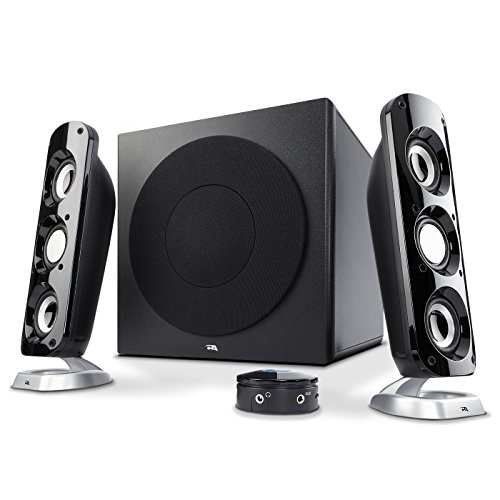
The CA-3908 Is A Higher-Power 2.1 Option With 92W Peak Power And 46W RMS, A Ported 6.5-inch Side-Firing Subwoofer, Dual 2″ Drivers, And A Passive Radiator Satellite Design.
- Control Pod Allows Volume And Bass Adjustments; Includes 3.5mm Aux And Headphone Jack.
- Room-Filling Sound Recommended Setup Suggests Source Volume At 65–80% For Best Fidelity.
- Designed For Users Who Want Stronger Low-End Output And Greater Loudness On Desktops And Consoles.
This Model Focuses On Deeper Bass Reproduction And Higher Output Compared To Entry-Level 2.1 Sets.
OROW S211 USB-Powered 2.1 Multimedia Speakers

The OROW S211 Is A USB-Powered 2.1 System Built With A Thick Wooden Enclosure And A Subwoofer Designed To Spread Bass Vibrations To The Ground. The System Is Rated At 16W Of Output Power.
- Wooden Box Construction Aims To Reduce Cabinet Resonances For Cleaner Sound.
- USB Power With 3.5mm Input Makes It Simple To Use With Laptops, PCs, And Consoles Without A Dedicated Power Brick.
- Intended For Small Rooms Or Desktop Setups Where Natural, Controlled Bass Is Preferred Over Maximum Volume.
This Option Prioritizes Cabinet Quality And Natural Tone Over High Peak Power.
Bose Companion 2 Series III Multimedia Speakers

The Bose Companion 2 Series III Is A Two-Piece Stereo Speaker System Without A Dedicated Subwoofer. It Focuses On Clear Sound At Any Volume And Offers An Auxiliary Input For Additional Devices.
- Compact Form Factor Suits Small Desks Or Setups Where Space Is Limited.
- Auxiliary Input For Phones Or Tablets; Simple, Direct Connection To A Computer.
- Useful For Users Prioritizing Vocal Clarity, Multimedia Playback, And Space Savings Over Thumping Sub-Bass.
Bose’s Design Is Intended To Deliver Natural, Detailed Sound From A Minimal Footprint.
Buying Guide: Choosing The Best PC Multimedia Speaker System
Selecting The Right Speaker System Depends On Several Factors. Below Are Key Considerations And Comparison Perspectives To Help Match A System To Your Needs.
1. Speaker Configuration And Bass Needs
2.1 Systems (Two Satellites + Subwoofer) Provide Noticeable Low Frequencies For Movies And Gaming. Stereo Two-Piece Systems Prioritize Clarity And Space Savings But May Lack Deep Bass.
2. Power Ratings And Real-World Loudness
Manufacturers Often List Peak Power; RMS Is A Better Indicator Of Continuous Output. Higher RMS Typically Delivers More Headroom And Cleaner Sound At Higher Volumes.
3. Subwoofer Design And Placement
Down-Firing, Front-Facing, And Side-Firing Subs Interact Differently With Room Acoustics. Ported Designs Boost Low-End Extension; Wooden Enclosures Can Reduce Unwanted Resonances.
4. Connectivity And Compatibility
Look For 3.5mm, RCA, Or USB Power Based On Your Source Devices. RCA Inputs Are Useful For TVs Or Older Gear; USB-Powered Units Simplify Laptop Use Without A Power Adapter.
5. Controls And Convenience
External Control Pods Or Front-Facing Volume Knobs Make Daily Use Easier. Headphone Jacks And Accessible Aux Inputs Add Convenience For Private Listening Or Switching Sources.
6. Sound Signature And Use Case
Decide Whether You Prefer Emphasized Bass For Gaming/Movies Or A Neutral Signature For Music And Voice. Brands And Enclosure Materials Can Influence Tonal Balance.
7. Size, Desk Footprint, And Aesthetics
Consider The Physical Size Of Satellites And Subwoofer Relative To Your Desk Or Shelf. Compact Systems Fit Small Spaces, While Larger Subs Require Floor Space For Best Performance.
8. Build Quality And Materials
Wooden Or Thicker Enclosures Often Reduce Cabinet coloration; plastic housings can still perform well but may show more resonance at high volumes.
9. Budget And Value Perspective
Match Feature Sets To Needs: multiple inputs and higher RMS are valuable when you plan to use the speakers for more than just desktop audio. Avoid overpaying for power you won’t use or skimping on connectivity you need.
10. Room Size And Acoustic Environment
Smaller rooms benefit from modest power and compact subs; larger rooms require more output and a sub that can move significant air. Room placement and surfaces will affect perceived bass and clarity.
Use These Criteria To Compare Systems Across Power, Connectivity, Enclosure Type, And Intended Use (Music, Movies, Gaming). That Approach Helps Identify Which Model Best Matches Your Desktop Or Media Setup.