
Find the right PC speakers with optical input for lossless connection to your computer, TV, or gaming console. Below is a quick comparison of the selected speakers to help you choose the best match for your setup.
| Model | Key Inputs | Power | Notable Features |
|---|---|---|---|
| Saiyin Bluetooth Bookshelf Speakers | Optical, Coaxial, AUX, RCA, Bluetooth | 30W x2 | Remote, Bluetooth 5.3, turntable support (line out) |
| Edifier R1280DB | Optical, Coaxial, Bluetooth | 42W RMS | 4″ woofer, silk dome tweeter, wood grain |
| Edifier R1280DBs | Optical, Coaxial, Sub Out, Bluetooth 5.0 | 42W RMS | Subwoofer line out, Soundfield Spatializer |
| AIYIMA S400 | Optical, RCA, Bluetooth 5.3, USB | 80W (pair) | Horn tweeter + woofer, remote control |
| Orroplus Powered Bookshelf Speakers | Optical, ARC, RCA, AUX, Bluetooth | 70W | ARC support, 24bit/192kHz, subwoofer-capable |
Saiyin Bluetooth Bookshelf Speakers, 30W X 2

The Saiyin powered bookshelf speakers include optical and coaxial digital inputs plus AUX and RCA options, making them compatible with PCs, TVs, and many other digital sources. Bluetooth 5.3 provides wireless streaming when needed.
- Inputs: Optical, Coaxial, 3.5mm AUX, RCA, Bluetooth
- Power: 30W per channel (active/passive configuration)
- Controls: Remote and top-panel buttons for input switching, volume, mute
- Turntable Support: Connect via LINE OUT (PHONO requires preamp)
This model focuses on versatility with multiple wired inputs and wireless convenience. The remote and front buttons let you toggle between OPT/COAX/LINE/Bluetooth quickly for different sources.
Edifier R1280DB Powered Bluetooth Bookshelf Speakers
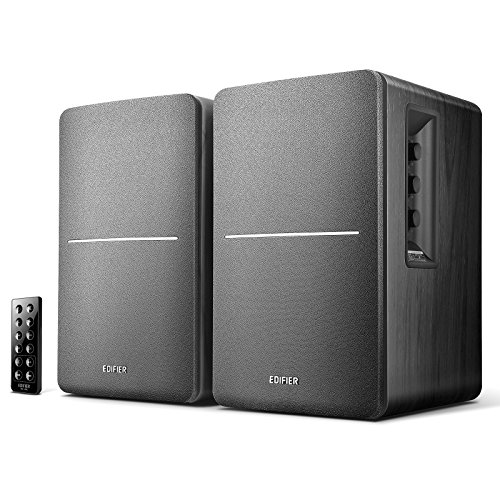
The Edifier R1280DB offers optical and coaxial digital inputs for lossless connections to PCs and TVs, alongside Bluetooth for wireless sources. Its 4″ woofer and 13mm silk dome tweeter are designed for near-field listening.
- Inputs: Optical, Coaxial, Bluetooth, RCA
- Power: 42W RMS (total)
- Design: Wood-grain cabinet with tuned studio-like sound signature
- Use Case: Desktop workstations and small-room listening where digital clarity matters
R1280DB emphasizes natural sound reproduction and simple digital connectivity, making it a common choice for PC and TV setups that require an optical input.
Edifier R1280DBs Active Bluetooth Bookshelf Speakers
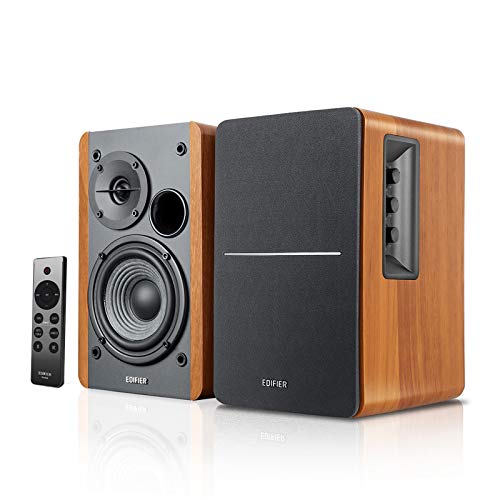
The R1280DBs builds on the R1280DB platform with Bluetooth 5.0, optical/coaxial inputs, and a subwoofer output. It includes automatic sub detection and a built-in crossover for integrating an active subwoofer.
- Inputs: Optical, Coaxial, Bluetooth 5.0, RCA
- Power: 42W RMS (combined)
- Extra: Sub Out for deeper bass expansion
- Processing: Soundfield Spatializer to adjust stereo image
This option is suitable if you want optical connectivity plus the option to add a subwoofer later for enhanced low-frequency performance.
AIYIMA S400 80 Watt 2.0 Channel Active Speakers

The AIYIMA S400 is an 80W pair offering optical and RCA inputs plus Bluetooth 5.3 and USB options. It combines a horn tweeter and woofer for a two-way design intended to deliver detailed highs and solid mid-bass.
- Inputs: Optical, RCA, USB, Bluetooth 5.3
- Power: 80W total
- Drivers: 1″ mid-treble driver and 3″ woofer
- Convenience: Remote control and compact cabinet design
AIYIMA targets higher output and multiple digital input options, useful for users who want a louder, fuller sound with optical digital connection options for modern sources.
Orroplus Powered Bookshelf Speakers Pair, 70W
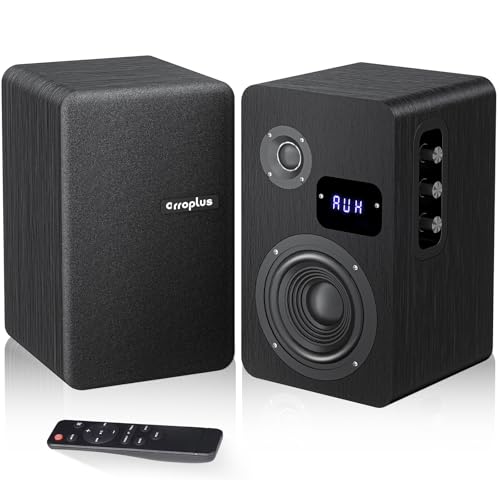
Orroplus speakers emphasize digital fidelity with optical and ARC inputs supporting up to 24bit/192kHz. These powered speakers include ARC for smart TV connectivity and a subwoofer-capable design.
- Inputs: Optical, ARC, RCA, AUX, Bluetooth
- Power: 70W
- Resolution: Supports high-resolution digital audio transmission
- Drivers: 1″ silk dome tweeter and 4″ woofer
The inclusion of ARC and high-resolution digital support makes this pair suitable for AV setups or users wanting lossless audio from modern TVs and PCs with optical outputs.
Buying Guide: Choosing PC Speakers With Optical Input
Optical Input Benefits: Optical (Toslink) transmits digital, lossless audio and avoids ground-loop noise. It’s ideal for connecting PCs, sound cards, TVs, and game consoles that offer a dedicated optical output.
Input Compatibility
- Confirm your source has an optical/Toslink output or that your DAC/interface provides one.
- Look for coaxial, RCA, or USB alternatives if your device lacks optical output.
- ARC support is useful when connecting to modern TVs for simplified control and audio return.
Sound Goals And Power
- For near-field desktop listening, 40–80W total is typically sufficient.
- If you want deeper bass, choose a model with a sub out or plan to pair with a powered subwoofer.
- Driver size influences tonal balance: larger woofers usually give fuller low end, while dedicated tweeters improve clarity.
Room Size And Placement
- Small desks and near-field setups work well with compact bookshelf speakers.
- Larger rooms may require higher wattage speakers or adding a subwoofer for full-range sound.
- Consider cabinet materials (MDF/wood) for reduced resonance and improved accuracy.
Digital Features And Convenience
- Bluetooth adds flexibility but won’t offer the same lossless quality as optical for critical listening.
- Remote control and onboard buttons make switching inputs and adjusting volume easier for mixed-source setups.
- Check sample rate support (e.g., 24bit/192kHz) if you plan to use high-resolution audio files.
Use Case Comparisons
- If You Need Simple Desktop Audio: Choose a compact model with optical input and good near-field tuning (e.g., Edifier R1280DB).
- If You Want Expandability: Pick speakers with a sub out or higher power rating (e.g., Edifier R1280DBs or Orroplus).
- If You Need Higher Output And Multiple Inputs: Consider models with higher wattage and multiple digital options like AIYIMA S400 or Orroplus.
Additional Tips
- When connecting a turntable, check if the table has LINE OUT or requires a phono preamp.
- Use a quality optical cable and ensure proper input selection on the speaker to avoid sync issues.
- Match speaker placement and toe-in to your listening position for best stereo imaging.