
Best PC Speakers With Digital Input for Clear Computer Audio
Looking for PC speakers with solid digital input options? This guide spotlights five USB- or Bluetooth-capable desktop speakers that suit gaming, work, and media playback. Best for users who want simple USB power and clean 3.5mm or Bluetooth connections, with clear guidance on who benefits most from each option.
The top picks below are selected for ease of use, compact design, and reliable connectivity. They cover USB-powered desktop setups, 3.5mm auxiliary compatibility, and small form factors ideal for crowded desks. A quick comparison helps you choose the right match for your device and space.
| Product | Best For | Connectivity | Notes |
|---|---|---|---|
| Amazon Basics Stereo 2.0 Speakers | Budget desktops and laptops | USB-powered, 3.5mm aux | Great value; simple inline volume control |
| 1Mii 3.5mm Computer Speakers | Any device with 3.5mm jack | 3.5mm aux; USB power option | Rotary volume; broad compatibility |
| Tylubio 2-in-1 Desktop Speakers | Multimedia setups with lighting | USB/Bluetooth; 3.5mm | LED modes; single control knob |
| Logitech S150 USB Speakers | Simple USB connection | USB | Compact, easy controls; plug-and-play |
| OHAYO 60W Computer Speakers | Gaming and media in small rooms | USB, 3.5mm, RCA | Powerful output; good detail; front controls |
Amazon Basics Stereo 2.0 Speakers

Best for budget PC users who want solid basic audio. These are a set of two USB-powered speakers with inline volume control and a 3.5mm AUX input. They are straightforward to set up and use with most laptops and desktops that provide a USB port for power. They suit students, shared workspaces, or anyone needing quick, reliable audio without extra features.
Who it’s best for: casual listeners, students, and home offices needing simple, plug-and-play PC audio.
Caution: Lacking advanced controls beyond volume, they offer limited bass adjustment and no built-in digital signal processing. If you need richer sound staging, consider an option with subwoofer or enhanced drivers.
1Mii 3.5mm Computer Speakers

Designed for broad compatibility with any device featuring a standard 3.5mm AUX jack. The front rotary volume knob allows easy, stepless adjustment, and they can be powered via USB for clean desk space. These are ideal for multimedia desktops, laptops, and monitor setups where a simple, reliable wired connection is preferred.
Who it’s best for: users who want universal 3.5mm compatibility and a dedicated volume control without Bluetooth.
Caution: For best audio quality, USB power is recommended to minimize potential static from shared power sources.
Tylubio 2-in-1 Desktop Speakers
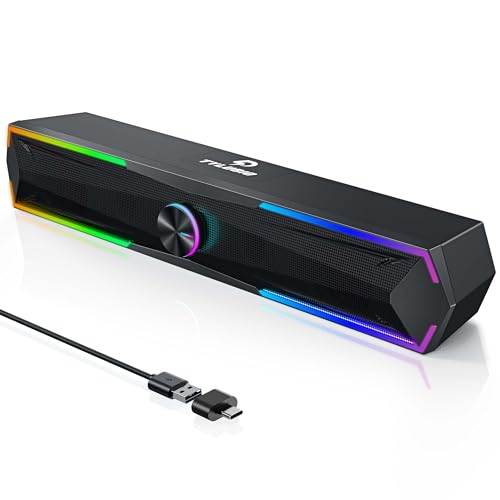
That is a 2-in-1 setup with Bluetooth and USB input, plus a 4-mode LED lighting system. The system delivers 10W total power with dual 5W drivers, offering crisp highs and clear mids for gaming, movies, and music. The all-in-one control knob simplifies mode switching, volume, and power management.
Who it’s best for: gamers and streamers who want compact desk speakers with ambient lighting and quick control.
Caution: LED lighting can be distracting in low-light environments if the brightness is left on high; consider turning lights off during late-night work sessions.
Logitech S150 USB Speakers

Logitech S150 provides a simple USB connection for power and audio, with an orange LED indicator to show when powered. These compact speakers emphasize ease of setup and reliable USB-audio delivery, making them suitable for basic desktop use, dorm rooms, or office cubicles where space is at a premium.
Who it’s best for: users who want plug-and-play USB connectivity with minimal setup and straightforward controls.
Caution: They offer basic performance without advanced bass or soundstage enhancements; best for casual listening rather than critical audio work.
OHAYO 60W Computer Speakers

These 60W peak power speakers deliver robust, detailed sound for gaming and media in smaller rooms. They support USB power, 3.5mm AUX, and RCA inputs, giving flexible connectivity to many desktops and laptops. The built-in bass port helps extend low end for a fuller listening experience, while a front panel volume control keeps adjustments quick during sessions.
Who it’s best for: users seeking higher playback level and richer mid-bass in compact desktop setups.
Caution: The larger output makes them more noticeable on desk surfaces; ensure adequate space and ventilation to avoid vibration or resonance issues in small rooms.
Buying Guide
What matters most for PC speakers with digital inputs?
Connectivity: USB-powered speakers are convenient for clean desks and reliable power. 3.5mm AUX remains universal for legacy devices. Bluetooth may add wireless flexibility but can introduce latency or pairing considerations.
Power and size considerations
Smaller desk spaces benefit from compact designs; larger speakers deliver deeper bass and higher volume but require more room. Consider whether you need a built-in DAC or just simple analog/digital pass-through.
Sound quality versus features
Look for clear mids and highs for voice clarity, especially for meetings and video calls. If you watch movies or play games, check for bass response and soundstage, or opt for a model with a dedicated subwoofer or bass port.
Ease of use
Front-facing volume controls, simple USB power, and plug-and-play operation reduce setup time. Unified controls or rotary dials simplify adjustments during use.
What to compare across models
- Connection options: USB, 3.5mm, Bluetooth, RCA
- Power delivery: USB-powered versus external power adapters
- Speaker layout: stereo pair versus soundbars
- Additional features: LED lighting, built-in mic, tilt design
Quick buying questions
- Do I need Bluetooth or is a wired connection enough? If you only need plug-and-play with a computer and no wireless audio, wired options simplify setup.
- Is a subwoofer required for better bass? A dedicated subwoofer improves low-end impact but adds cost and space.
- Will USB power affect audio quality? USB power generally provides stable power; some setups benefit from dedicated power adapters.
- Which is best for office use? Quiet, compact, and reliable USB-powered speakers with simple volume control are ideal.
- Are these good for gaming? Look for clear highs and midrange, plus a design that minimizes delay and distortion for gaming audio.
- Can I use these with a monitor’s built-in audio? Yes, through the 3.5mm or USB input, depending on the monitor and PC setup.
FAQ
- What is the easiest way to connect PC speakers? Use USB for power and a 3.5mm aux for audio, or use USB-only if supported.
- Do USB speakers require drivers? Most do not require drivers; they function as standard USB audio devices.
- Can these replace built-in laptop speakers? Yes, they typically offer better volume and clarity than many laptop speakers.
- Are these suitable for conference calls? Yes, models with clear midrange and easy mute/volume adjustments perform well for calls.
- Do all models support Bluetooth? No—only select models combine USB/Bluetooth inputs with easy switching.