Best Blu-Ray PC Drives for Windows and Mac Setups
Growing demand for reliable optical drives on PCs and laptops remains steady, especially for reading and backing up Blu-ray, DVD, and CD media. The following five drives cover a range of needs—from fast Blu-ray writing and USB-C connectivity to all-in-one external interfaces with HDMI and LAN features. Each option is compatible with common Windows and macOS systems, providing plug-and-play or minimal software requirements. Use the buying guide below to compare performance, compatibility, and convenience across these popular models.
| Product | Brand | Key Strength |
|---|---|---|
| ASUS BW-16D1X-U | ASUS | 16x Blu-ray writing; USB 3.0; BDXL support |
| LLMHHKYK External Blu-ray Drive | LLMHHKYK | Portable 2-in-1 with Type-C; CD/DVD burning |
| Yaeonku 8-in-1 External Blu-ray Drive | Yaeonku | HDMI output; 100G burning tech; LAN port |
| Dainty External Blu-ray Drive | Dainty | USB 3.0 & Type-C; 5-in-1 with USB hub |
| Panasonic DP-UB154P-K | Panasonic | 4K HDR Blu-ray playback; Hi-Res audio |
ASUS Powerful Blu-ray Drive BW-16D1X-U

ASUS offers a high-speed Blu-ray writing solution designed for both Mac and Windows systems. The BW-16D1X-U supports up to 16x Blu-ray writing with BDXL compatibility, enabling data backups up to 128 GB per disc. It connects via USB 3.0, delivering reliable transfer rates for large files and media libraries. While primarily a writer, this drive also handles BD reading with solid compatibility across Windows 10/8/7, Vista, XP and macOS X 10.6 or higher. Temperature operating range is 5°C to 40°C, making it suitable for typical desktop setups. This model emphasizes fast media authoring for creators and IT environments that require dependable disc burning and broad OS support.
Features recap: 16x Blu-ray writing with BDXL support; USB 3.0 connection; cross-platform compatibility; data storage capabilities; OS coverage includes Windows and macOS. Its design focuses on speed and reliability for daily backups and media archiving, balancing performance with broad system support.
LLMHHKYK External Blu-ray Drive

LLMHHKYK presents a portable 2-in-1 external Blu-ray drive that blends Blu-ray reading capabilities with CD/DVD burning. It supports BD reading up to 6x, DVDs up to 8x, and CDs up to 24x, while noting that Blu-ray burning is not available. Connectivity spans USB 3.0 and Type-C, enabling plug-and-play operation with Windows, macOS, and Linux systems. The drive is designed for laptops and desktops, offering energy-efficient performance and quiet operation. For users who need a compact solution for media playback and data creation on multiple OS platforms, this option provides a practical mix of speed and versatility, especially when a dedicated internal drive is not feasible.
Important considerations: BD playback may require third-party software, such as PowerDVD or Leawo, and software compatibility should be verified before use. The drive is not compatible with Chromebooks, tablets, TVs, iPads, or car systems, so ensure it fits your device ecosystem. The USB-C/USB-A dual interface supports modern laptops and desktops with minimal setup.
Yaeonku 8-in-1 External Blu-ray Drive

Yaeonku combines multiple features into an all-in-one external drive designed for diverse needs. It reads BD discs at up to 6x, DVDs at up to 8x, and CDs at up to 24x, with a 5Gbps USB 3.0 interface and a Type-C option for flexible connections. Notable is the HDMI output, allowing video and audio to be transmitted directly to displays, plus a LAN port for networked resource sharing. The device supports Windows XP through 11 and macOS, but playback may require compatible software and drivers. It emphasizes a broad interface set that suits multimedia enthusiasts who want convenient HDMI output and network integration along with standard USB connectivity.
Purchase considerations: Ensure software compatibility with Blu-ray playback and verify that your display setup can handle HDMI output from the drive. The HDMI feature is advantageous for audiences wanting direct media playback to TVs or monitors without separate media players.
Dainty External Blu-ray Drive

Dainty offers a versatile external Blu-ray drive with both USB 3.0 and Type-C connectivity and a 5-in-1 feature set, including USB ports and SD/TF card slots. It is designed for easy expansion of your PC or laptop’s capabilities, functioning as a USB hub in addition to reading and writing Blu-ray, DVD, and CD media. The drive is compatible with Windows 7-11, macOS, and various Linux distributions, but note that Blu-ray playback may require third-party software. It aims to balance data transfer flexibility with convenient device expansion, making it useful for users who frequently transfer files across devices and need additional ports on the go.
Key points: dual USB options, SD/TF card slots, broad compatibility, and the convenience of a built-in USB hub. If your workstation lacks USB-A or USB-C ports, this device can simplify connectivity while providing optical drive functionality.
Panasonic DP-UB154P-K 4K Blu-ray Player
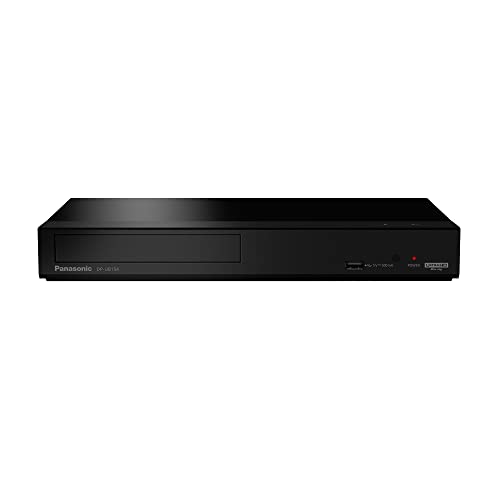
Panasonic’s DP-UB154P-K is a dedicated Blu-ray player designed to deliver 4K HDR playback and Hi-Res audio in a compact form. It supports HDR formats including HDR10+, HDR10, and HLG, enabling detailed, lifelike picture quality for compatible discs. While primarily a standalone movie player, this model complements a PC-based setup where a TV or projector serves as the display. Its emphasis on high-quality video and audio makes it suitable for home theaters or media rooms that require robust Blu-ray performance and flexible file compatibility across common formats.
Considerations: This is a consumer Blu-ray player rather than an external PC drive, so it’s best paired with a display system that benefits from 4K HDR and high-fidelity audio. The device focuses on media playback rather than PC data writing or drive connectivity.
Buying Guide: Key Purchase Considerations
- Interface and connectivity: USB 3.0/3.1, USB-C, HDMI, and LAN ports affect how you connect to laptops, desktops, TVs, and networks. Choose a model that matches your primary device ports and intended use (backup, media playback, or gaming).
- Disc capabilities: If you need to burn Blu-ray discs, prioritize drives with BD writing speeds and BD-XL support. If you only read discs, focus on read speeds and reliable compatibility with your disc formats.
- Software requirements: Some drives require third-party software for Blu-ray playback. Verify compatibility with your preferred media players (PowerDVD, Leawo, Cyberlink BD & 3D Advisor, etc.).
- Cross-OS compatibility: Ensure the drive supports Windows and macOS versions you use. Consider bundled software and driver availability for seamless setup.
- Portability versus desktop use: Portable drives are ideal for laptops, while larger external drives with multiple ports suit desktop setups and home theater contexts.
- Display and multimedia integration: HDMI-enabled drives can output video directly to TVs or monitors. LAN-enabled units support network sharing, which may benefit collaborative or shared storage environments.
- Power and stability: Some drives rely on USB power alone, while others may benefit from additional power adapters for stable long-term operation, especially during high-speed writing.