Best Phone Mirroring for Car: Top Wireless CarPlay &Amp; Screen Mirroring Adapters
Finding the right phone mirroring solution for your car starts with matching features to your needs. This guide covers five reliable adapters that turn wired CarPlay into wireless, add in-car HDMI streaming, and enable screen mirroring for both iPhone and Android devices. Ideal buyers include road-trippers seeking in-car entertainment, tech enthusiasts who want a clutter-free cockpit, and families needing easy passenger access to streaming apps. The table below compares core capabilities to help you choose quickly before reading detailed product sections.
| Product | Best For |
|---|---|
| ByteWave 2-in-1 Wireless CarPlay Adapter & Car TV Mate Pro | Car owners wanting wireless CarPlay plus HDMI streaming for TV/movies on the go |
| Gatatol 4 in 1 Wireless CarPlay Adapter | Users needing CarPlay, Android Auto, AirPlay, and MirrorLink in one device |
| OTTOCAST Mirror Touch | Drivers who want bidirectional touch control and full screen mirroring |
| Joywind 3-in-1 HDMI Input Car TV & Wireless CarPlay Adapter | Families seeking HDMI TV input and wireless CarPlay/Android Auto |
| Hantan 4 in 1 Wireless CarPlay Adapter | Users wanting a robust 4-in-1 solution with low latency |
ByteWave 2-in-1 Wireless CarPlay Adapter & Car TV Mate Pro

Best for: drivers who want a compact CarPlay upgrade plus in-car HDMI streaming. This device converts wired CarPlay to wireless while enabling HDMI input for streaming devices or gaming. It preserves car controls and supports maps, music, and calls via the car’s display. The setup is plug-and-play, with no app installation required, making it suitable for users who prefer quick, straightforward installation.
Why selected: It combines CarPlay wirelessly with an HDMI streaming option in one dongle, reducing clutter and expanding entertainment options for passengers. The integrated design helps keep the cockpit tidy and avoids multiple adapters.
Caution: HDMI streaming requires an external device and a powered USB/HDMI connection; a separate HDMI-enabled streaming device is not included. Use a compatible hotspot or car Wi‑Fi for internet access.
Gatatol 4 in 1 Wireless CarPlay Adapter
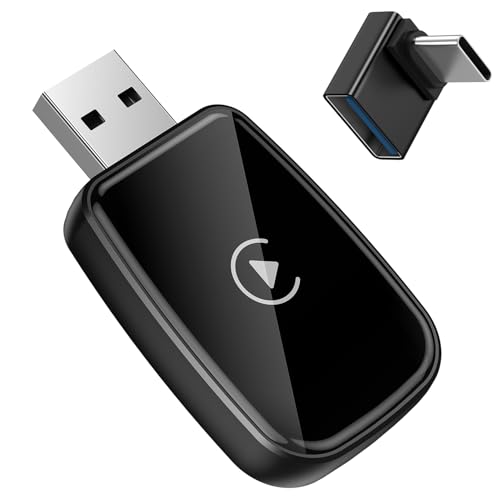
Best for: users who need a universal 4-in-1 solution. The device supports CarPlay, Android Auto, AirPlay, and MirrorLink, with compatibility announced for iPhone and Android devices. It targets vehicles with factory wired CarPlay or Android Auto and offers a single, versatile interface for screen mirroring and app use on the car display.
Why selected: Its broad compatibility and multi-mode functionality let users switch between ecosystems (iOS and Android) without buying multiple adapters. It is a strong choice for mixed-device households or vehicles that support wired CarPlay/Android Auto.
Caution: It is not compatible with factory wireless CarPlay; confirm your vehicle’s compatibility before purchasing by scanning the QR code on the product image.
OTTOCAST Mirror Touch
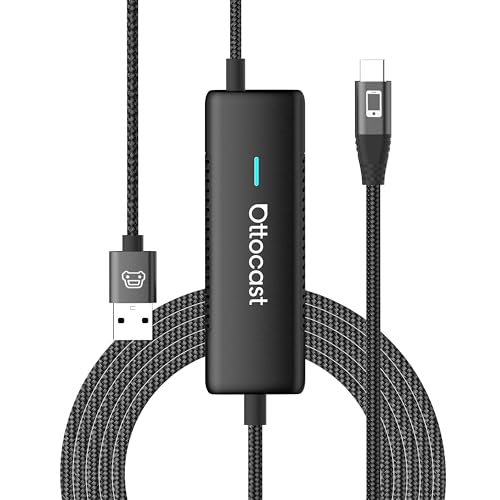
Best for: drivers who prioritize phone control from the car’s touchscreen. This model emphasizes bidirectional touch control and full screen mirroring, supporting apps like Netflix, YouTube, and more with low latency. It keeps core CarPlay functionality intact while enabling broader media streaming.
Why selected: The bidirectional touch capability helps drivers stay hands-free while using compatible apps, reducing the need to pull out the phone during trips. It is a practical choice for passengers who want smooth streaming with minimal lag.
Caution: Latency is influenced by wireless conditions and device compatibility; ensure your phone and car display support the required features for optimal performance.
Joywind 3-in-1 HDMI Input Car TV & Wireless CarPlay Adapter

Best for: families needing an HDMI TV input alongside wireless CarPlay and Android Auto. It enables devices like streaming sticks or game consoles to output to the car display, turning trips into entertainment marathons. Wireless CarPlay/Android Auto remains available for navigation and calls.
Why selected: The 3-in-1 design consolidates CarPlay, Android Auto, and HDMI TV input into one device, simplifying installation and reducing cable clutter. It is ideal for road trips where backseat passengers want varied media sources.
Caution: HDMI devices must be powered and compatible with your vehicle’s USB port; rely on a stable power source to prevent interruption during streaming.
Hantan 4 in 1 Wireless CarPlay Adapter

Best for: users seeking a robust 4-in-1 system with compatibility across CarPlay, Android Auto, AirPlay, and Mirror Link. It emphasizes low-latency wireless performance and device versatility, with support for Type-C adapters for universal fit.
Why selected: The combination of fast, stable connections and broad compatibility makes it a practical choice for users who want a single adapter that works across multiple devices and car models.
Caution: While it claims broad compatibility, some vehicles may have restrictions or require specific configurations to enable all features; verify your car’s wired CarPlay/Android Auto setup before purchase.
Buying Guide: Key Purchase Considerations
- Compatibility: Confirm your vehicle has wired CarPlay or Android Auto, and check whether the adapter supports AirPlay, MirrorLink, or Android Auto if you need those features.
- Connectivity Type: Decide between wireless CarPlay/Android Auto or HDMI-in options. HDMI input is ideal for streaming sticks and game consoles, while wireless solutions reduce cables.
- Latency and Responsiveness: Look for low-latency specs, especially for navigation and calls. Bluetooth 5.2 and dual-band Wi-Fi improve stability.
- Ease of Setup: Plug-and-play units are preferred for quick installs. Some models require app setup or phone-side enabling; consider your comfort level.
- Power and Internet: Most adapters require a car USB power source and in-car Wi‑Fi or mobile hotspot for internet access; plan power needs accordingly.
- Vehicle-Specific Limitations: Some cars (like certain BMW/Tesla models) may have limited compatibility; verify with product images, QR codes, or compatibility guides.
Frequently Asked Questions
- What is the main benefit of wireless CarPlay adapters?
They convert wired CarPlay into wireless, reducing cable clutter and giving you instant access to maps, music, and calls on the car screen. - Can these adapters stream video from streaming services in-car?
Some support HDMI input or screen mirroring, enabling streaming, but performance depends on the streaming device and internet connection. - Do these devices require apps to work?
Most plug-and-play models do not require extra apps, but some may need you to enable CarPlay/Android Auto on your phone. - Is latency a concern?
Latency varies by device and network; models with Bluetooth 5.2 and strong Wi‑Fi support generally offer smoother performance. - Will these adapters work with any car model?
Compatibility depends on whether your car has wired CarPlay/Android Auto and the adapter’s supported modes; verify with the manufacturer’s compatibility notes. - Do I need to keep my phone connected to the internet?
Yes, for streaming apps and maps, your phone needs internet access either via hotspot or in-car Wi‑Fi.