
Best Ways to Play Your Phone in the Car Without an Aux Cable
Answer: You can safely play your phone in the car without an AUX cable by using wireless CarPlay/Android Auto systems or Bluetooth adapters that add wireless audio. This guide highlights five practical options for different setups, from built-in wireless car infotainment to simple Bluetooth adapters. Ideal for drivers who want hands-free control or who must upgrade an older stereo without heavy installation.
The top picks below are best suited for: wireless CarPlay/Android Auto enthusiasts, drivers with non-wireless radios seeking a quick upgrade, and parents or caregivers looking for affordable, easy-to-use solutions. The table summarizes key considerations at a glance.
| Product | Type | Best For | Key Benefit |
|---|---|---|---|
| ESSGOO Carplay Screen for Car 10.26″ Wireless Android Auto with Rear Cam | Wireless CarPlay / Android Auto Screen | Drivers wanting a built-in, wireless infotainment upgrade | Large IPS touchscreen and flexible audio options |
| WAVEPAV Bluetooth 5.4 Transmitter Receiver 2-in-1 | Bluetooth Transmitter & Receiver | Car owners seeking a universal wireless adapter | TX/RX modes with LCD status display for easy use |
| Keenso Bluetooth AUX in Cable ABS Car Bluetooth Module | Bluetooth AUX In Cable | Older radios needing wireless audio input | Plug-and-play AUX input upgrade without rewiring |
| Generic Bluetooth Aux in Cable for RCD/RS series | Bluetooth AUX In Cable | Budget-friendly car audio upgrades | Simple replacement to restore wireless audio |
| Seulliya Apple MFi Certified Lightning to 3.5 mm Adapter | Lightning to 3.5 mm Adapter | iPhone users needing wired 3.5 mm output | High compatibility and audio quality with iOS devices |
ESSGOO Carplay Screen: Wireless CarPlay & Android Auto

The ESSGOO unit provides wireless CarPlay and Android Auto for compatible smartphones. Best for drivers who want an integrated infotainment system with navigation, hands-free calling, and music without a USB tether. The 10.26-inch IPS touchscreen supports day/night mode and brightness adjustment for visibility in diverse lighting. It also offers multiple audio connection options, including Bluetooth, AUX, FM, and built-in speaker output. Choose this if you want a single, self-contained wireless solution and a rear-view camera input.
Caution: Requires compatible vehicle wiring or mounting space; installation complexity can vary by vehicle. Better for buyers who want a dedicated wireless head unit rather than adapters.
WAVEPAV Bluetooth 5.4 Transmitter & Receiver

This 2-in-1 device works as a transmitter or receiver, allowing wireless audio to a vehicle’s non-Bluetooth radios or from a phone to wireless speakers. Best for drivers who want flexibility across devices, including TVs and car stereos. The built-in LCD display shows mode, status, and pairing information for straightforward operation. It is especially useful when upgrading without changing the car’s original head unit.
Limitation: Performance depends on the car’s 3.5 mm input and radio circuitry. Choose this if you need a universal wireless bridge rather than a dedicated head unit.
Keenso Bluetooth AUX In Cable

Keenso offers a plug-and-play AUX input upgrade for radios supporting an AUX jack. Best for older cars lacking wireless streaming but with an available AUX port. It restores wireless audio functionality by enabling Bluetooth audio input directly into the car stereo. This option is choose-this-if you want an affordable, simple retrofit that avoids full head-unit replacement.
Limitation: Requires a functioning AUX input on the vehicle’s head unit; no wireless control or display is included, and user must handle Bluetooth connections manually.
Generic Bluetooth AUX In Cable for RCD/RNS Series

This budget-friendly Bluetooth AUX In Cable is designed for common radio models like RCD310/510 and RNS models. Best for cost-conscious buyers who want a straightforward way to stream audio via AUX without replacing the head unit. It offers plug-and-play installation and enables wireless music input to the car stereo.
Limitation: May not support advanced features like hands-free calling depending on the head unit, and build quality varies by seller. Choose this if price matters most and your radio model matches the listed compatibility.
Seulliya Lightning to 3.5 mm Adapter
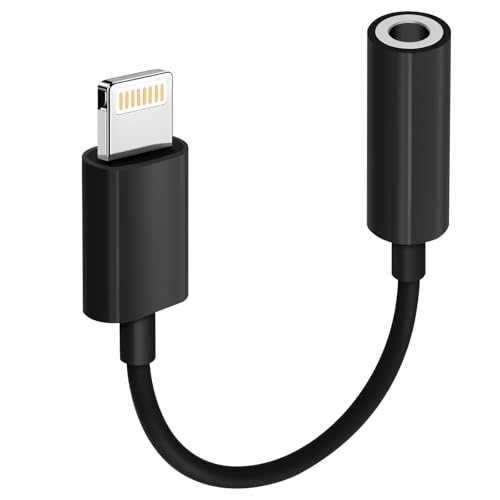
Apple MFi certified, this adapter is ideal for iPhone users who want to connect to a 3.5 mm input. Best for those who prefer or require a wired connection from iPhone devices to older car stereos. It guarantees compatibility with a wide range of iOS devices and 3.5 mm accessories, ensuring stable audio output. Use this if your vehicle’s AUX or 3.5 mm input is the preferred path, and you own an iPhone with a Lightning port.
Limitation: It does not support microphone or hands-free calling through the adapter; only audio output is guaranteed. Choose this if you specifically need a wired 3.5 mm solution with iPhone devices.
Buying Guide
What should you consider when choosing a wireless solution to play your phone in the car without an AUX cable?
- Car compatibility: Does your head unit support wireless CarPlay/Android Auto, or do you need a separate adapter? A built-in wireless system can be more seamless, while adapters are flexible but may require more setup.
- Audio needs: Do you want hands-free calling, navigation prompts, and music streaming? If yes, prioritize devices with Bluetooth hands-free capabilities or built-in microphones in the head unit.
- Installation effort: Are you comfortable with replacing a head unit or mounting a screen, or do you prefer plug-and-play adapters? The ESSGOO option is a larger install, while KO/S variants are easier retrofits.
- Audio output method: Do you want AUX relay, FM transmitter, or direct Bluetooth input? Each method has its pros and potential interference in certain environments.
- Device compatibility: Ensure the adapter supports your phone’s OS (iOS or Android) and the vehicle’s input options. Some adapters are universal, others are OS-specific.
- Future-proofing: If you anticipate upgrading your phone or car stereo, consider devices that favor updates and broad compatibility with CarPlay/Android Auto ecosystems.
Frequently Asked Questions
- Can I play music from my phone in the car without any cable? Yes, by using wireless CarPlay/Android Auto head units or Bluetooth adapters that connect to the car’s audio system.
- Is a Bluetooth transmitter the same as a Bluetooth receiver? No. A transmitter sends audio from a non-Bluetooth device to Bluetooth-enabled speakers, while a receiver does the opposite. Some devices can do both (2-in-1).
- Will these solutions work with older radios? Yes, many Bluetooth AUX in cables and FM transmitters are designed to upgrade older radios without replacing the head unit.
- Do I need to install anything special? Some options require mounting a screen or running wiring; others are plug-and-play adapters. Check your vehicle’s constraints before purchase.
- Is it possible to use wireless CarPlay without a car that supports it? Not directly; you would need a compatible wireless CarPlay head unit or a dedicated installation that supports wireless CarPlay/Android Auto.
- Are there any limitations with iPhone users? Some adapters are iPhone-friendly via Bluetooth, while others rely on wired connections through 3.5 mm. Check compatibility for features like hands-free calling and mic support.