
Best Portable Digital Recorders for Music and Lectures
Looking for a compact, reliable portable digital recorder to capture music, lectures, or meetings? This guide highlights five top options suited to different needs—from students and journalists to musicians and meeting coordinators. Each choice features easy controls, clear playback, and strong noise reduction to help you focus on the sound that matters. The following table provides a quick snapshot of the recommended products.
| Product | Brand | Key Strength | Best For |
|---|---|---|---|
| Digital Voice Recorder 16GB Voice Recorder with Playback | Sunlan | Simple one-button operation; clear playback | Everyday note-taking and quick interviews |
| 136GB Digital Voice Recorder with Playback (Tonfarb) | Tonfarb | Massive storage; long battery life | Back-to-back meetings and lectures |
| 64GB Digital Voice Recorder with Playback (EVISTR) | EVISTR | Advanced noise reduction; compact | Classroom and field use |
| TASCAM DR-05XP 32-Bit Float | Tascam | Pro-level recording options; USB-C | Music, video sound, and podcasts |
| Cappsu 32GB Digital Voice Recorder | Cappsu | High data rate 1536Kbps; portable | Meetings and interviews |
Sunlan Portable Voice Recorder With Playback
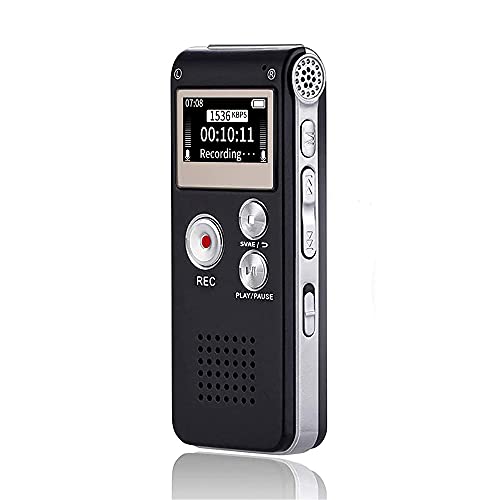
The Sunlan device emphasizes simple operation. It uses a single REC button to start recording, STOP to end, and PLAY to listen back, with A-B repeats for repeating important sections. This design helps beginners or casual note-takers who want a straightforward, reliable tool. Best for individuals who value quick access and a compact form factor.
Key features include a built-in speaker for immediate playback and compatibility with external speakers for larger listening sessions. A notable limitation is that the unit may not offer advanced multi-mics or high-resolution formats found on higher-end models; use this when you need a fast, portable option without extra complexity.
Ideal for: students, journalists, and meeting participants who prioritize ease of use and instant playback over advanced recording modes.
Tonfarb 136GB Digital Voice Recorder

The Tonfarb 136GB model offers extensive storage and long continuous recording, making it well-suited for long lectures, interviews, and conference sessions. With a 136GB memory capacity and a robust battery, it supports up to thousands of hours of audio in MP3 or WAV formats. Best for: students and professionals who need to capture lengthy sessions without swapping cards frequently.
One-click recording and saving simplify workflow; a potential drawback is that some users may wish for more refined microphone configurations or higher sample-rate options. This device remains a strong choice when endurance and capacity are the priority.
Best for: back-to-back classes, field reports, and extended interviews where uninterrupted capture matters.
EVISTR 64GB Digital Voice Recorder

The EVISTR L357 model provides advanced noise reduction microphones and 1536 kbps PCM high-quality stereo sound. It supports a long battery life and offers a simple two-button operation for quick recording and saving. It’s a strong pick for classrooms, meetings, and fieldwork where clean audio and straightforward controls are important.
Best for: students and professionals who want clear audio in varied environments. Caution: while compact, it may still be better to pair with a separate mic in very loud settings for maximum clarity.
Cappsu 32GB Digital Voice Recorder

The Cappsu device focuses on balanced clarity at 1536Kbps, offering a compact form and A-B repeat for easy navigation through meetings or lectures. Its small size makes it highly portable for daily carry, while the improved recording quality supports more detailed notes and transcripts.
Best for: professionals who need a portable recorder for quick notes and interviews. Choose this if you value a tiny footprint with high data rate audio. Limitation: the included memory is modest, so plan recordings or occasional expansion needs accordingly.
Buying Guide: How To Choose The Right Portable Digital Recorder
- Storage and battery life: Consider how long you’ll record between charges and how many hours of audio you need. Higher capacity models like 136GB or expandable cards help with long sessions.
- Recording quality and formats: Look for PCM/ WAV support for higher fidelity and MP3 for compact files. Noise reduction and dual-microphone setups improve clarity in noisy environments.
- Ease of use vs. features: One-button recording is ideal for quick capture, while more controls (A-B repeat, auto-record, voice activation) benefit frequent reporters and musicians.
- Portability: If you travel light, choose a compact model with sufficient battery life. A durable metal chassis adds resilience for field work.
- Connectivity and transfer: USB-C or USB 2.0 support accelerates file transfer to your computer. Consider whether you need direct playback or headphone monitoring.
- Best use case: Music production, lectures, interviews, or meetings each benefit from slightly different specs—choose accordingly.
Frequently Asked Questions
- What should I prioritize in a portable recorder for music?
- Is larger storage always better?
- What is A-B repeat useful for?
- Can I use these devices for video work?
- How important is noise reduction?
- Do these recorders require special software?
Look for high sampling rates, stereo recording, and low-noise preamps. A model with 32-bit float or WAV/PCM formats helps preserve dynamics during musical performances.
Not always. Bigger storage reduces the need to swap media, but consider battery life and file management. For students, 64GB or 128GB with expandable memory is often sufficient.
A-B repeat allows you to mark a section to replay—ideal for transcribing or studying a specific passage in lectures or music.
Yes, many models support 44.1kHz/48kHz sampling suitable for audio for video projects, podcasts, and interviews. Check the exact formats before use with video software.
Important in noisy environments. Dual-microphone setups and algorithmic noise reduction help isolate voice or instrument from ambient noise.
Most can transfer files via USB-C to PCs or Macs, and playback is often built-in. Convert or edit audio with standard audio software as needed.