
Best Portable DVD Players for Vehicles: Top Picks for In‑Car Entertainment
If you’re shopping for in‑car entertainment, these portable DVD players are designed to keep passengers—especially kids—engaged on road trips. Each option supports multiple formats, headrest mounting, and TV/AV syncing for larger screens. This guide highlights five strong choices and clarifies who each is best for, so you can pick confidently.
Summary table of selected products
| Product | Best For | Key Benefit |
|---|---|---|
| FANGOR 7.5″ Dual Car DVD Player | Same movie across screens with AV/DC; 5‑hour battery | |
| DBPOWER 11.5″ Portable DVD Player | Built‑in 2500 mAh battery; 9″ swivel screen | |
| WONNIE 12″ Dual Car DVD Players | Two players with sharing or separate playback | |
| DESOBRY 10.5″ Car DVD Player | HDMI input; sync to TV; last memory | |
| Arafuna 12.5″ Car DVD Player | Large display; HDMI/AV sync to other screens |
FANGOR 7.5 Inch Dual Car DVD Player

The FANGOR dual DVD setup includes a main player and a separate LCD screen, enabling simultaneous playback on two displays. It uses a new chipset to reduce disc skipping on rough roads and supports AV out for larger screens. Best for families who want synchronized viewing on the car’s television or projector, with clear audio from dual speakers. A built‑in battery runs about five hours, or you can use a car charger for longer trips. A caution: battery life may be shorter when the screens run simultaneously for extended periods.
DBPOWER 11.5″ Portable DVD Player

The DBPOWER model offers a large 9″ swivel screen plus a 2500 mAh battery for up to five hours of playback. It supports multiple media formats, including CD/DVD and USB/SD inputs, and is region‑free. This is especially suitable for long trips where a larger single screen helps keep younger travelers engaged. Limitation: not all formats are supported beyond standard DVD/CD media, and Blu‑ray is not compatible.
WONNIE 12″ Dual Car DVD Players

This 12″ dual‑screen setup improves visibility for backseat passengers. It includes mounting brackets and supports sharing a single movie across screens or playing different movies. Built‑in stereo speakers enhance sound, with options to use wired headphones. Best for families needing prominent displays and flexible mounting. Caution: larger size may require more headroom in smaller vehicles.
Car DVD Player Dual Screen With Headrest Mount (DESOBRY)
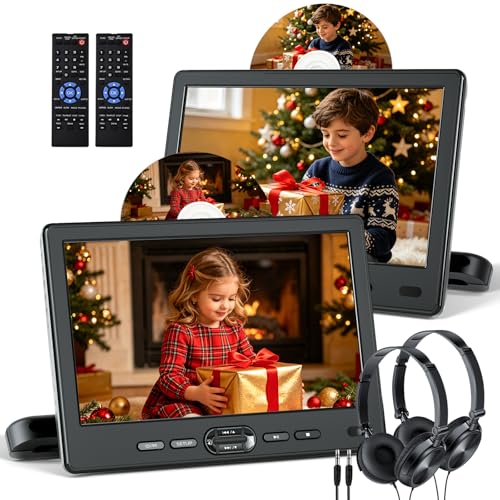
DESOBRY emphasizes HDMI input for syncing 1080P video from phones or other devices and provides AV In/Out for larger viewing via TV. It supports disc formats with last memory and a suction intake for quick disc loading. Choose this if you want TV syncing capability and easy disc management on bumpy trips. Limitation: some users report limited support for very new USB formats; ensure compatibility with intended media files.
Arafuna 12.5″ Car DVD Player

Arafuna’s 12.5″ player delivers a large display with 1920x1080p clarity, HDMI input for syncing to mobile devices, and AV/USB/SD inputs for broad media support. It’s suitable for households prioritizing a big screen and seamless HDMI connections. A caveat: very large screens may require additional headrest mounting space and careful installation in compact vehicles.
Buying Guide
What should you consider when choosing a portable car DVD player?
- Screen size and dual vs. single screens: Larger screens improve visibility for backseat passengers; dual units are ideal for siblings who want different content or a shared movie.
- Battery life: Look for models offering at least 5 hours of playback on built‑in power, plus car charging options for longer trips.
- Screen flexibility: Swivel or rotate displays help fit multiple seating layouts and ensure easier viewing for different passengers.
- Format support: Ensure the unit supports common formats (DVD, CD, USB/SD) and is region free if you plan to use discs from various regions.
- HDMI/AV syncing: HDMI input and AV out allow connection to TVs or projectors for larger viewing experiences; consider this if you frequently watch from the sofa or a living room setting.
- Durability and mounting: Headrest brackets and suction mounts influence stability on rough roads and during sudden stops.
Choosing by use case
If you want synchronized playback across two screens in the back seat, choose a dual‑screen package with AV/HDMI support. For longer road trips, prioritize a model with a long battery life and robust car charging options. If maximizing screen size is your goal, a 12–12.5″ unit can be the best fit, provided there’s adequate space in your vehicle.
Practical setup tips
- Mount the players securely to prevent movement during accelerations or braking.
- Preload discs and set up last memory to resume from breaks for a smooth viewing experience.
- Test HDMI/AV connections before a trip to ensure compatible devices are recognized.
- Keep spare media and charging cables accessible in the car for emergencies.
Frequently Asked Questions
- Do these players support Blu-ray discs? Answer: Most listed models do not support Blu-ray discs; they focus on standard DVD/CD formats and USB/SD media.
- Is all regions compatibility important? Answer: All‑region capability helps with discs from different regions; if you frequently borrow discs, this feature is beneficial.
- Can I connect these to a home TV? Answer: Yes, many models offer AV out or HDMI input to sync to a larger screen.
- What about mounting compatibility? Answer: Look for included headrest mounts or brackets; durability varies by model and mounting method.
- Is the battery removable? Answer: Most entries use built‑in rechargeable batteries; removable options are rare in this category.
- Are these good for backseat entertainment only? Answer: They are primarily designed for backseat use but can be used with TVs or projectors when synced via HDMI/AV.