
Best Professional Voice Over Microphone for Clear, Studio-Quality Recordings
Answering your search for a professional voice over microphone: these picks are designed to deliver broadcast-quality vocal clarity for podcasts, voice acting, YouTube narration, and streaming. Each option emphasizes clear front-focus capture, low noise, and easy setup. Best for podcasters, content creators, and voice-over artists who need reliable, plug-and-play sound with minimal editing. Below, five top USB/XLR models are compared, with best-use scenarios and practical cautions to help you choose.
ZealSound K66 USB Podcast Microphone: Best All‑Around For Multiplatform Creators

The ZealSound K66 delivers studio-quality vocal realism with a cardioid capsule and a broad 40Hz–18kHz range. Its –45dB ±3dB sensitivity supports clean, expressive voice capture while reducing background noise. The microphone includes a mute button and gain/volume controls, plus intelligent Noise Reduction Mode for cleaner recordings in busy spaces. It’s plug-and-play across Windows, Mac, iPhone, iPad, Android, and tablets, with USB-C and Lightning adaptors for quick mobile switching. This model is best for creators who record across desktops and mobile devices, including YouTube, podcasts, and streaming. Caution: Noise reduction depends on mode; some environments may still need acoustic treatment.
FIFINE T669 Studio Condenser USB Microphone: Best Starter USB Kit

The FIFINE T669 offers a straightforward USB solution with a cardioid condenser capsule that emphasizes voice clarity and minimizes ambient noise. This bundle includes a desk boom arm, a pop filter, and a long USB cable for flexible desktop setup. It’s ideal for beginners or budget-conscious creators starting podcasts, video voice-overs, or student projects. The mic supports simple plug-and-play operation on PCs and Macs but is incompatible with Xbox. Best for: individual content creators needing an affordable, ready-to-record setup. Limitation: Some users report improvements with external acoustic treatment for richer audio in untreated rooms.
Logitech Creators Blue Yeti USB Microphone: Best Versatile Pattern Options

The Blue Yeti offers multiple pickup patterns (cardioid, omni, bidirectional, stereo) and Blue VO!CE software for enhanced vocal control. This flexibility is valuable for creators who record voice-overs, podcasts, and gaming streams, switching patterns to suit solo narrations or multi-person interviews. It’s a plug-and-play USB setup compatible with Windows and Mac systems. Choose this if you expect varied recording scenarios or want broadcast-like vocal effects without extra gear. Caution: The price reflects its feature breadth; some users may prefer a simpler single-pattern mic for focused vocal work.
FIFINE AmpliGame AM8T: Dynamic USB/XLR Gaming Microphone Kit

The AmpliGame AM8T pairs a USB/XLR dynamic mic with a sturdy boom and a boom arm stand, plus RGB lighting for a visually engaging setup. It features a cardioid pattern, –50dB sensitivity, a gain knob, and a headphone jack for real-time monitoring. This kit is best for streamers and gamers who want quick, plug-and-play USB use or enhanced XLR connectivity for a future upgrade. Caution: RGB features may be a distraction in quiet recording spaces; switch to a neutral mode during voice work as needed.
RØDE NT1 Signature Series: Best Quiet Studio Voice
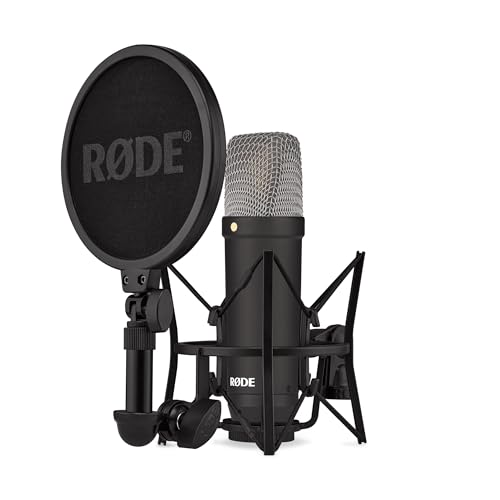
The RØDE NT1 Signature is a premium studio condenser mic known for exceptionally low self-noise and a warm vocal character. While this model is primarily used in professional studio environments, it is designed for calm vocals, voice-overs, and broadcast-quality recordings when paired with an interface. It’s best for dedicated voice actors or serious podcasters who want a high-fidelity, natural vocal tone and are comfortable with an external audio interface. Limitation: Requires an XLR interface (not a USB mic) for operation, adding setup steps for beginners.
Buying Guide
- What’s your recording setup? USB mics are simplest for desktops and laptops, while XLR mics require an interface but can offer higher fidelity and upgrade paths.
- What is your recording environment? Choose mics with strong cardioid patterns to minimize room noise if untreated, and consider a basic pop filter or reflection reduction for better results.
- Do you need versatility or simplicity? If you record across gaming, podcasts, and mobile work, a USB mic with mobile adapters (like ZealSound) can be advantageous. If you want studio-grade sound, an XLR option (like Shure SM7B or RØDE NT1) with an interface provides more control.
- Monitoring needs: Real-time headphone monitoring helps you hear exactly what your audience will hear. Pick mics with a dedicated headphone jack or use an audio interface with monitoring.
- Budget and upgrade path: Starter USB mics offer immediate results, while XLR mics unlock room for future sound improvements with better preamps and processors.
Quick Comparison Table
| Product | Best For | Key Benefit | Note |
|---|---|---|---|
| ZealSound K66 | Multi-device creators | Intelligent Noise Reduction modes | Mobile adapters included |
| FIFINE T669 | Beginners on a budget | Includes arm, pop filter | USB only |
| Blue Yeti | Versatile recording | Four pickup patterns | Software suite included |
| FIFINE AmpliGame AM8T | Streamers and gamers | USB/XLR flexibility, RGB | Dynamic mic |
| RØDE NT1 | Professional studios | Very low self-noise | XLR only |
FAQ
- What is the difference between USB and XLR microphones? USB mics are plug-and-play and user-friendly, ideal for quick setups. XLR mics require an audio interface but generally offer higher fidelity and upgrade potential.
- Which mic is best for voice acting? For voice acting, a mic with low self-noise and a smooth frequency response is ideal. The RØDE NT1 and Shure SM7B are popular for professional voice work when paired with appropriate interfaces.
- Do I need a pop filter? Yes, a pop filter helps reduce plosives and sibilance, improving vocal clarity in close-range recording.
- Is software essential? Some mics include processing software (e.g., Blue VO!CE) for immediate vocal shaping. Otherwise, many creators rely on post-production tools or built-in interface features.
- Should I consider room treatment? Simple acoustic panels, rugs, or blankets can significantly reduce echo and improve overall recording quality.
- Can I use a USB mic for mobile devices? Many USB mics provide adapters (USB-C, Lightning) to work with phones and tablets, enabling on-the-go recording.