
Best USB-C to RCA Audio Cables for Hi-Fi Systems
Looking to connect modern USB-C devices to classic RCA-equipped audio gear? This guide highlights five strong options and explains who each is best for. Each product supports audio output from USB-C or USB-A sources to RCA inputs, helping you enjoy higher-fidelity sound on stereo receivers, speakers, amplifiers, and more. Ideal buyers include smartphone users with Type-C, laptop owners seeking simple DAC-enabled connections, and anyone upgrading a home theater setup without swapping legacy equipment.
Product comparison at a glance
| Product | Best For | Key Benefit |
|---|---|---|
| CableCreation USB C to RCA Audio Cable | USB-C devices seeking high-fidelity DAC output | Gold-plated, robust build, 24K gold |
| UGREEN USB C to RCA Audio Cable | Most devices with USB-C/Thunderbolt 3 | Advanced DAC with clear stereo |
| RCA to USB C Cable by ZOOAUX PRO | Type-C to RCA on modern laptops and phones | Dual-shielded, wide compatibility |
| biaze USB-C to 2 RCA Cable | iPhone/Samsung users needing simple adapter | Stunning DAC performance, wide device support |
| ZARSSON USB to RCA Audio Cable | Older USB-A systems to RCA gear | Plug-and-play, durable build |
CableCreation USB C to RCA Audio Cable 6FT

Best for users who want a longer USB-C to RCA connection without sacrificing sound quality. The cable supports 16bit/48kHz output, with higher capacity up to 24bit/96kHz via the built-in DAC, offering richer detail for music and film audio. Copper core and 24K gold-plated contacts reduce interference and distortion, while a nylon braided jacket adds durability. This option is especially suitable for mobile devices, tablets, and laptops with USB-C outputs that feed a home stereo or amplifier.
- Best for: USB-C devices that require a stable, high-quality stereo feed to RCA inputs.
- Why selected: Strong DAC performance and robust construction for frequent use.
- Caution: The length may cause minor signal loss over very long runs with impedance-sensitive systems.
UGREEN USB C to RCA Audio Cable Type C to 2RCA

Best for users with modern Type-C or Thunderbolt 3 devices seeking a straightforward, no-converter RCA connection. This cable claims a stable 16bit/48kHz DAC performance and aims to preserve original audio quality when streaming to 2RCA outputs. It’s a strong choice for connecting devices like smartphones, tablets, or laptops to car stereos, soundbars, or home theater systems without additional adapters.
- Best for: High-fidelity, direct Type-C to RCA connections on a variety of devices.
- Why selected: Clear DAC performance and wide compatibility reach.
- Caution: The specification emphasizes 16bit/48kHz; higher-resolution needs may not be supported in all scenarios.
biaze USB C to RCA Audio Cable 4.9FT

Best for users who need a shorter, reliable USB-C to RCA link with consistently solid DAC support. The cable emphasizes 16bit/48kHz output and a wide compatibility range, including popular iPhone and Android models, making it a flexible choice for mixed-device setups. Its 4.9-foot length fits typical living room configurations without excess slack.
- Best for: Mixed-device households needing a compact USB-C to RCA adapter.
- Why selected: Integrated DAC and broad compatibility for everyday audio tasks.
- Caution: The listed device support scope is broad; verify compatibility with niche audio gear before purchase.
ZARSSON USB to RCA Audio Cable 4FT
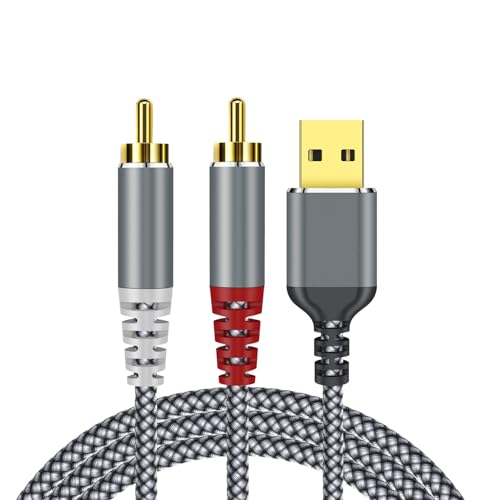
Best for users connecting USB-A sources to RCA receivers, or for setups where a concise 4-foot run is optimal. This cable emphasizes plug-and-play operation with a built-in DAC and an enamel copper core for stable signal transmission. Aluminum alloy shell adds durability for daily use in living room or home theater environments.
- Best for: USB-A to RCA setups on desktops, laptops, or game consoles.
- Why selected: Durable construction and easy setup, suitable for quick connections.
- Caution: Not compatible with PS3 according to stated notes; verify your device’s USB interface before purchasing.
Buying Guide
Key considerations when choosing a USB-C or USB-A to RCA cable:
- Device compatibility: Confirm your source device’s USB interface (C, A, or Thunderbolt 3) and its output capabilities.
- DAC quality and audio resolution: Look for cables advertising DAC chips and 16bit/48kHz output as baseline; 24bit/96kHz support indicates higher fidelity potential.
- Cable length: Choose a length that minimizes signal loss and avoids clutter; longer runs may require higher-quality shielding.
- Connector and build quality: Gold-plated contacts reduce corrosion; braided jackets and sturdy shells improve durability in daily use.
- Compatibility scope: Some cables list extensive device compatibility; verify against your specific phone, tablet, laptop, or game console to avoid driver or recognition issues.
FAQ
- Do these cables require external power? No, these cables use the USB/USB-C source’s power to drive the DAC and output to RCA inputs.
- Will I get surround sound with these cables? These cables provide stereo left and right channels (2RCA). They do not inherently deliver surround processing unless your receiver applies it.
- Can I use them with a car stereo? Yes, many models are designed to feed car audio systems via RCA inputs, but check your vehicle’s compatibility with USB-C or USB-A sources.
- Is higher sample rate available beyond 48kHz? Some cables advertise 24bit/96kHz capability, but performance can depend on source device and DAC implementation.
- Which cable should I choose for mixed devices? The UGREEN or CableCreation options are strong for broad compatibility and consistent DAC performance across many devices.