
Best Record Players That Convert Vinyl to MP3 for Easy Digital Listening
Answer: These record players smoothly convert vinyl to MP3 or digital formats, making it easy to enjoy your collection on modern devices. The top picks below are ideal for listeners who want built‑in MP3/USB encoding or direct PC/Mac transfer. Best for beginners who want plug‑and‑play recording, best for tech‑savvy users who need flexible USB/SD encoding, and best for compact, all‑in‑one setups that require minimal setup.
| Product | Best For | Notes |
|---|---|---|
| DIGITNOW Bluetooth Record Player Turntable with Stereo Speaker | All‑in‑one MP3 encoding | Built‑in amp, Bluetooth, USB/SD encoding |
| FEKTIK 10‑in‑1 Mahogany Turntable | Multi‑function vinyl to MP3 recording | USB/SD for encoding; CD/cassette not for recording |
| DigitPro USB 2.0 Audio Capture Card for Vinyl | Direct PC/Mac recording | USB audio capture, versatile inputs |
| to MP3 Converter, USB 2.0 Turntable | Standalone MP3 conversion | USB direct conversion to MP3/USB drive |
| VICTRESS Vinyl Record Player with USB Vinyl to MP3 | Portable USB to MP3 conversion | Built‑in speakers, Bluetooth, USB/MP3 |
DIGITNOW Bluetooth Record Player Turntable with MP3 Encoding
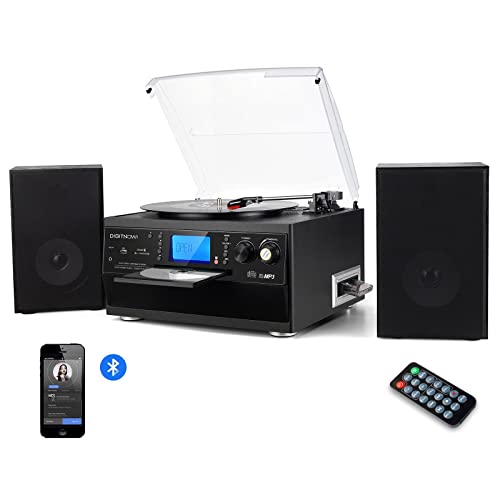
Product overview: This all‑in‑one unit combines a turntable, built‑in stereo speakers, and multiple recording options. It supports MP3 encoding via USB/SD, enabling digital copies of vinyl or other media. Bluetooth lets you stream from mobile devices, and there is a CD, cassette, radio, and AUX in to broaden playback options.
- Best for: Casual listeners who want one device to handle vinyl playback and digital conversion without extra equipment.
- Why chosen: It combines a built‑in amplifier and encoding to MP3, making it easy to archive records directly to USB or SD.
- Caution: The CD recorder is described as a playback/recording center but check compatibility for CD ripping to USB if needed.
FEKTIK 10‑in‑1 Mahogany Turntable with MP3 Encoding

Product overview: This classic mahogany turntable blends vinyl playback with a range of media features, including Bluetooth streaming and USB/SD/MMC for encoding to MP3. It supports 3.5 mm Aux and a built‑in FM radio. Note: The CD player acts as playback only and cannot record CD to USB/SD.
- Best for: Users who want a vintage look with robust Bluetooth and USB/SD MP3 encoding options.
- Why chosen: The USB/SD encoding provides flexible digital archiving for vinyl, cassettes, and radio material.
- Caution: The CD function is for playback and not for recording CDs to MP3.
DigitPro USB 2.0 Audio Capture Card for Vinyl

Product overview: This USB 2.0 capture device connects vinyl, cassette, or radio sources to a PC or Mac for direct MP3/WAV conversion. It supports multiple OS versions and provides flexible input options for stereo RCA and 3.5 mm connections.
- Best for: Tech‑savvy users who want direct control over digital file formats on a computer.
- Why chosen: Plug‑and‑play recording to PC/Mac facilitates precise MP3 or WAV archiving and editing.
- Caution: Compatibility notes apply to older OS versions; verify current OS support before use.
to MP3 Converter USB Turntable
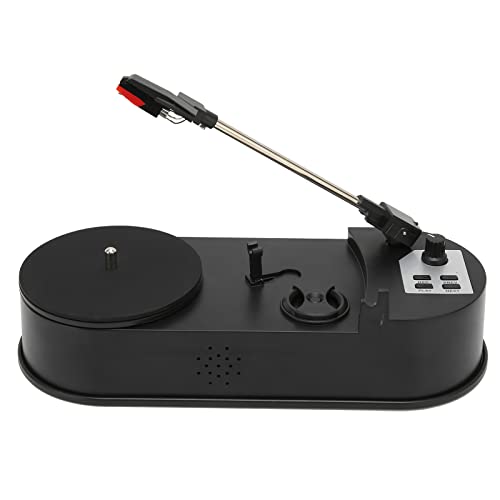
Product overview: This mini USB turntable specializes in converting records directly to MP3 on a USB drive or memory card. It can play records as a standalone device, with the added ability to function as a dedicated MP3 converter for quick archiving without a computer.
- Best for: People who want a simple, portable solution to convert vinyl to MP3 without a computer.
- Why chosen: Standalone MP3 conversion makes it ideal for quick digitization on the go.
- Caution: Performance may be more basic than full‑featured systems; consider audio quality needs.
VICTRESS Vinyl Record Player with USB MP3 Conversion
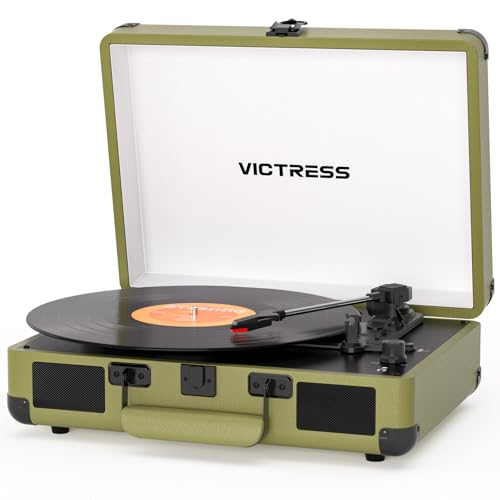
Product overview: This portable suitcase style player includes dual built‑in speakers and Bluetooth. It also offers USB MP3 conversion for easy digitizing of vinyl, plus RCA and headphone outputs for flexible listening options.
- Best for: Casual listeners who want a portable, stylish unit with easy USB MP3 conversion.
- Why chosen: Built‑in speakers and wireless streaming, plus USB MP3 conversion, offer a balanced mix of convenience and quality.
- Caution: Built‑in speakers may not satisfy high‑fidelity needs; external speakers can improve sound.
Buying Guide: Record Players That Convert to MP3
What to consider when choosing a vinyl-to‑MP3 converter:
- Encoding method: Direct USB/SD encoding vs. PC/Mac software capture. If you want simple archiving, USB/SD options are easier. If you need editing, PC/Mac capture provides greater control.
- Input options: Look for RCA, 3.5 mm auxiliary, and Bluetooth to connect various media and devices. The more inputs, the broader your source compatibility.
- Turntable quality: Belt‑drive turntables with anti‑skip design and proper RPM support (33/45/78) preserve vinyl groove integrity during playback.
- Output options: USB drive, SD card, or direct PC output affect how you store the converted files. Consider your preferred workflow.
- Portability vs. home use: Portable suitcase models are convenient for quick digitizing, while larger units often offer better sound and more features.
- Included speakers: Built‑in speakers simplify setup but may limit volume and bass—external speakers can provide better sound if needed.
FAQ
Can these devices directly convert vinyl to MP3 without a computer?
Yes, several models support direct USB/SD MP3 encoding or standalone MP3 conversion to USB drives. Check each product’s encoding options to confirm.
Will recordings preserve original vinyl sound quality?
Sound quality depends on turntable build, tracking, and encoding resolution. High‑quality belt‑drive turntables with proper stylus help preserve dynamics during digitizing.
Is Bluetooth needed for MP3 conversion?
No. Bluetooth is for wireless playback or streaming. MP3 conversion can happen via USB/SD or computer capture depending on the model.
Do these devices require software on a computer?
Some models are plug‑and‑play (USB/SD encoding). Others require USB connection and software on a PC/Mac for encoding to MP3/WAV.
Can I use external speakers with these turntables?
Yes. Many models include RCA outputs or headphone jacks for private listening, and you can connect external speakers for louder or higher‑fidelity playback.