Best Recording Studio Mixing Boards for Home and Small Pro Setups
Looking for a reliable recording studio mixing board to power your home studio or small-scale podcast, livestream, or music production setup? This guide highlights five solid options that balance ease of use with solid sound quality. Each pick suits different needs—from affordable beginner boards to more feature-rich interfaces. The table below summarizes the core details to help you compare at a glance.
| Product | Inputs & Interfaces | Best For |
|---|---|---|
| Yamaha MG10XU | 10 channels, USB, SPX effects | Home studios needing built-in effects and reliable preamps |
| XTUGA CT160 | Up to 16 channels, Bluetooth, USB, 48V phantom | Multi-source podcasting and streaming setups |
| Depusheng XT7 | 7 channels, 16 DSP effects, USB | Karaoke and small studio recording with digital effects |
| Zenolix RM06 | 6 channels, Bluetooth, USB audio interface | Compact home studio and live streaming |
| Mackie ProFX10v3+ | 10 channels, USB interface, GigFX effects, Bluetooth | Streaming and home recording with versatile effects |
Buyer note: each product below is described with its listed features and practical buying considerations. Use the “best for” guidance to identify which one aligns with your workflow, whether that’s multiple external sources, live streaming, or on-the-go setups.
Yamaha Mg10XU 10-Input Studio Mixer With Effects

The Yamaha MG10XU is a compact 10-channel mixer that includes USB connectivity and SPX digital effects. It uses studio-grade discrete Class A D-PRE preamps and an inverted Darlington circuit to deliver a solid bass and clear highs. A 3-band EQ and high-pass filters help eliminate noise and shape precise mixes. Best for beginner to intermediate home studios that want built-in effects and a robust preamp stage. Caution: the onboard effects are useful but may not replace dedicated outboard processors for highly specialized mixes.
XTUGA Ct160 16 Channel Audio Mixer

XTUGA CT160 offers 6/8/12/16 channel inputs with USB and phantom power, plus Bluetooth for wireless streaming. It features gold-plated XLR ports, balanced inputs, and an ergonomic, ultra-slim build ideal for mobile setups and home studios. Best for podcasters and multi-source productions where wireless streaming and multiple line sources are needed. Limitation: while feature-rich, it may be less intuitive for absolute beginners who prefer plug-and-play simplicity.
Depusheng XT7 7 Channel Digital DJ Mixer

Depusheng XT7 combines 7 channels with built-in 16 digital effects and USB connectivity for computer recording. It targets enthusiasts looking for built-in reverb and delay to enhance performances or studio recordings. Best for small studios and karaoke setups where digital effects add depth without external processors. Caution: information emphasizes effects; ensure your computer and software are compatible with the USB interface for direct recording.
Zenolix RM06 6-Channel Bluetooth Mixer
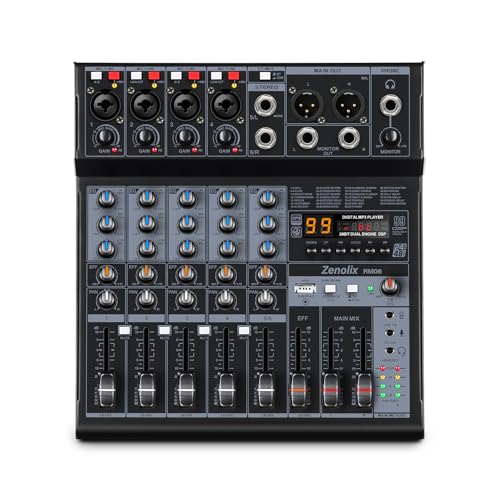
Zenolix RM06 provides 4 XLR/6.35 mm mono inputs plus a stereo line-in, with 48 V phantom power and a complete monitoring suite, including headphone outputs. It includes 99 built-in reverb effects and a USB port for playback and on-board recording. Best for solo artists, podcasters, and small ensembles seeking an all-in-one compact mixer with strong EQ and effects. Limitation: fewer physical inputs than larger 16- or 24-channel mixers, which could constrain bigger setups.
Mackie ProFX10v3+ 10-Channel Mixer

Mackie ProFX10v3+ blends analog warmth with modern digital effects delivered by the GigFX+ engine. It offers a built-in 2×4 USB-C audio interface, three recording modes (Standard, Loopback, Interface), and bidirectional Bluetooth with Mix Minus. This makes it a strong choice for home studios that require reliable streaming and flexible recording options. Best for users who want a complete package for audio interface functionality plus high-quality effects. Caution: USB-C recording modes may require drivers or software updates for certain systems.
Buying Guide
What should you consider when choosing a recording studio mixer?
- Inputs and routing: Match the number of channels you need for mics, instruments, and playback devices. Consider future expansion.
- Audio interface needs: If you plan to record to a computer, check USB/USB-C capabilities and whether the mixer offers 2-in/2-out or more complex routing.
- Built-in effects vs. external processing: Built-in effects save space and cost but may not replace specialized processors for critical productions.
- Phantom power and mic compatibility: If you use condensers, ensure phantom power is available and properly rated.
- Portability vs. size: Compact mixers are great for mobile setups; larger boards offer more control but are heavier.
- Connectivity: Bluetooth and USB playback can simplify sessions but may introduce latency in some workflows—plan around your recording needs.
Practical questions to guide your choice
- Do I need an all-in-one mixer with USB recording or a mixer with a dedicated audio interface?
- Will I be recording multiple mics and instruments simultaneously, or mainly streaming from a few sources?
- Is built-in effects processing essential, or will I rely on external plugins?
- Do I require Bluetooth for wireless playback or collaboration?
- Is portability critical for live gigs or travel-based setups?
FAQ
- What is the difference between a mixer with USB audio interface and a mixer without one?
Answer: A mixer with USB audio interface can route multitrack or mixed audio directly to a computer, simplifying recording and streaming. A mixer without USB interface typically requires an external audio interface. - Should I choose a 6-channel or 10-channel mixer for a home studio?
Answer: If you mainly record a few vocal mics and a guitar or keyboard, a 6-channel mixer may suffice. A 10-channel mixer provides more inputs for future expansion and live overdubbing. - Are built-in effects on mixers necessary for professional results?
Answer: They are convenient for quick tweaks and practice sessions but are not a substitute for high-quality external effects or a dedicated processor in a pro studio. - Is Bluetooth connectivity beneficial for a recording setup?
Answer: Bluetooth is useful for wireless playback and collaboration, but it may introduce latency. Use USB or direct line inputs for critical recording. - Can I use any mixer for podcasting?
Answer: Yes, if it provides clean mic preamps, reliable routing, and easy monitoring. Choose models with good headphone output and ease of use for hosts and guests.