
Best Remote Controlled Audio Switches for Seamless Multi-Source Listening
Looking for a reliable remote controlled audio switch to route multiple audio or video sources to a single display or receiver? This guide highlights five top options, explaining who they’re best for and why, with clear, practical buying considerations. Whether you’re building a home theater, managing a multi-room audio setup, or adding remote control to a vintage system, these picks offer straightforward control and solid compatibility.
| Product | Best For | Key Benefit |
|---|---|---|
| LiNKFOR Digital Toslink 4×1 Switch | Home theater with multiple optical sources | Four input optical switching with long reach |
| Lutron Pico Remote for Audio | Sonos users needing remote volume control | Integrated control for multi-room Sonos setups |
| UGREEN HDMI Switch 3 in 1 Out | Video switching with 4K support | 4K60, HDR, remote control |
| Koopman-Tech RCA Switch Box | Analog audio/video distribution | 4 in, 3 out with remote |
| Rockville RockerBT v2 | Bluetooth-enabled multi-source listening | Bluetooth with aux in/out for flexible setups |
Product options below are organized for quick comparison: how they handle inputs, outputs, and remote control, plus practical cautions to help you avoid setup pitfalls. All selections aim to be clear, objective, and installation-friendly for American readers.
LiNKFOR Digital Toslink 4×1 Optical Switch

This LiNKFOR Toslink switch provides four optical inputs to one Toslink output, ideal for homes with multiple optical sources like game consoles, Blu-ray players, and TV soundbars. It supports LPCM 2.0, DTS, and Dolby Digital, with a signal distance up to 130 feet when using proper fiber. It’s best for users who need a dedicated optical path and long cable runs. A limitation is that it does not carry some 7.1-channel formats, and requires compatible optical receivers.
- Best for optical-only multi-source routing
- Better for long-distance fiber runs up to 40 m
- Avoid if you need 7.1 channel formats over fiber
Lutron Pico Remote for Audio

The Lutron Pico Remote enables remote control of Sonos audio setups when paired with a compatible Caseta hub. It’s best for users who want room-to-room volume and power control across a Sonos system. It requires a Caseta Smart Hub for full functionality, so plan for compatible, existing smart home gear. It’s not a standalone switch for non-Sonos devices.
- Best for Sonos-based multi-room listening
- Better for centralized control via Caseta hub
- Avoid if you don’t use Sonos or don’t want a hub dependency
Wireless Remote Switch With 328 Ft Range

This high-power remote switch leverages a 30A relay to control DC-powered devices. It’s best for automating high-current loads such as motors, luminaires, or other equipment that benefits from a long-range RF remote. It’s straightforward to install, but ensure the connected devices fall within the device’s current rating and safety guidelines.
- Best for high-current, remote-controlled loads
- Better for outdoor or remote installations thanks to wide range
- Avoid if you only need small-signal switching or require ceiling-mounted control
UGREEN HDMI Switch 3 In 1 Out

The UGREEN HDMI switch handles three HDMI sources to one display with 4K@60Hz support and HDR10+. This is ideal for users who want simple, remote-controlled video switching without swapping cables. It supports HDMI 2.0/1.4 and HDCP2.2/1.4. A limitation is that only one monitor displays at a time, and it requires a constant power connection for stable operation.
- Best for multi-source video switching to a single display
- Better for 4K HDR video with a remote control
- Avoid if you need simultaneous multi-monitor output
RCA Switch Box 4 In 3 Out
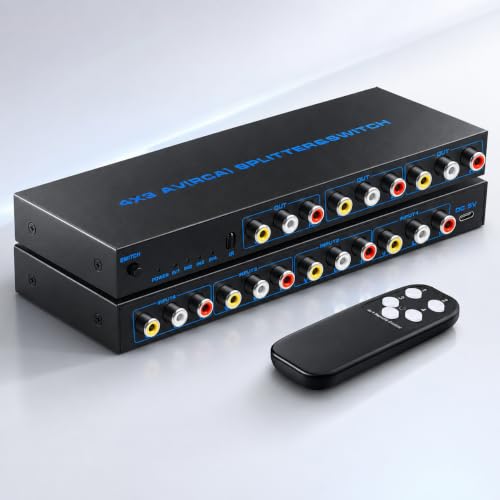
The Koopman-Tech RCA switcher distributes four analog inputs to three outputs with a remote control. It’s best for users who want simple, mirror-like display across multiple TVs or projectors. It supports up to 1080p and uses a sturdy metal casing for durability. The limitation is that it mirrors input sources rather than extending them, so you won’t get independent outputs from different sources.
- Best for analog AV routing to multiple displays
- Better for mirror-display setups across rooms
- Avoid if you need independent source output per display
Buying Guide: Key Considerations For Remote Controlled Switches
What matters most is how you plan to use the switch. Consider input types (optical, HDMI, RCA, Bluetooth), the number of sources, and the number of outputs. Power needs and remote compatibility are crucial for reliable convenience. If you have modern, high-bandwidth content, prioritize HDMI 2.0/2.1 or optical formats that preserve audio quality. For older setups, analog switches or Bluetooth adapters may be preferable. Always verify supported formats, range, and whether remote control requires a hub or specific app.
What input and output formats do you require?
Choose optical for clean digital audio paths; HDMI for video and audio together; RCA for legacy analog signals. Ensure the device supports your source formats (DTS, Dolby, PCM) and the desired number of inputs/outputs.
Do you need remote control, or is manual switching enough?
Remote control adds convenience, especially in living rooms or theater setups. Some switches require hubs or apps; others provide simple IR remotes. Balance convenience against potential setup complexity.
What about video quality and compatibility?
For video, prioritize 4K60 HDR and HDCP compatibility if you’re routing HDMI. For audio, confirm supported codecs and whether the switch preserves the full fidelity of Dolby or DTS formats over the chosen cable type.
What are the installation and space considerations?
Check the device size, mounting options, and whether it fits in your AV rack or behind a TV. Note any power requirements and cable lengths to ensure reliable performance across distances.
Are there any notable limitations?
Some switches do not support multi-channel formats or require continuous power. Others only mirror inputs on all displays rather than routing independently. Evaluate these trade-offs against your setup goals.
How should you approach choosing between optical, HDMI, and RCA switches?
Optical switches are best for digital audio paths over long fiber runs. HDMI switches are ideal for modern home theaters needing video and audio in one. RCA switches suit legacy equipment where analog signals dominate. Your choice depends on the devices you own and your desired listening/ viewing experience.
Quick comparison at a glance
- Best overall optical routing: LiNKFOR 4×1 Optical Switch
- Best for Sonos-based control: Lutron Pico Remote
- Best HDMI multi-source: UGREEN HDMI Switch
- Best analog multi-output: Koopman-Tech RCA Switch
- Best for Bluetooth-enabled setups: Rockville RockerBT v2
FAQ
- What is a remote controlled audio switch? A device that routes audio signals from multiple sources to one or more outputs, controlled remotely.
- Can these switches handle 4K video as well? Some models support HDMI 4K, others focus on audio or RCA signals. Check format support for your needs.
- Do I need a hub to use the remote control? Some products require a smart hub or specific apps; others use standalone IR remotes.
- Will these switches improve audio quality? They preserve the signal path, but quality also depends on source and receiver capabilities.
- Are there limits on supported audio formats? Yes; some switches exclude certain high-end formats like 7.1ch Dolby formats over fiber.
- Can I use these in a multi-room setup? Yes, especially models designed for remote control and distribution to multiple outputs.