Best Sound Bars for PC: Top Pick List for Clear Desk Audio
Choosing a PC sound bar can simplify your setup while delivering immersive, room-filling sound without the clutter of traditional speakers. The following five models are among the best options for computer desks, laptops, and gaming rigs, offering USB-C power, Bluetooth, and easy one-cable connections. Each product emphasizes clarity, bass response, and desk-friendly form factors to improve movie nights, gaming, and music without taking over your space.
Summary Table
| Product | Brand | Key Strengths | Connection Options |
|---|---|---|---|
| Razer Leviathan V2 X PC Soundbar | Razer | Compact, full-range drivers, RGB, USB-C power | USB-C, Bluetooth 5.0 |
| Nylavee Computer Speakers | Nylavee | 4 speakers and 2 bass diaphragms, dual magnet design | Bluetooth, AUX |
| BLUEDee Computer Speakers | Bluedee | Hi-Fi sound with dual drivers/diaphragms, ambient lighting | Bluetooth, 3.5mm Aux |
| Redragon GS560 RGB Desktop Soundbar | Redragon | RGB lighting, dynamic sound with inline backlight modes | USB, 3.5mm |
| Assistrust Sound Bar | Assistrust | 4-driver system, 80W, multiple placements | Bluetooth, ARC, Aux |
Razer Leviathan V2 X PC Soundbar

The Razer Leviathan V2 X is designed for compact desktop setups, fitting neatly under a monitor to reduce desk clutter. It features two full-range drivers and two passive radiators to deliver a wide frequency range and robust midrange presence, making it suitable for movies, games, and music. USB Type-C power and audio delivery simplify wiring, allowing a single cable to supply both power and sound. With Bluetooth 5.0, it can pair with PCs, laptops, and mobile devices for versatile use. The device is designed for desktop environments where space is a premium and performance remains critical.
Key specifications emphasize a compact form factor and dynamic output, capable of producing up to 90 dB in volume without overwhelming the workspace. The Leviathan V2 X aims to balance clarity and power, offering a practical upgrade for users who want immersive audio without a bookshelf speaker setup. It’s particularly appealing for users who prefer a clean, minimal desk while still achieving cinematic sound from a compact bar. While it may not replace larger surround sound, it adds meaningful depth and presence to everyday PC use.
Nylavee Computer Speakers
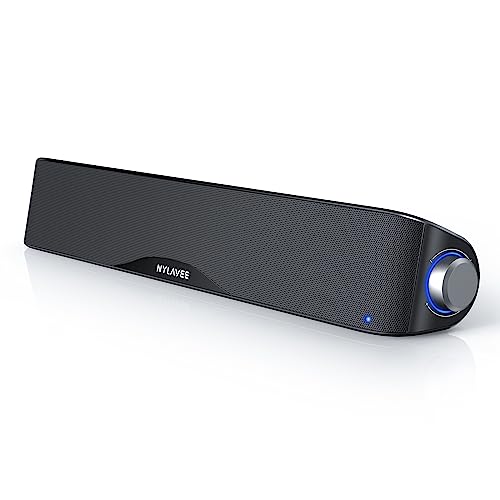
Nylavee’s computer sound bar adopts a four-driver, dual-bass approach to deliver a richer top end and deeper bass response compared with many compact bars. The design concentrates on maximizing loudness and detail through a unique cavity architecture and high-quality magnets and diaphragms. This model supports both Bluetooth and AUX wiring, making it flexible for desktops, laptops, gaming consoles, and mobile devices. It appeals to users seeking a balanced, room-filling sound without needing a separate subwoofer.
In terms of usability, the Nylavee bar offers straightforward pairing and reliable wired connectivity, ensuring stable audio output in gaming or movie apps. The materials emphasize safety and sustainability, with non-toxic construction for safer daily use. The combination of 2 connection methods and a robust speaker layout makes it a strong contender for those who want a versatile, high-output PC sound bar with clear vocals and responsive bass.
BLUEDee Computer Speakers

BLUEDee’s sound bar emphasizes Hi-Fi sound quality with dual drivers and dual diaphragms to deliver a balanced blend of crisp highs and punchy bass. Anti-magnetic technology helps minimize static interference, contributing to cleaner audio during gaming and streaming. The bar provides two primary connection methods: Bluetooth 5.0 and a 3.5mm aux input, rendering it compatible with a wide range of devices—from desktops and laptops to tablets and phones. Ambient lighting adds a subtle desk accent while the audio remains focused and clear for dialogues and midrange content.
For users prioritizing ease of use and aesthetics, this model offers a compact footprint and straightforward setup. The emphasis on low distortion and solid midrange presence makes it suitable for daily computer tasks, casual gaming, and multimedia consumption. The dual-connectivity approach also helps in environments with diverse devices, ensuring quick switching between Bluetooth and wired playback without reconfiguring settings.
Redragon GS560 RGB Desktop Soundbar

Redragon GS560 pairs clear sound with dynamic RGB lighting to create an engaging visual and auditory experience. The upgraded driver technology delivers crisp sound with a notable bass response, enhanced by multiple backlit modes that can sync to music or games. The soundbar is compact enough to fit under most monitors or on a desk shelf, and it includes both USB power and a 3.5mm input for flexible connections. The design supports a stylish desk setup that blends with gaming peripherals and monitors, making it an attractive option for gamers seeking immersive audio without a full speaker system.
The GS560’s light show options can complement entertainment and gaming sessions, offering a visual cue that aligns with audio dynamics. While the unit focuses on a balanced sound stage rather than booming bass, it remains a practical choice for users who want an all-in-one, plug-and-play solution that enhances dialog clarity and medium-to-loud game sound without requiring a subwoofer.
Assistrust Sound Bar

The Assistrust sound bar emphasizes versatile placement and a strong 80W output to fill rooms with clearer dialogue and fuller sound. It supports multiple placement options, including horizontal, vertical, tabletop, and wall-mount configurations, enabling a customizable acoustic footprint in different environments. The system uses four high-performance drivers to deliver richer details and a cinematic feel, with a tailored EQ approach through three dynamic modes—movie, music, and news—to optimize listening for the chosen content. ARC compatibility allows for seamless integration with compatible TVs and setups.
For users seeking a flexible, powerful PC or TV accompaniment, this model offers a robust blend of clarity and impact. The combination of a strong driver array and adaptive equalization makes it suitable for movie nights, gaming marathons, and daily productivity audio where even quiet dialogue stands out. Its versatility in placement and sound tuning supports mixed-use rooms and varied seating arrangements.
Buying Guide: Key Purchase Considerations
Sound Quality And Drivers
Look for sound bars with multiple drivers and dedicated bass radiators. A combination of full-range drivers and passive radiators generally delivers better midrange clarity and bass extension without a separate subwoofer. Consider whether you prefer a neutral sound, boosted bass for gaming, or enhanced dialogue clarity for movies and video calls.
Connectivity And Setup
USB-C for power and audio, Bluetooth, and 3.5mm inputs cover most desks and devices. USB-C often simplifies wiring by delivering both power and sound from a single cable. ARC compatibility can improve integration with TVs and home theater setups. Ensure the model you choose supports easy pairing and quick switching between devices.
Desk Footprint And Aesthetics
Compact form factors are ideal for crowded desks or dual-monitor setups. Some bars include ambient lighting and RGB, which can add style but may be distracting for some users. Choose a length that fits beneath your monitor or above your monitor stand to avoid obstructing vents or camera angles.
Durability, Build, And Safety
Consider material quality and the presence of non-toxic construction or safety features for extended daily use. A well-built bar should remain stable on a desk and resist overheating during long gaming sessions or movie marathons.
Voice Clarity And Use Case
For productivity and communication, prioritize clear treble and midrange to ensure voices remain intelligible. If your focus is immersive gaming or music, a stronger bass response and dynamic range may be more important. Some models offer EQ presets (movie, music, news) to tailor sound to content type.