Best Soundbar Mounts for TV: Top Picks to Keep a Clean Setup
Whether you want a sleek, cable-free look or you need to save shelf space, a soundbar mounting solution can dramatically improve your home theater setup. This guide highlights five reliable options that fit a range of TVs, soundbars, and installation styles. Ideal buyers include renters seeking no-drill setups, homeowners with wall-mounted TVs, and anyone wanting a flexible, above-or-below-TV solution. Below is a quick buying table of the featured products to help you compare at a glance.
| Product | Best For | Mount Style | Weight Capacity |
|---|---|---|---|
| Perlegear PGSM04B | Most setups needing flexible height | Under or Above TV | Up to 15 lbs |
| CUISIBOT | Renters or quick installs | No-drill top-shelf | Up to 15 lbs |
| MD5420 Mounting Dream | Users needing 180° swivel | Above or Below TV | Up to 15 lbs |
| Amazon Fire TV Soundbar | Integrated Fire TV experience | Standalone soundbar, non-mount | Not specified |
| ELIVED | Flexible height with depth control | Above or Below TV | Up to 15 lbs |
Perlegear Soundbar Mount With Adjustable Height

The Perlegear PGSM04B is a versatile soundbar mount rated for up to 15 lbs. It supports mounting above or below most TVs under 83 inches, with adjustable extension arms and 360° rotation to tailor the gap between the TV and soundbar. This design works well for consumers who want a minimal, clean look and flexible placement. Best for rooms where wall space is tight or where you want the option to shift the soundbar position as seating changes. Caution: For larger TVs beyond 83 inches, the bracket length may limit below-TV mounting.
CUISIBOT Soundbar Mount No Drilling
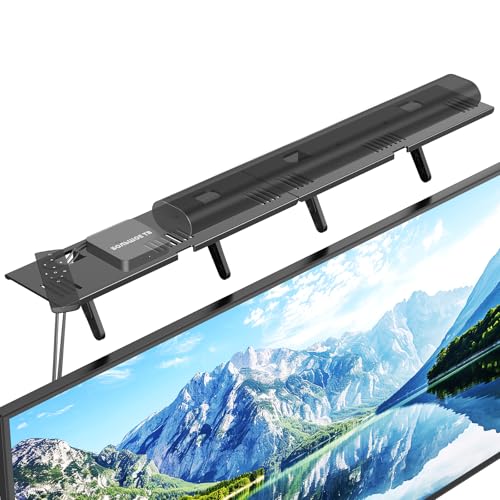
The CUISIBOT mount sits on top of the TV, requiring no tools or wall drilling. It’s ideal for renters or quick setups with minimal risk to walls. It fits most flat-screen TVs and soundbars up to 15 lbs. Best for spaces where you cannot modify the wall or remove the TV for installation. Limitation: It requires at least 4.72 inches of space between TV and wall and is not compatible with curved or arc-top TVs.
Mounting Dream MD5420 Soundbar Bracket

The MD5420 from Mounting Dream supports up to 15 lbs and offers detachable long extension plates for better mounting flexibility, including a 180-degree swivel. It works with various wall mounts and VESA patterns up to 600x400mm. Best for users who want to move the soundbar with the TV or need a bracket that adapts to different mounting configurations. Caution: Sonos Beam users should refer to a dedicated MD5426 model for compatibility.
C YECEN Depth Adjustable Sound Bar Mount

The C YECEN mount supports up to 22 lbs, with depth-adjustable arms and a 360° rotating extension option. It is designed to fit a wide range of soundbars and TV setups, including those with bottom mounting holes on the bar. Best for households needing strong weight support and flexible depth alignment. Limitation: Some larger soundbars may require careful measurement to avoid contact with the TV or wall.
ELIVED Soundbar Mount Under or Above TV

The ELIVED mount offers tool-free knobs and 27-inch extension arms to place the soundbar above or below the TV. It rotates 360° and extends to minimize or eliminate the gap for a cleaner look. It supports most soundbars up to 15 lbs. Best for those who want a long reach from the TV and a simple, tool-free setup. Caution: Ensure the TV and soundbar have sufficient clearance from the wall to accommodate the depth adjustments.
Buying Guide
Key considerations when choosing a soundbar mount for your TV include compatibility, weight capacity, and installation style. If you want a no-drill option, consider top-shelf mounts like CUISIBOT, which rely on the TV’s surface to hold the soundbar. For above-or-below setups on larger TVs, ensure the bracket length and extension arms accommodate your space. Depth adjustment helps align the soundbar with the TV for a balanced look and optimal sound projection.
- Compatibility: Check the TV size, VESA pattern, and soundbar mounting holes to confirm a snug fit.
- Weight capacity: Choose a mount rated above the soundbar’s weight to ensure stability over time.
- Install style: Decide between above-TV, below-TV, or no-drill options based on rental needs and wall/kickspace.
- Depth and reach: Longer extension arms help align the soundbar with the TV and avoid occlusion.
- Accessibility: Consider how easy the mount is to adjust after installation and whether you might reposition seating.
Frequently Asked Questions
- What is the best mounting position for a soundbar? Best results come from aligning the soundbar with the TV’s top edge or slightly forward to optimize sound projection toward the listening area.
- Can all soundbars be mounted above a TV? Most can, but always verify compatibility with your specific model and the mount’s weight rating.
- Do I need to drill to mount a soundbar? Not always. No-drill options exist, but wall-mounted or under-TV mounts may require drilling for the most secure fit.
- Will mounting affect TV warranty? Some mounting methods can impact warranties; check manufacturer guidelines for your TV and mount.
- How do I choose between above-TV and below-TV mounting? Consider seating position, cable routing, and whether you prefer the soundbar to be closer to ear level or to avoid blocking vents.
- Are depth-adjustable mounts worth it? Yes, they allow precise alignment with various soundbar thicknesses and wall distances, improving both appearance and sound.