
Quick Overview: This guide compares top soundbars that include digital audio inputs (optical/Toslink or HDMI ARC) so you can improve TV dialogue clarity, movies, and music. The table below summarizes the selected products for easy comparison.
| Product | Channels / Sub | Key Digital Input | Notable Feature |
|---|---|---|---|
| Polk Audio Signa S2 | 2.1 / Wireless Subwoofer | Optical & HDMI ARC | VoiceAdjust & Ultra-Slim |
| Sony HT-S400 | 2.1 / Wireless Subwoofer | Optical | S-Force PRO Front Surround |
| PHILIPS B5109 | 2.0 | Optical | DTS Virtual:X & Dolby Digital Plus |
| Westinghouse 2.0 Compact | 2.0 | Optical | Dolby Atmos / Roku TV Ready |
| RAINEVERRY 5.1 System | 5.1 / Wireless Sub + Rear | HDMI & Optical | Dolby Digital Plus, Wireless Rears |
Polk Audio Signa S2 Sound Bar & Wireless Subwoofer
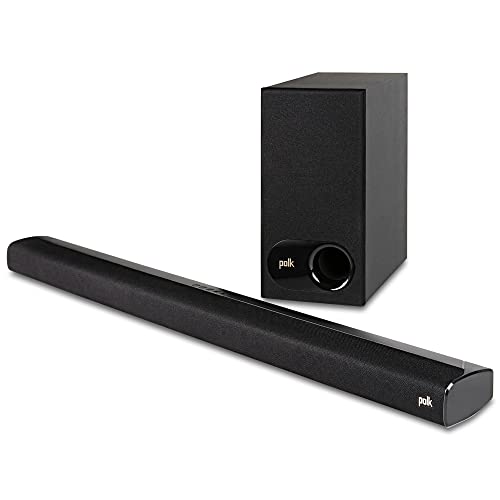
The Polk Audio Signa S2 Offers HD TV compatibility with HDMI ARC and optical inputs for digital audio sources. It includes a wireless subwoofer and five full-range drivers to deliver a 2.1 experience. Polk’s VoiceAdjust technology focuses on vocal clarity and timing, useful for dialogue-heavy content. The unit’s ultra-slim design allows placement under most TVs without blocking sensors. Setup supports Bluetooth streaming and an AUX input as an alternative to digital connections.
Ideal For: Users who want a compact 2.1 system with simple HDMI ARC integration and enhanced voice clarity for TV watching.
Sony HT-S400 2.1ch Soundbar With Wireless Subwoofer

The Sony HT-S400 connects via optical digital input and supports Dolby Digital decoding for multichannel content passed from TVs or set-top sources. Sony’s S-Force PRO front surround processing aims to create a wider soundstage without rear speakers. The system emphasizes dialogue clarity through design choices like X-Balanced Speaker Units. A compact wireless subwoofer extends low-frequency response while keeping wiring minimal.
Ideal For: Buyers prioritizing brand reliability, Dolby Digital playback via optical input, and a simple 2.1 setup with stronger bass presence.
PHILIPS B5109 SoundBar For TV With DTS Virtual:X

The PHILIPS B5109 includes optical digital input and supports Dolby Digital Plus and DTS Virtual:X processing for virtualized height and surround effects. Its 2.0 profile emphasizes balanced treble and bass with customizable EQ modes accessed via the remote or Philips app. Night Mode and voice-enhancement presets help adapt the sound to different viewing contexts. Bluetooth LE audio provides low-latency wireless streaming when not using a digital cable.
Ideal For: Users wanting virtual surround enhancements from a 2.0 bar with flexible EQ and digital optical connection to TVs.
Westinghouse Sound Bar For Smart TV, 2.0 Compact

The Westinghouse 2.0 compact soundbar supports optical digital input and advertises Dolby Atmos and Dolby Digital Plus decoding. Designed as a simple upgrade over TV speakers, it is Roku TV Ready for straightforward integration with Roku displays. The soundbar aims to improve dialogue clarity and provide spatial cues through Dolby processing while keeping a compact footprint for smaller rooms or wall mounting.
Ideal For: Roku TV owners or users seeking Dolby Atmos processing in a compact, easy-to-install soundbar connected via optical digital cable.
5.1 CH Surround Sound Bar With Dolby Audio (RAINEVERRY)
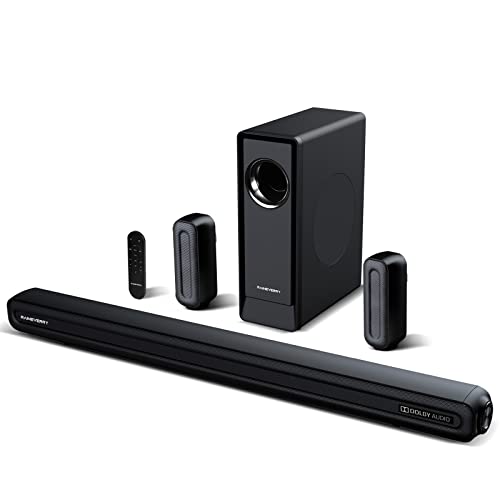
This RAINEVERRY system includes HDMI and optical digital inputs and provides a full 5.1 layout with wireless rear speakers and a large wireless subwoofer. It supports Dolby Digital Plus and multiple DSP-based EQ modes for music, movies, and 3D sound. The system emphasizes room-filling virtualization and deep bass extension down to 50 Hz, while the included remote allows treble and bass adjustments. HDMI connectivity helps pass through multichannel audio from compatible sources.
Ideal For: Users looking for a complete 5.1 package with both optical and HDMI digital connections to support multichannel TV or external players.
Buying Guide: Choosing A Soundbar With Digital Audio Input
Digital Input Types: Optical (Toslink) transmits multichannel compressed audio (like Dolby Digital) and is common on TVs. HDMI ARC/eARC supports higher bandwidth, return audio, and advanced formats. Choose HDMI ARC if your TV and soundbar both support it for greatest flexibility.
Number Of Channels: 2.0/2.1 systems focus on front imaging and bass (with or without subwoofer). 5.1 packages add dedicated surrounds for discrete channel separation. Match channel count to room size and content types.
Dolby and DTS Support: If you stream or play Blu-ray content with Dolby Digital Plus or Dolby Atmos, ensure the soundbar and your digital input type support decoding or passthrough. Optical cannot carry Dolby Atmos object streams; HDMI eARC is required for advanced Atmos bitstreams.
Voice Clarity Tools: Look for features like adaptive speech/voice enhancement or dialog modes (e.g., Polk VoiceAdjust) to improve TV dialogue without boosting overall volume.
Subwoofer And Bass Needs: Built-in or wireless subwoofers make a big difference for movies and music. Decide whether you need a compact subwoofer or a larger unit for deeper low end.
Room Size And Soundstage: Small rooms often do well with 2.1 bars. Medium to large rooms benefit from 5.1 systems or virtual surround technologies that simulate width and height.
Connectivity & Compatibility: Confirm your TV’s outputs (optical, HDMI ARC/eARC) and match them. Also check for Bluetooth if you plan wireless streaming, and mobile apps for advanced tuning.
Ease Of Setup: Wall-mounting options, remote simplicity, and wireless subwoofer pairing can reduce installation time. Roku TV Ready units provide extra convenience for Roku TV owners.
Future-Proofing: HDMI eARC, support for newer codecs, and firmware update capability make a soundbar more adaptable as sources change.
Accessories: Use a quality Toslink cable (e.g., Amazon Basics Toslink) for optical connections to ensure reliable digital signal transfer. Gold-plated connectors and proper length matter for clean installation.
Comparison Perspectives: Evaluate based on these lenses: connectivity (optical vs HDMI), channel count (2.1 vs 5.1), decoding support (Dolby/DTS formats), targeted use (dialogue vs cinematic bass), and room compatibility. Prioritize the features that match how you watch TV and what connections your existing devices provide.