
Best Soundbars With HDMI Switching for Seamless Home Theater Connectivity
Answering the question for buyers who want easy, wired harmony between gaming consoles, streaming boxes, and TVs: these soundbars and switches let you route multiple HDMI sources to a single soundbar or display while preserving high-quality audio formats. The picks below are best for setups that demand quick source switching, compatible eARC/ARC support, and clear, room-filling sound. Ideal buyers include dedicated gamers, home theater enthusiasts, and anyone upgrading from basic TV speakers who wants simplified remote control and reliable audio extraction.
Comparison At A Glance
| Product | Best For | HDMI Features | Notes |
|---|---|---|---|
| OREI 4-Port eARC 8K Audio Extractor | High-end multi-source setups | eARC/ARC extraction, 8K/4K@120Hz pass-through | Great for 8K displays; includes dual voltage supply |
| JCHICI HDMI 2.1 Switch | Console + streaming devices | 4×1, 8K@60Hz, 4K@120Hz, audio passthrough | Supports multiple formats; note HDMI cables matter |
| FeinTech VAX04101A HDMI eARC Pass Switch | Multi-source to a single eARC soundbar | 4×1, eARC pass-through, supports Dolby Atmos/DTS-X | USB updateable; solid for atmos setups |
| ROFAVEZCO HDMI SplitterARC eARC | Home theater with ARC/eARC emulation | Bi-direction splitter, ARC/eARC output | Best when TV lacks eARC but you need it on soundbar |
| Fansbe Direct HDMI Sound Bar System | Versatile all-in-one soundbar | HDMI-ARC, multiple input options | Good for flexible connections and ease of use |
OREI 4-Port eARC 8K Audio Extractor 4×1 Switch

The OREI device is a multi-source HDMI 2.1 switch with eARC audio extraction. It passes 8K video while extracting full eARC audio to a soundbar or receiver, preserving Dolby Atmos and other advanced formats. This is best for users with up to four HDMI sources and a desire to keep video quality intact on an 8K or 4K@120Hz display. The dual-voltage supply supports global use with included adapters.
Best for: high-end home theaters and gamers who demand 8K/4K video passthrough with uncompromised audio. Choose this if you need four sources and want to control audio separately via eARC/ARC.
Caution: Ensure your HDMI cables are 2.1-compatible to realize full 8K/120Hz capabilities and Atmos audio.
JCHICI HDMI 2.1 Switch 4 In 1 Out

The JCHICI switch offers four input sources and one output, supporting up to 8K@60Hz and 4K@120Hz, with backward compatibility for older video formats. It emphasizes high-bandwidth video and solid audio support through DTS/Dolby formats. This is a practical choice for households with several consoles or streaming devices and a single display or soundbar.
Best for: gamers and media lovers who need reliable, fast switching without video delay. Choose this if you want 8K/60Hz support and straightforward operation.
Caution: To achieve 8K resolution, use HDMI 2.1 cables; otherwise you’ll stay at lower refresh rates or avoid certain formats.
FeinTech VAX04101A HDMI eARC Pass Switch 4×1

FeinTech’s VAX04101A provides four HDMI inputs to a single HDMI output with eARC pass-through and support for Dolby Atmos, Dolby TrueHD, DTS-X, and more. It’s designed for setups where multiple external players feed a single soundbar or projector, while maintaining HDMI-CEC compatibility for unified control. It’s also USB-updateable, which helps future-proofing a bit.
Best for: users building a tidy, Atmos-capable home theater with several media players and a primary eARC soundbar. Choose this if you want flexible input options and ongoing firmware updates.
Caution: Some users might prefer built-in remote control integration with TV remotes; check if your TV supports seamless CEC control in your setup.
Fansbe Direct HDMI Sound Bar System
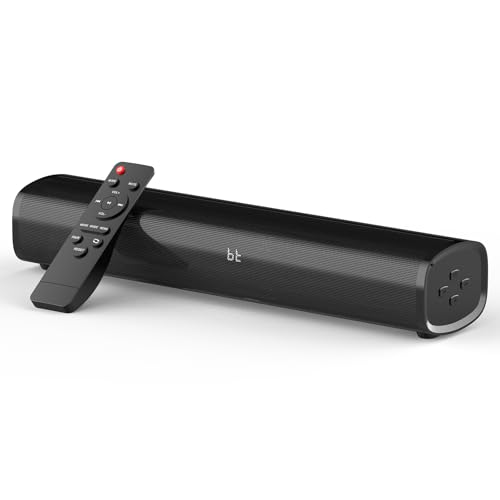
This fans-long description sound bar system emphasizes multiple connection options and built-in Bluetooth, with a focus on providing a versatile home theater experience. It supports common input methods and delivers clear dialogue and balanced audio for movies, games, and music. It’s suitable for setups where HDMI-ARC is desired alongside other inputs, simplifying switching for non-technical users.
Best for: households seeking a straightforward, all-in-one soundbar with flexible input choices. Choose this if you want easy setup and broad compatibility without needing a separate receiver.
Caution: If you require the deepest surround formats or the most expansive configuration, you may benefit from a dedicated AV receiver rather than a single-soundbar solution.
Buying Guide: Key Considerations For HDMI Switching Soundbars
- What video formats do you need? If you require 8K/120Hz or Dolby Atmos, prioritize switches with eARC/ARC passthrough and HDMI 2.1 support.
- How many sources must you connect? Choose a model with enough inputs (4×1 is common) to avoid swapping cables frequently.
- Do you need TV remote control integration? HDMI-CEC compatibility can let your TV remote control the soundbar, power, and inputs.
- Is audio extraction important? Some devices can extract audio for a separate soundbar while passing video to the display, preserving high-end formats.
- Compatibility with your soundbar and display: confirm that your soundbar supports eARC/ARC in the same format as the extracted audio, to avoid lip-sync or compatibility issues.
- Future-proofing: look for firmware update options and forward-looking specs like 8K/passthrough, HDR formats, and Dolby Atmos/DTS-X support.
Frequently Asked Questions
- What is HDMI eARC, and why is it important for these devices?
eARC is an enhanced form of ARC that supports higher-bandwidth audio formats, such as Dolby Atmos and DTS:X, allowing full audio quality when using a soundbar.
- Can I use these switches with any TV?
Most are designed to be compatible with standard HDMI-equipped TVs. Check HDMI version requirements (2.0/2.1) for best results with high-resolution video formats.
- Do I need special cables?
For 8K and 4K@120Hz, use HDMI 2.1 cables to ensure full bandwidth and features like VRR and ALLM where supported.
- Will these switches affect video quality?
Quality switches preserve video passthrough by design, but the actual result depends on the display, source, and cable quality.
- Which option is best for a multi-device gaming setup?
Look for 4×1 HDMI switches with 8K/4K@120Hz support and robust audio passthrough to maintain gaming performance and immersive sound.
- Do these devices support Bluetooth or wireless connections?
Some soundbars include Bluetooth or USB inputs; switching devices focus on wired HDMI integration with optional wireless features in the soundbar itself.