
Best SPDIF Coax Optical Converter Options for Clear Digital Audio
Looking for a reliable SPDIF converter to switch between coaxial and optical (Toslink) audio formats? This guide highlights five top options that cover bi-directional conversion, ease of use, and compatibility with common home theater gear. Each product is chosen for different buyer needs—from simple plug-and-play setups to devices that double as signal boosters. The goal is to help you pick the right converter for your TV, soundbar, or receiver without complicated setup or unnecessary features.
Summary table of chosen products for quick comparison:
| Product | Best For | Key Benefit | Limitations |
|---|---|---|---|
| PROZOR 192K Bi-Directional Optical Converter | Best for versatile setups | Bi-directional, supports up to 192 kHz | No Dolby ability beyond passthrough |
| LiNKFOR 192kHz Coaxial to Optical Converter | Best for built-in cables | Built-in Toslink and Coaxial cables | Limited to 192 kHz |
| Azduou Bi-Directional Digital Audio Converter | Best budget option | Bi-directional, easy plug-and-play | Basic feature set |
| LUKFOCAB Bi-Directional DAC | Best for repeatable long runs | Built-in input switch, supports 192 kHz | Power via USB |
| OREI Digital to Analog Audio Converter | Best for analog outputs | Analog RCA/3.5mm outputs | Does not decode Dolby Digital |
PROZOR 192K Bi-Directional Optical Converter

The PROZOR model supports both optical Toslink and coaxial inputs, with a simple switch to choose the input type. It handles LPCM 2.0, DTS, and Dolby Digital Plus/AC3, including 5.1-channel formats. It is designed for lossless digital audio conversion up to 192 kHz (24-bit), then works down through 32 kHz and 44.1–48 kHz as needed. Best for users who want a compact, all-in-one converter that can serve multiple devices without extra dongles.
Who it’s best for: Home theater enthusiasts with devices that use either coaxial or optical outputs, especially when building a bi-directional link. Why selected: It offers true bi-directional conversion and high sampling-rate support in one unit.
Caution: Some users report needing careful input selection to avoid errant switching in edge cases; ensure your source device matches the converter’s input you select.
LiNKFOR 192kHz Coaxial to Optical Converter
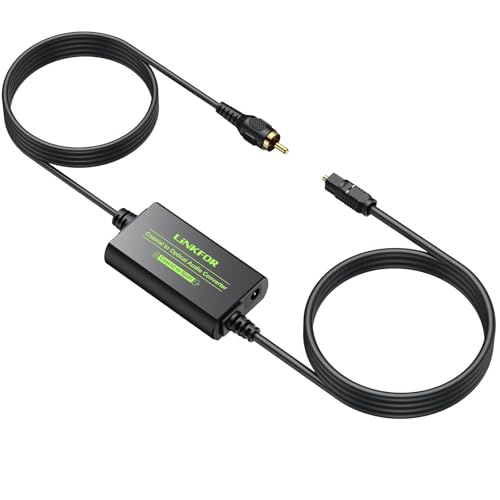
LiNKFOR provides a compact converter with built-in 1-meter Toslink and 1-meter coaxial cables for easy long-distance connections. It supports 192 kHz sampling with 24-bit depth and common PCM/LPCM formats, including DTS and Dolby Digital. This model is well-suited for setups where minimizing extra cables is desirable and when you want a straightforward, plug-and-play experience.
Who it’s best for: Users with older TVs or soundbars needing a ready-made cable package. Why selected: The included cables reduce additional purchases and simplify placement.
Caution: It is primarily a sender-only device in some configurations; verify that your system requires true bi-directional capability before purchase.
Azduou Bi-Directional Digital Audio Converter

Azduou’s unit is a budget-friendly, bi-directional adaptor that supports both optical and coaxial inputs. It emphasizes easy setup with plug-and-play operation and focuses on noise-free audio transmission. This option is suitable for basic installations that need reliable conversion without extra features or cables.
Who it’s best for: Budget-conscious buyers who want a straightforward converter with minimal setup. Why selected: It covers the essential bidirectional conversion without complicating features.
Caution: The feature set is basic; if you need advanced audio formats beyond stereo PCM or standard DTS/Dolby signals, consider a more feature-rich model.
LUKFOCAB Bi-Directional DAC
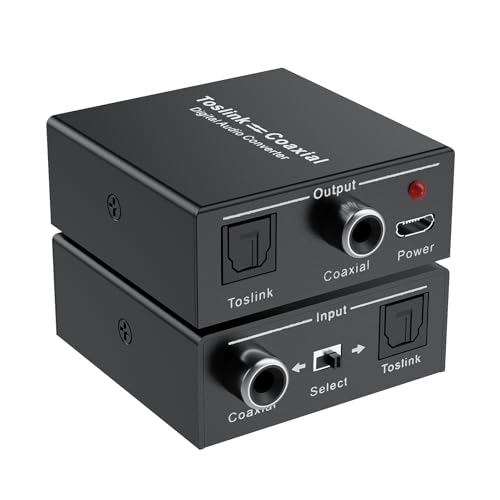
The LUKFOCAB model offers true bi-directional conversion with a user-selectable input and supports high-definition audio up to 192 kHz. It includes a built-in amplification chip to help extend transmission distance, acting as a repeater when needed. This makes it a good pick for longer cable runs or when amplifying weak signals is a priority.
Who it’s best for: Home theaters with longer runs between source and receiver, or users who want a built-in repeater function. Why selected: The separate input switch and repeater capability provide flexibility beyond basic converters.
Caution: It relies on USB power; ensure a nearby power source is available during use to prevent dropouts or noise.
OREI Digital to Analog Audio Converter

OREI focuses on converting digital optical or coaxial inputs to analog stereo outputs via RCA and 3.5mm jacks. It does not convert Dolby Digital signals, so it’s best for PCM-based sources. This is a practical choice when the goal is simply to deliver stereo audio to older amplifiers or speakers without needing multichannel support.
Who it’s best for: Users with legacy AV equipment requiring analog outputs, especially those who only need PCM or LPCM formats. Why selected: It fills a niche for analog-only end points without overcomplicating the signal path.
Caution: Do not expect Dolby Digital decoding; if your system relies on multichannel audio, this device will not meet those needs.
Buying Guide
What to consider when choosing an SPDIF coax/optical converter:
- Bidirectionality: Do you need two-way conversion (Coaxial to Optical and Optical to Coaxial) or a one-way path? Bi-directional units give maximum flexibility in mixed setups.
- Sample Rate and Bit Depth: Check the highest supported sampling rate (e.g., 192 kHz) and bit depth (often 24-bit). Higher specs preserve more detail in lossless formats.
- Input/Output Interfaces: Ensure your source and destination devices have compatible inputs and outputs. Some units include built-in cables, which simplifies placement.
- Power Requirements: Some converters rely on USB power or an external adapter. Plan for a nearby power source or accessible USB port.
- Signal Type Compatibility: If you need Dolby Digital or DTS passthrough, verify that the converter supports the required formats. Some models only pass PCM.
- Physical Size and Cable Management: A compact unit is easier to place, but built-in cables (as with LiNKFOR) can limit routing options.
- Noise and Coloration: In practice, most consoles and receivers maintain clean output with modern converters. Consider models with features like short signal paths to minimize noise.
Practical buyer questions
- Do I need a bi-directional converter? If your setup requires both inputs to switch between devices, yes.
- Will this work with a Dolby-enabled system? Check the product’s formats; some devices do not decode or pass through Dolby Digital.
- Is a built-in cable beneficial? If cable clutter is a concern, a unit with integrated Toslink and/or coax cables is helpful.
- Can I run long cables? Some converters function as repeaters to extend distance; look for built-in amplification when needed.
- Is PCM enough for my system? For stereo setups and many TVs, PCM or LPCM is adequate, while multispeaker systems may require additional features.
FAQ
- What is SPDIF? Answer: SPDIF is a digital audio interface that transmits stereo or multi-channel audio data over coaxial or optical cables.
- Can I use these with a soundbar? Answer: Yes, many soundbars accept coaxial or optical inputs; verify the input type on your model.
- Do these convert to analog? Answer: Some models convert digital to analog (DAC); others focus on digital-to-digital conversions or pass-through. Read product specs carefully.
- Will they introduce latency? Answer: Typical converters add minimal latency suitable for home theater audio, not noticeable in normal use. High-end models focus on preserving timing.
- Which one is the easiest to set up? Answer: Look for plug-and-play designs with clear input selection and, if possible, built-in cables to reduce extra components.
- Are there limitations with 5.1 audio? Answer: Some devices do not support decoding Dolby Digital or true 5.1 channels; ensure your source matches the converter’s capabilities.