
Best SPDIF Digital Output Coax Converters and Cables for Clean Audio
When selecting SPDIF digital output hardware, choose devices that reliably convert, preserve, and deliver high-fidelity audio to your setup. This guide highlights five reliable options for common home theater and audio needs. It covers bi-directional converters, high-quality coaxial cables, and DACs that support 2.0 LPCM and up to 192 kHz sampling. This is ideal for buyers building or upgrading a TV, receiver, soundbar, or computer audio chain who want clear, low-noise digital-to-analog or analog-to-digital conversions. The top picks are best for different use cases: simple passthrough, long cable runs, or upgrading to higher-resolution audio formats.
| Product | Best For | Notes |
|---|---|---|
| PROZOR 192K Bi-Directional Optical Coverter | Users needing easy bi-directional Toslink/Coax conversion | Supports LPCM2.0, DTS, Dolby AC3, up to 192 kHz |
| FosPower Digital Coaxial Cable 3ft | Clean digital connection between devices | Gold-plated connectors, orange color coding |
| Musou RCA Analog to Digital Optical Coaxial Adapter | Converting analog RCA to digital optical and coaxial | Omni-output to Toslink and coaxial |
| OREI Digital to Analog Audio Converter | Analog RCA/3.5mm output from digital input | Will not decode Dolby Digital |
| LiNKFOR 192kHz Coaxial to Optical Converter | Long-distance digital signal conversion with built-in cables | 192 kHz sampling, LPCM2.0/DTS/Dolby AC3/5.1 |
PROZOR 192K Bi-Directional Optical Converter

The PROZOR unit functions as a bi-directional converter between coaxial and Toslink (optical) signals. It is designed for straightforward plug-and-play use with a simple switch to select input type. Best for: users who need a flexible, two-way conversion between optical and coaxial formats without purchasing separate adapters. It supports LPCM 2.0, DTS, Dolby Digital, and 5.1-channel output, providing lossless digital audio conversion. It also advertises support for up to 192 kHz sampling rate, which helps preserve high-resolution audio on compatible devices. Caution: verify your source device’s ability to output the desired formats, since some setups rely on a fixed format like PCM only.
What this product is best for: A home theater user who needs a compact, easy-to-use converter to connect a Blu-ray player, game console, or streaming device to a receiver or soundbar via either optical or coaxial cables. The built-in 192 kHz compatibility aims to maintain high-quality sound across formats.
Limitation to note: It is a converter, not a decoder; ensure your source device outputs a compatible format (LPCM, DTS, Dolby Digital) for the intended destination.
FosPower Digital Coaxial Cable 3ft
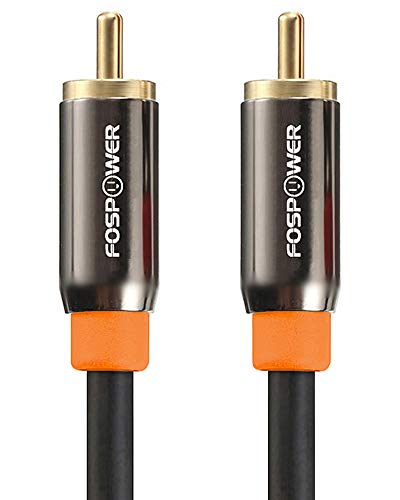
This premium S/PDIF coaxial cable features 3 feet of connection with gold-plated connectors designed to minimize signal loss. Best for: short to medium-distance digital audio connections between a source (like a DAC, player, or receiver) and a digital input. The orange-coded connectors help quick, correct pairing of devices, and the cable is designed for reliable compatibility with various coaxial SPDIF ports. Caution: while gold-plating improves corrosion resistance, cable length and shield integrity still influence overall noise performance in very high-end systems.
Why choose this: When a sturdy, easy-to-identify coaxial cable is needed, this FosPower option reduces alignment errors and improves physical durability for daily use in home theaters, soundbars, and gaming setups.
Musou RCA Analog to Digital Optical Toslink Coaxial Adapter

The Musou adapter converts an analog RCA stereo signal to digital formats (both Toslink and coaxial SPDIF) simultaneously. Best for: users with legacy analog sources (like older CD players orTuners) who want to route digitally into a modern digital input. It supports uncompressed 2-channel LPCM output, with a 48 kHz sampling rate noted. Caution: the source must not rely on Dolby or surround formats; the product note cautions that Dolby compatibility is not supported on the analog input side.
Why this fits your setup: If upgrading from analog to digital audio in a budget-friendly path is the goal, this adapter provides flexible output options to feed into both an optical input and a coaxial input from the same source.
OREI Digital to Analog Audio Converter

The OREI converter takes a digital input (coaxial or optical) and outputs analog stereo via RCA and a 3.5mm jack. Best for: users who need to feed an analog amplifier, mixers, or older speakers from a digital source. It clearly states that it will not convert Dolby Digital signals, and it requires setting the TV or source device to PCM/LPCM before use. Caution: this is a one-way converter (digital to analog); it does not decode surround formats or downmix Dolby to stereo automatically.
Why it’s a fit: For setups where the goal is to simplify a digital-to-analog path to standard stereo listening, this device offers straightforward conversion without introducing extra processing or complexity.
LiNKFOR 192kHz Coaxial to Optical Converter
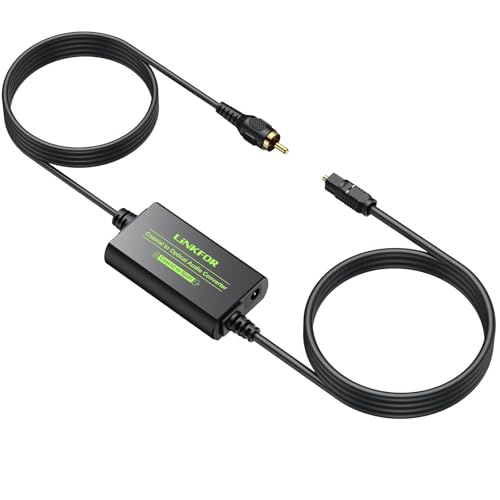
LiNKFOR’s converter is designed to bridge coaxial and Toslink signals, including a built-in 1-meter Toslink cable and a 1-meter coaxial cable for extended setups. Best for: users who need to connect devices separated by distance, like media players in one room and DACs in another, without extra cables. It supports 192 kHz sampling rate with 24-bit depth and LPCM2.0/DTS/Dolby Digital 5.1 output. Caution: ensure the target device accepts optical or coaxial SPDIF inputs in the expected format; some devices require explicit PCM output from the source.
Why choose LiNKFOR: Built-in cables simplify installation and are advantageous for longer runs where a separate interconnect would add clutter or require additional connectors.
Buying Guide
Key purchase considerations help pinpoint the right SPDIF option for your setup. Use these practical questions to compare devices and formats.
- Do you need a bi-directional converter or a one-way signal path (digital to analog or vice versa)?
- What sampling rates and bit depths do your devices support (32kHz to 192kHz, 16-bit to 24-bit)?
- Will you rely on PCM/LPCM or require support for Dolby Digital, DTS, or 5.1 channels?
- Distance and cable management: do you need built-in cables or longer runs with separate connectors?
- Device compatibility: does the source or destination require PCM output, or can it decode Dolby/DTS themselves?
Direct vs. active converters
Direct (pass-through) converters focus on maintaining signal integrity without adding processing. Active DACs add amplification or decoding features, which can help in noisy environments or when the analog stage requires stronger output.
Format compatibility
Check whether your equipment outputs native LPCM or Dolby/DTS. Some devices cannot pass optimized formats through a converter and may require setting changes on the source device to PCM/LPCM first.
Cable quality and length
High-quality coaxial cables and properly shielded Toslink cables reduce noise and jitter. If you need long runs, consider cables with better shielding and ferrite cores to limit interference.
Practical upgrade paths
For mixed setups, a bi-directional converter paired with a high-quality coaxial or optical cable can simplify integration. For pure digital-to-analog needs, a DAC with robust PCM support and a clean analog output reduces the need for additional amplification or processing.
Frequently Asked Questions
- Can I use a SPDIF coaxial cable with a Toslink device? Not directly; you need a compatible converter that translates signal formats between coaxial and optical SPDIF.
- Will a DAC convert Dolby Digital to stereo? Some DACs can downmix PCM, but many do not decode Dolby Digital; verify the device’s capabilities before purchase.
- Is 192 kHz/24-bit audio always audible? The audible difference depends on source material, playback device, and listener sensitivity; higher sample rates can reduce artifacts in some cases but may provide diminishing returns in others.
- Do I need a built-in Toslink or coaxial cable? Built-in cables save setup time and reduce clutter; they are convenient for shorter distances.
- What format should I set on my TV? If your converter supports PCM/LPCM, set the TV output to PCM/LPCM to ensure compatibility with most converters.
- Are these converters plug-and-play? Most listed items advertise plug-and-play operation, but some scenarios may require selecting the correct input or adjusting source formats for compatibility.