
Finding The Right Speaker For Your Computer can improve video calls, music, and gaming without taking up much desk space. Below is a quick comparison table of the five selected computer speakers from the product list to help you scan core features at a glance.
| Product | Power / Inputs | Mounting / Size | Notable Feature |
|---|---|---|---|
| OGUPGX Computer Speakers For Desktop Pc | USB (single cable) | Clip-To-Monitor / Desktop | Monitor clip, plug-and-play |
| LIELONGREN USB Computer / Laptop Speaker | USB (single cable) | Portable mini soundbar | Dual 3W drivers + passive radiator |
| Amazon Basics Stereo 2.0 Speakers (3.5mm) | 3.5mm Aux + USB power | Traditional desktop pair | Inline volume control |
| Tylubio Computer Speakers | USB + Bluetooth | Soundbar under monitor | LED lighting modes, multifunction knob |
| XKX Computer Soundbar | USB (single cable) | Clip-To-Monitor / Desktop | Adaptive channel switching (G-sensor), touch control |
OGUPGX Computer Speakers For Desktop Pc

Key Features: Two 1.4-inch internal magnetic drivers, single USB cable for audio and power, spring-loaded clip to attach to monitor, plug-and-play decoder chip compatibility. The clip opens up to 0.78 inches for most monitors. Manufacturer notes limited cavity size affects bass compared to systems with subwoofers.
This model Emphasizes compact mounting and straightforward setup. It is aimed at users who want to free desktop space and avoid 3.5mm jacks. The USB-only design requires a computer USB port for both power and audio; it won’t work with devices that require a 3.5mm connection.
LIELONGREN USB Computer / Laptop Speaker
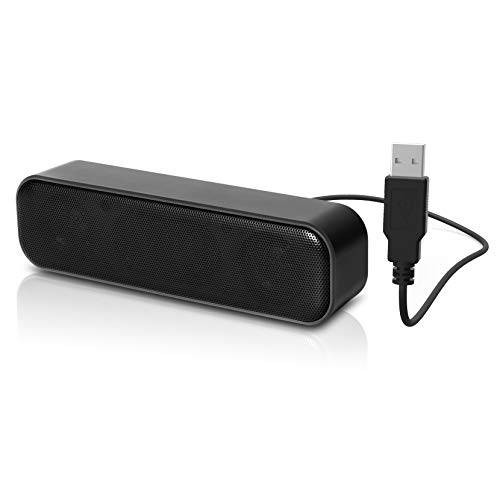
Key Features: Dual 3W high-excursion drivers, passive radiator for improved bass and lower distortion, single USB cable for audio and power, compatibility with a wide range of Windows PCs. No physical volume knob—use system volume controls.
This compact soundbar targets laptop and desktop users who prioritize better bass and louder output than typical tiny speakers. The single-cable USB simplifies connectivity but relies on computer-side volume control for adjustments.
Amazon Basics Stereo 2.0 Speakers For PC Or Laptop

Key Features: Pair of external speakers, USB-powered, 3.5mm auxiliary input for broad device compatibility, inline volume control for easy access. Standard desktop footprint.
These speakers represent a traditional, widely compatible option. The 3.5mm input accommodates older PCs, phones, and many audio sources, while USB power avoids needing a wall outlet. Inline volume control adds tactile convenience for quick adjustments.
Tylubio Computer Speakers With Bluetooth & USB Input

Key Features: Upgraded 2x5W drivers, Bluetooth and USB input, four LED lighting modes with on/off, multifunction knob for input switching and playback controls. Designed to sit under a monitor and add visual effects.
This speaker suits users who want wireless Bluetooth connectivity alongside wired USB operation and customizable LED lighting. The multifunction knob consolidates several controls, making it convenient for setups where desk space and wire management matter.
XKX Computer Speakers For Desktop PC Monitor

Key Features: Dual ultra-magnetic drivers with passive radiators for louder sound and deeper bass, adaptive-channel-switching with G-sensor to maintain correct L/R orientation when repositioned, touch controls for mute and volume, clip-on design, USB power.
This soundbar is focused on flexibility when mounting to monitors and keeping stereo orientation correct via an adaptive sensor. Touch controls provide a modern interface for quick adjustments without extra cables or knobs on the desk.
Buying Guide: How To Choose The Best Computer Speaker
When picking a speaker for your computer, compare these key factors:
- Connection Type: USB speakers combine power and audio in one cable for simplicity, while 3.5mm aux speakers offer wide device compatibility. Bluetooth adds wireless convenience but may introduce latency for gaming.
- Mounting And Form Factor: Clip-on and under-monitor soundbars save desk space and can position sound closer to your ear. Traditional desktop pairs may offer wider stereo separation.
- Sound Quality And Drivers: Look at driver size, number, and presence of passive radiators or a subwoofer. Smaller speakers will have limited low-frequency response compared to systems with dedicated subwoofers.
- Controls And Usability: Inline knobs, touch controls, or system-volume-only operation affect convenience. Physical volume controls offer instant tactile feedback; touch and multifunction knobs can reduce clutter.
- Orientation And Stereo Imaging: Adaptive channel switching or proper left/right placement matters for accurate stereo imaging in games and media. Consider models that maintain correct orientation when clipped to different monitor positions.
- Compatibility: Ensure the speaker’s input type matches your computer ports and OS. USB audio typically works plug-and-play on modern systems; check Bluetooth profiles if wireless streaming is needed.
- Desk Space And Cable Management: Single-cable USB designs and glued or bundled cables reduce clutter. Clip-mount designs further free up desktop surface area.
- Extras: LED lighting, multifunction knobs, and included adapters (USB-C to USB) can enhance usability. Assess whether these extras are useful for your setup or merely cosmetic.
- Use Case: For video calls and general productivity, compact USB speakers are often sufficient. For music and gaming, prioritize models with passive radiators or larger drivers for improved bass and dynamic range.
Compare the features above against your priorities—portability, bass, space saving, or wireless convenience—to select the speaker that best fits your computer setup.