
Quick Overview: This guide reviews five compact computer speakers ideal for desktops and laptops, highlighting connectivity, sound features, and mounting options. Use the summary table to compare form factor, power source, and standout features at a glance.
| Product | Power / Connection | Standout Feature |
|---|---|---|
| Creative Pebble 2.0 | USB-Powered | Far-Field Drivers & Passive Radiators |
| Logitech Z207 | Bluetooth / 3.5mm | Wireless Pairing & Easy-Switch |
| Redragon GS520 | USB + 3.5mm | RGB Touch Lighting |
| OGUPGX Clip-On Speakers | USB (no 3.5mm) | Monitor Clip For Space Saving |
| Amazon Basics 2.0 | USB-Powered, 3.5mm | Simple, Reliable Stereo With Inline Volume |
Creative Pebble 2.0 USB-Powered Desktop Speakers

The Creative Pebble 2.0 Uses A Single USB Cable For Both Power And Audio, Eliminating A Power Adapter. Its Far-Field Drivers And Rear Passive Radiators Are Tuned To Improve Audio Projection And Bass For A Small Desktop Footprint. The 45° Elevated Drivers Help Direct Sound Towards The Listener For A More Immersive Personal Listening Experience. This Model Is Suited For Users Who Want A Clean Cable Setup And Improved Low-end Compared To Typical tiny PC speakers.
Logitech Z207 2.0 Stereo Computer Speakers With Bluetooth

The Logitech Z207 Offers Bluetooth Wireless Connectivity Along With A 3.5mm Option, Letting You Switch Between A Computer And Mobile Device Easily Using Logitech’s Easy-Switch Workflow. Each Speaker Includes An Active Driver And A Passive Radiator For Bass Extension, Delivering Full-Range Output For General Media, Video Calls, And Background Music. This Pair Is Designed For Users Who Need Both Bluetooth Flexibility And Simple Wired Backup.
Redragon GS520 RGB Desktop Speakers With Touch RGB
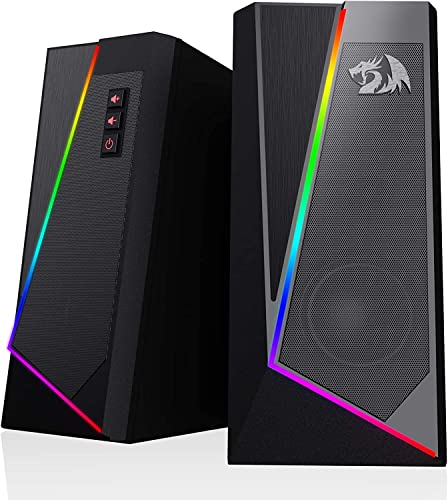
The Redragon GS520 Is A 2.0 Channel USB-Powered Option With An Additional 3.5mm Cable And Touch-Control RGB Lighting Supporting Six Modes. It Uses An Enhanced Stereo Drive Unit Intended To Provide Clear Audio And Stronger Midrange Presence. The Touch Volume Control And RGB Make It Suitable For Gaming Desks Or Multimedia Setups Where Aesthetic Lighting And Easy Access Controls Matter.
OGUPGX Clip-On Computer Speakers For Monitor

The OGUPGX Speakers Are Designed For Space-Conscious Desktops With A Spring-Loaded Clip That Attaches To Monitors. They Use Two 1.4-Inch Internal Magnetic Drivers And A Single USB Cable For Power And Audio—Plug And Play Compatibility With Most Computers. They Emphasize Loud Output In A Small Cavity, But Note The Product States Bass Will Be Limited Compared To Systems With Subwoofers.
Amazon Basics Stereo 2.0 Speakers For PC Or Laptop

Amazon Basics Offers A Straightforward USB-Powered 2.0 Stereo Pair With A 3.5mm Aux Option And Inline Volume Control For Easy Adjustment. The Design Prioritizes Reliable, No-Frills Amplification Of Laptop Or Desktop Audio. This Set Works Well Where Simplicity And Cable Convenience Are Primary Requirements.
Buying Guide: How To Choose The Best Computer Speakers
Choose speakers based on connectivity, size, and intended use. Below are the main factors to weigh before buying.
Connectivity And Compatibility
- USB vs 3.5mm vs Bluetooth: USB speakers commonly use one cable for power and audio—handy for laptops without audio jacks. 3.5mm gives broad compatibility with older devices. Bluetooth adds wireless convenience for phones and tablets.
- Plug-And-Play Support: Look For Native Support With Your OS To Avoid Driver Issues.
Sound Signature And Drivers
- Driver Size And Type: Larger drivers usually deliver fuller bass; passive radiators help extend low-end in compact designs.
- Use Case: For music and movies prefer wider frequency response; for voice and calls clarity at mid frequencies matters more.
Form Factor And Placement
- Desktop Footprint: Compact speakers or clip-on units save desk space. Soundbars and elevated-driver designs can improve projection.
- Mounting Options: Clip-on speakers attach to monitors to free desktop area; ensure clip dimensions match your monitor.
Controls And Features
- Volume / Mute Access: Inline or front-mounted controls are convenient during calls or streaming.
- Lighting And Aesthetics: RGB or touch lighting suits gaming setups but is optional for office use.
Loudness, Bass, And Noise
- Output Expectations: Small two-speaker systems can achieve loud, clear sound but limited deep bass compared to setups with a subwoofer.
- Distortion And Clarity: Look For Passive Radiators Or Dedicated Amplifier ICs For Lower Distortion At Higher Volumes.
Power Source And Port Availability
- USB Power: Convenient when USB ports are plentiful. Confirm whether the speaker requires a USB port on the computer (not the monitor or a hub) if specified.
- External Power: Some high-output speakers need external adapters—plan for outlet access.
Multiple Comparison Perspectives
- Value And Simplicity: Amazon Basics Provides Straightforward Performance For Budget-Oriented Users.
- Space And Convenience: OGUPGX Clip-On Models Save Desk Space While Delivering Strong Output For Their Size.
- Feature-Rich Options: Logitech Z207 Adds Bluetooth Flexibility; Redragon GS520 Adds RGB For Visual Appeal.
- Audio-Focused Compactness: Creative Pebble Emphasizes Tuned Drivers And Passive Radiators For Improved Bass In A Compact Package.
Consider your primary use—voice calls, music, gaming, or media playback—and match connectivity, size, and feature sets accordingly to pick the best speaker for your computer setup.