
Best Speaker Microphone Combo for Laptop and Why It Works for Different Buyers
Answering the search intent quickly: these combos integrate speakers and microphone into one device, ideal for remote workers, students, and casual gamers who want simple, plug-and-play audio. The top picks below emphasize clear voice capture, easy mounting, and desk-space efficiency. Each product targets a slightly different buyer profile—budget-conscious students, professional remote workers, and compact setups for small desks.
Summary of chosen products:
- EMEET M0 Plus Conference Speaker and Microphone — best for mid-sized meeting rooms and teams needing 360° voice pickup.
- INGA Computer Speakers With Detachable Mic — best for those who want strong audio with an adjustable, noise-suppressing mic.
- Inwa Computer Speakers With Clip — best for space-saving setups that clamp to monitors and provide stereo sound.
- EMEET C980 PRO 3-in-1 Webcam With Microphone and Speaker — best for all-in-one video meetings with integrated mic and speakers.
- AIRHUG Conference Speaker and Microphone — best for multi-user conferences with flexible connection options.
EMEET M0 Plus Conference Speaker And Microphone

The EMEET M0 Plus uses a four-mic array with 360° voice pickup and VoiceIA processing to reduce background noise and echoes. It provides 3W of full-duplex, room-spanning audio and can link with a second unit to extend coverage for up to 16 attendees. Best for small to medium conference rooms or shared office spaces where multiple participants are near and far from the device.
Best for: teams needing reliable, natural-sounding conference audio with expandability. Limitation: the capability to chain devices requires compatible models and may add setup complexity.
INGA Computer Speakers With Detachable Mic
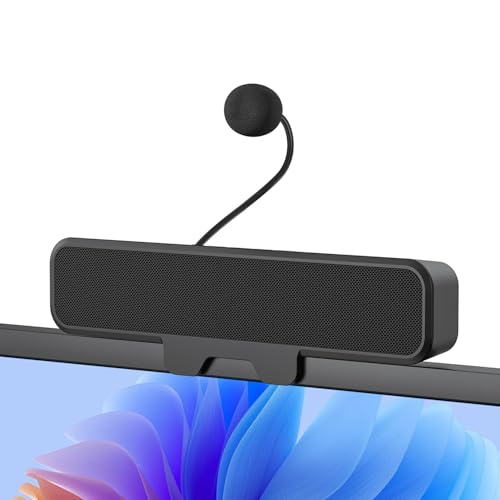
INGA integrates a detachable mic with Advanced Echo Cancellation to suppress noise and echoes, delivering crisp voice pickup for meetings and gaming. The system features enhanced bass and dual drivers for a balanced sound. It uses a clip-on monitor attachment that saves desk space and includes USB-C and USB-A adapters for wide compatibility.
Best for: users who want a compact, clip-on mic solution with strong noise suppression and easy monitor mounting. Limitation: not all curved-back monitor designs are compatible with the clip.
Inwa Computer Speakers With Clip
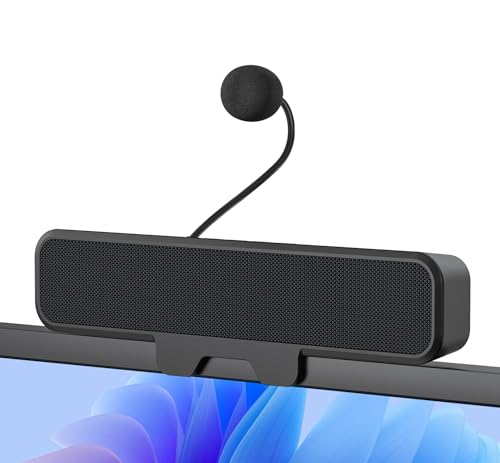
Inwa’s setup features detachable microphone with Acoustic Echo Cancellation, plus dual 10W drivers and a passive radiator for robust bass. The upgraded monitor clip clamps to most monitors up to one inch thick. It stays compact and desk-friendly while offering plug-and-play USB compatibility and flexible placement.
Best for: users who want strong desk-space efficiency with good overall audio, including deep bass for media. Limitation: the clip design may block some monitor edges on very thin displays and isn’t ideal for curved-back monitors in all cases.
EMEET C980 PRO 3-in-1 Webcam With Microphone And Speaker

This all-in-one device combines a 1080p webcam with four mics and two speakers. It targets remote workers who want professional video and audio in one unit. Noise cancellation helps keep calls clear, while the wide 60°–98° field of view supports larger teams and whiteboards. It’s a strong pick for home offices needing a single integrated solution.
Best for: users who value a unified video and audio setup with professional-looking video calls. Limitation: the webcam’s microphone array is part of a broader device, not a standalone mic, which may matter for specialized audio needs.
AIRHUG Conference Speaker And Microphone

The AIRHUG model supports both Bluetooth and USB connections with a full-duplex microphone array that covers six feet for 4–6 participants. It includes acoustic signaling for power, Bluetooth, and USB modes and supports plug-and-play across Windows, Mac, and Linux. It’s designed for flexible setups and multi-device usage.
Best for: multi-user small meetings where wireless flexibility and quick switch between modes matter. Limitation: dual-mode operation might require more careful pairing time when starting a session.
Buying Guide
What should you consider when choosing a speaker-microphone combo for a laptop?
- Voice pickup range and mic array: More mics generally improve pickup around a table, but ensure the mic pattern suits your room layout and speaking distance.
- Noise suppression and echo cancellation: Look for advanced algorithms or AAC/AEC features to reduce background noise and echo in open spaces.
- Mounting and desk space: Clip-on monitors, built-in stands, or compact speaker bars help keep desks tidy. Consider clip compatibility with your monitor thickness.
- Connectivity and compatibility: USB-A, USB-C, and Bluetooth options broaden compatibility with laptops, desktops, and mobile devices. Check your operating system support if needed.
- All-in-one vs. modular: A webcam with integrated mic and speaker saves space, while modular sets may offer better upgrade paths or specialized mic/ speaker performance.
- Room size and audience: For larger rooms, consider expandable daisy-chaining or dual-device setups. For solo or small-space use, a single high-quality unit may suffice.
Practical buying questions
- Is a detachable mic better than an integrated mic? Detachable mics can be angled for optimal pickup and may work better in varied setups, but integrated mics reduce clutter.
- Do I need a webcam with mic and speaker? If video calls are essential, an all-in-one webcam can simplify setup and reduce cable clutter, though dedicated mic performance may vary by model.
- Can I use these with Mac and Windows? Most listed products support major OS families via USB or Bluetooth; check specific compatibility if you rely on Linux.
- What is the best option for a small desk? A compact clip-on or a single-device conference speaker often maximizes space without sacrificing audio quality.
- Should I prioritize two-way talk or richer playback? If conversations are the priority, prioritize mic clarity and full duplex capability; if media playback matters, focus on speaker output and bass performance.
Frequently Asked Questions
- What is a full-duplex conference speaker? It allows both parties to speak and be heard simultaneously, reducing delays in conversation.
- Do these devices require software installation? Most are plug-and-play with automatic driver support on common OSes.
- Can I daisy-chain multiple units? Some models support daisy-chaining for larger rooms; confirm compatibility with your chosen devices.
- Are clip-on microphones reliable for meetings? Clip-on mics with noise cancellation can be highly effective when positioned close to the speaker’s mouth.
- What should I avoid when selecting a speaker and mic? Avoid units with limited compatibility or inadequate mic pickup for your room size; prioritize models with clear noise suppression and stable connections.
- Is a webcam necessary for calls? Not strictly, but it improves communication in video calls when accompanied by a capable mic and speakers.
For buyers prioritizing simple, reliable, and compact audio setups for laptop use, the selections above cover balanced options across room sizes, mounting preferences, and connection needs. Each product is chosen to provide clear voice capture, functional speakers, and practical features that support common remote-work and learning scenarios.