
Looking For The Best Speaker To Connect To Your Monitor? This Guide Compares Compact USB Soundbars, Clip-On Monitor Speakers, Bluetooth Bars, And Near-Field Studio Monitors Ideal For Desktop Use. Below Is A Quick Comparison Table Of The Selected Options To Help You Scan Features Fast.
| Product | Type | Key Connectors / Features |
|---|---|---|
| Computer Speakers For Desktop PC Monitor (XKX) | USB Clip-On Soundbar | USB powered, adaptive-channel-switching, touch controls, dual drivers |
| OGUPGX Computer Speakers For Desktop Pc | USB Clip-On Speaker | USB plug-and-play, loud sound, spring-loaded clip, USB-C adapter included |
| Computer Speakers For Desktop PC (XKX USB-C) | USB-C Compatible Soundbar | USB and USB-C adapter, dual drivers, deep bass, wide OS compatibility |
| Cyber Acoustics USB & Bluetooth Speaker Bar (CA-2890PRO) | USB + Bluetooth Speaker Bar | USB-C/USB-A, Bluetooth 5.0, speakerphone, clamps to thick monitors |
| PreSonus Eris 3.5 Studio Monitors, Pair | Powered Near-Field Studio Monitors | RCA/1/8″ inputs, 50W Class AB, accurate stereo for production |
Computer Speakers For Desktop PC Monitor, USB Plug-in, Wired (XKX)

This USB clip-on soundbar Is Designed To Mount To A Monitor And Offers dual ultra-magnetic drivers With dual passive radiators For louder output And Enhanced Bass. It Uses adaptive-channel-switching With G-Sensor To Maintain Proper Stereo Orientation When Mounted Upside Down Or Right-Side Up. Front touch controls Provide Mute And Volume Adjustment.
Best For Users Who Need A Space-Saving USB-Powered Soundbar That Clips To The Monitor While Retaining Stereo Channel Consistency.
OGUPGX Computer Speakers For Desktop Pc, Monitor Speakers

OGUPGX Offers A Compact USB Speaker That Clips To Monitors With A Spring-Loaded Clip. It Houses Two 1.4-Inch Internal Magnetic Drivers For Clear Output In Small Enclosures. The Unit Is Plug-And-Play With Modern Decoder Chips So It Works With Most Computers Via USB.
Note That It Requires Connection To A Computer USB Port (Not A Monitor USB) And Is Designed For Desktop/Laptop Use Where A 3.5mm AUX Is Not Preferred. The Clip Opening Handles Typical Monitor Bezels Up To 0.78 Inches.
Computer Speakers For Desktop PC, USB Plug-in With USB-C Adapter (XKX)

This Version Focuses On USB-C Compatibility With A Built-In USB-C To USB Adapter, Making It Suitable For Newer Laptops And Devices With USB-C Only Ports. It Promises high-quality stereo sound From Dual Super-Magnetic Drivers And A Passive Radiator For Deeper Bass.
It Lists Compatibility With Windows, macOS, Chrome OS, And Linux, But States It’s Incompatible With Monitors And TVs For Direct Audio Inputs. Designed For Users Who Need A Universal USB-C Option For Modern Computers.
Cyber Acoustics USB & Bluetooth Speaker Bar (CA-2890PRO)
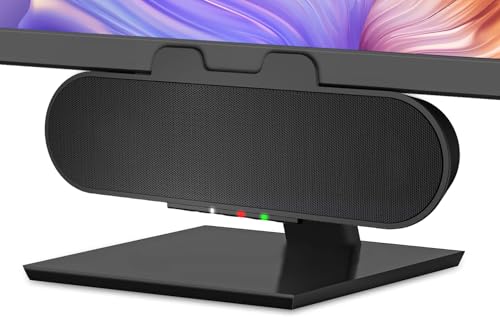
The Cyber Acoustics CA-2890PRO Offers USB Or USB-C Connectivity Plus Bluetooth 5.0, Allowing Wired Desktop Connection And Wireless Pairing With Smartphones. It Features A Speakerphone With A Multi-Function Button, Volume And Mic Mute LEDs, And Attaches To Monitors Up To Two Inches Thick.
With A 15W Power Output And Rear-Facing Bass Radiator, This Bar Targets Users Who Want Flexibility Between Computer USB Audio And Bluetooth Streaming, While Retaining On-Device Controls For Calls And Media.
PreSonus Eris 3.5 Studio Monitors, Pair

PreSonus Eris 3.5 Are Powered Near-Field Studio Monitors Built For Accurate, Reference-Grade Sound. They Provide 50 Watts Of Class AB Amplification (25W Per Speaker), Woven-Composite Woofers For Tight Low-End, And A Neutral Response Useful For Music Production, Mixing, And Critical Listening.
Connectivity Typically Uses Line Inputs (1/8″ Or RCA) Rather Than USB Directly To The Monitor, So These Work Best When Connected To A Computer Audio Interface Or Headphone/Line Output For True Studio-Quality Desktop Sound.
Buying Guide: How To Choose A Speaker To Connect To Your Monitor
Choosing The Right Speaker To Connect To A Monitor Depends On Several Key Factors. Below Are The Main Considerations To Compare Across Models.
Connection Type
- USB/USB-C: Easiest For Plug-And-Play With Laptops And PCs; Power And Audio Over One Cable For Simplicity.
- 3.5mm AUX: Common For Monitors Or TVs With Headphone Outputs; Needs Separate Power Or USB For Power.
- Bluetooth: Good For Phone/Tablet Streaming; Introduces Latency That May Affect Gaming Or Video Sync.
- Line-Level/RCA: Standard For Studio Monitors; Requires An Audio Interface Or Adapter For USB-Only Devices.
Mounting And Space
- Clip-On Soundbars Save Desk Space And Attach Directly To The Monitor Bezel.
- Desktop Speakers / Monitors Sit On Stands Or On The Desk And Need Clearance For Optimal Placement.
- Monitor Thickness And Bezel Design Determine Whether A Clip Will Fit Securely.
Audio Goals
- Casual Listening & Streaming: Compact USB or Bluetooth bars Provide Convenience And Decent Volume.
- Gaming And Movies: Look For Stronger Bass, Passive Radiators, Or A Separable Subwoofer For Impact.
- Music Production: Choose Near-Field Studio Monitors For Flat Response And Accurate Imaging.
Power And Volume
- Wattage Gives A Sense Of Maximum Loudness But Not Always Sound Quality.
- Check Whether The Speaker Is Self-Powered (Active) Or Needs An External Amp.
Latency And Sync
- Bluetooth Can Cause Noticeable Latency For Video Or Competitive Gaming.
- Wired USB/3.5mm Offers Lowest Latency And Most Reliable Sync.
Compatibility And Ports
- Confirm The Speaker Works With Your OS And Device Ports. Some USB Speakers Require A Computer USB Port Rather Than A Monitor USB Hub.
- If Your Device Only Has USB-C, Prefer Speakers With USB-C Support Or An Included Adapter.
Controls And Features
- On-Device Volume, Mute, And Source Switching Add Convenience.
- Extra Features Like Touch Controls, Lighting, Or Speakerphone Functions May Be Useful Depending On Workflow.
Sound Signature
- Enhanced Bass From Passive Radiators Suits Gaming/Movies.
- Neutral Signature From Studio Monitors Is Best For Mixing And Critical Listening.
Comparison Perspectives
- Space-Saving Convenience: Clip-On USB Soundbars (XKX, OGUPGX) Are Compact And Simple To Install.
- Versatility: Bluetooth + USB Bars (Cyber Acoustics) Support Multiple Devices And Calls.
- Accuracy: Powered Studio Monitors (PreSonus Eris 3.5) Provide Reference Sound But Need Line Inputs/Interface.
Use This Guide To Match Your Monitor Setup, Port Availability, And Listening Priorities To The Best Type Of Speaker For Your Desktop.