Best Speaker With Microphone for Laptop: Clear Audio for Meetings
Choosing a reliable speakerphone for laptop use boosts meeting clarity and collaboration. The following picks are optimized for home offices and small conference spaces, offering 360° pickup, noise reduction, and easy USB-C connectivity. Each product is evaluated on mic quality, full-duplex capability, and ease of use to help you select a model that fits your setup.
| Product | Brand | Key Benefit |
|---|---|---|
| EMEET M0 Plus | EMEET | 4 AI mics, Daisy Chain expansion for up to 16 attendees |
| Anker PowerConf S330 | Anker | Smart voice enhancement, 360° coverage, plug-and-play |
| Yealink SP92 | Yealink | AI noise cancelling, 360° room coverage for 4–8 people |
| AirHug Conference Speaker | AIRHUG | 360° pickup, USB-C plug & play, supports multi-device connections |
| ANKER PowerConf (Second Model) | Anker | 6 mics, 360° coverage, Zoom certified, long call times |
Note: All products are designed for USB connectivity, with features aimed at reducing background noise, enhancing voices, and enabling clear, hands-free meetings across various platforms.
EMEET Conference Speakerphone M0 Plus

The EMEET OfficeCore M0 Plus uses a four-mic array for 360° voice pickup, powered by an updated VoiceIA algorithm to filter background noise and reduce echo. It delivers crystal-clear audio with full duplex support, distributing sound evenly across the room. For larger meetings, it can be linked via Daisy Chain with other EMEET units to extend coverage up to 16 attendees, offering flexible scalability for conference rooms.
Anker PowerConf S330 USB Speakerphone

The Anker PowerConf S330 offers Smart Voice Enhancement to suppress background noise while boosting speaker voices. It is plug-and-play via USB-C and includes a standard USB adapter for compatibility. With 360° voice coverage and four high-sensitivity microphones, it captures voices within about a 3-meter radius, giving meetings a clear, professional sound.
Dell SP3022 USB Computer Speaker

Dell’s compact USB soundbar provides a professional look with AI noise cancellation and full duplex audio. It integrates easily with laptops and monitors, delivering balanced sound and a lightweight footprint ideal for desktop setups. LED indicators help monitor MS Teams status, calls, and mute controls, contributing to a streamlined conferencing experience.
Yealink SP92 Conference Speaker

The Yealink SP92 delivers real-time AI noise cancellation capable of filtering over 1,000 noise sources. Its 360° omnidirectional microphone supports up to a 13-foot radius, making it suitable for 4–8 person rooms. Built-in full-duplex microphones and echo cancellation provide natural, simultaneous conversation and improved audio depth with virtual bass enhancements.
INGA Computer Speakers with Detachable Mic
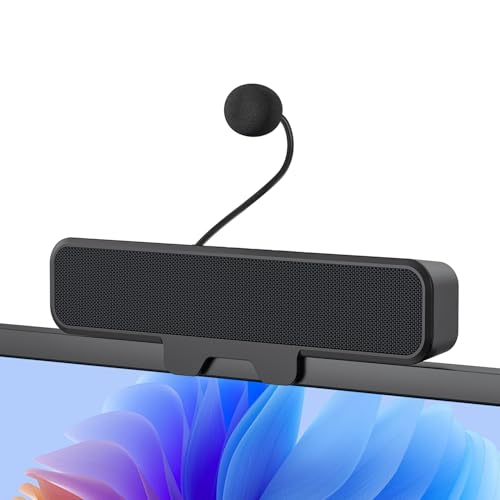
INGA’s system features a detachable mic with Advanced Echo Cancellation and a unidirectional mic design to minimize background noise. It provides immersive stereo sound with enhanced bass, and a clip-on desk design that attaches to monitors up to 1 inch thick. It includes both USB-C and USB-A options, supporting broad computer compatibility and space-saving setup.
Anker PowerConf Speakerphone (Zoom Certified)

With six microphones arranged for 360° coverage, the Anker PowerConf enhances voice pickup in any direction. It leverages Voice Radar 3.0 AI to reduce noise, cancel echo, and recognize multiple speakers. The device automatically balances voice levels, ensuring clear communications across platforms and environments, including personal workspaces.
AIRHUG Conference Speaker And Microphone

AIRHUG 01 provides absolute 360° voice capture with advanced noise reduction. It supports plug-and-play USB-C connectivity and multi-device pairing for Zoom and MS Teams. The unit offers a high sampling rate for clear word-for-word interpretation, ensuring fidelity in meetings and online classes alike.
Buying Guide
Key considerations help narrow choices for laptop conferencing systems:
- Voice pickup and coverage: Look for 360° microphone arrays and room radius specs to ensure everyone is heard in your typical meeting size.
- Noise reduction and echo cancellation: AI-based algorithms improve speech clarity in busy environments by filtering background sounds and eliminating reverberation.
- Connection and compatibility: USB-C is common, but check for USB-A and Bluetooth options, plus platform compatibility (Zoom, Teams, etc.).
- Scalability: If you host larger groups, consider models that support daisy chaining or expandable systems to cover more attendees.
- Device form factor: Desktop soundbars save space; clip-on mics and compact speakers suit tight desks; clamp-on designs work well with various monitor setups.
- Power and longevity: Look for units with long call time or reliable power options for long meetings without interruptions.
- Brand reliability and support: Choose brands with robust support and clear warranty terms to ensure ongoing service.
Compared to built-in laptop mics, these speakerphones provide significantly improved intelligibility, reduced listener fatigue, and more natural conversation flow. For mixed environments—home offices, small conference rooms, or shared workspaces—a scalable, noise-resilient model can yield consistent meeting quality across platforms and participants.