
Best Speakers With Audio Output for Any Setup
Looking for reliable speakers with solid audio output across different devices? This guide highlights five top options that cover desktops, laptops, and home entertainment. Each pick is best for a specific use case—from compact, portable listening to room-filling sound. Use this overview to compare compatibility, power, and sound quality before you buy. The top picks are ideal for office work, multimedia enjoyment, or casual gaming, without requiring expert setup.
| Product | Brand | Best For |
|---|---|---|
| 1Mii 3.5mm Computer Speakers | 1Mii | Multidevice listening with stepless volume |
| LENRUE A39PRO Computer Speakers | LENRUE | Quiet, clear 2x5W stereo for movies and games |
| [Upgraded] USB Desktop Speaker | LIELONGREN | USB-powered plug-and-play for Windows/macOS |
| AYL Mini Speaker System | AYL | Ultra-portable travel listening |
| Edifier MR3 Powered Studio Monitor | Edifier | Hi-Res, balanced desktop monitoring |
1Mii 3.5mm Computer Speakers for Desktop Laptop Tablet

The 1Mii computer speakers are best for users who need broad compatibility with multiple devices. They support any device with a standard 3.5mm AUX out and work with Windows, macOS, Linux, and even desktop monitors. The built-in dual 3W stereo drivers deliver loud, clear vocals with immersive Hi-Fi detail, suitable for movies, music, and casual gaming. A front rotary volume control offers stepless adjustment for quick, on-the-fly changes. For optimal audio quality, a USB power adapter is recommended to reduce static noise.
Best for: users seeking a straightforward, plug-and-play setup across laptops, desktops, and accessories. The absence of wireless features keeps the signal simple and reliable. Caution: relying on 3.5mm jacks means you won’t get Bluetooth convenience from these speakers.
LENRUE Computer Speakers, A39PRO

LENRUE A39PRO is suited for users who want a compact soundbar-style speaker setup with easy top-mounted volume control. It uses upgraded 2x5W drivers to provide clear, crystal sound, improving movies, music, and games in a desktop or laptop environment. USB powers the device, while the 3.5mm AUX handles audio connections. The top-mounted volume knob simplifies on‑the‑spot adjustments without navigating through device menus.
Best for: desk users who prefer a small, desk-friendly footprint with straightforward volume control. Limitation: the compact design may not deliver deep bass for bass-heavy genres compared with larger systems.
[Upgraded] USB Plug-n-Play Desktop Speakers

This LIELONGREN USB speaker is a plug-and-play choice for Windows, macOS, Linux, and Chrome OS users. It’s designed for easy setup—connect via USB for power and USB audio output, then select the speaker in your sound settings. The model emphasizes user-friendly operation and broad compatibility, making it ideal for laptops and mini PCs that lack robust built-in speakers. It suits workstations, home offices, and dorm rooms where simple, reliable audio is needed.
Best for: users who want a no-hussle, USB-powered speaker that just works across multiple operating systems. Caution: relying on USB power means performance can vary slightly with PC USB port quality or power draw.
AYL Mini Speaker System
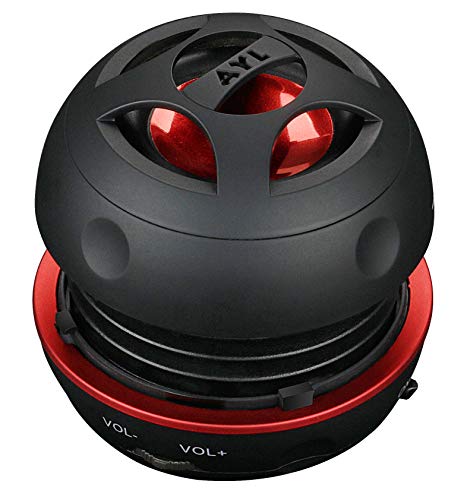
The AYL mini speaker is the lightest and most portable option, weighing about 3 ounces. It’s designed for travel or quick on-the-go listening and supports a 3.5mm AUX input plus built-in 3W output. It’s ideal for laptops, MP3 players, or phones that need a quick audio boost. Built-in amplifier ensures surprisingly loud volume for its size, and a rechargeable battery offers up to 10 hours of playback at moderate volume.
Best for: travelers and students who want a pocket-sized speaker with decent loudness and no external power needs. Limitation: small size means limited bass and overall volume ceiling compared with larger desktop units.
Edifier MR3 Powered Studio Monitor

Edifier MR3 is a desktop monitor-style speaker with Hi-Res certification, designed for accurate, balanced sound. It features 18W per channel RMS output, multiple input options (balanced TRS, RCA, AUX), and a headphone output along with Bluetooth support for wireless pairing. Its enrichment across 52 Hz to 40 kHz makes it suitable for music production, important detail listening, and everyday desktop use. The setup supports multi-device connections, making it versatile for a studio or office.
Best for: users who want a high-fidelity, studio-monitor style speaker with multiple connectivity options. Caution: larger footprint than compact desk speakers; ensure your workspace has appropriate space.
Buying Guide: Key Purchase Considerations
- Device compatibility: Check if the speaker uses 3.5mm AUX, USB power, or Bluetooth. If you need universal compatibility across laptops, desktops, and tablets, USB-powered or 3.5mm options are essential.
- Power and size: Smaller speakers are portable and space-saving but may lack deep bass. Larger monitors or soundbars deliver more powerful output but require more desk space.
- Sound characteristics: If you want precise sound for music or video editing, consider Hi-Res certified or studio-monitor style units. For casual listening, 3W–5W per channel options are often sufficient.
- Controls and setup: Top-mounted knobs or plug-and-play USB devices simplify adjustments and reduce setup time. Avoid models with hard-to-reach controls if you frequently tweak volume.
- Connectivity options: Look for devices with multiple inputs (AUX, USB, Bluetooth, RCA) to support multiple devices simultaneously or future upgrades.
- Durability and placement: Some speakers are desk-focused; others can double as TV or PC soundbars. Place balance and room acoustics into account for best results.
Frequently Asked Questions
- What type of speaker is best for a home office?
– A compact USB-powered or 3.5mm AUX desktop speaker set is ideal for simple, reliable audio without clutter. - Are Hi-Res certified speakers worth it for casual listening?
– Hi-Res certification helps with accurate audio across a wide frequency range, beneficial for critical listening and production work, though it may be less noticeable for casual use. - Should I choose a powered or passive speaker for a computer setup?
– Powered speakers include built-in amplification, which simplifies setup and reduces the need for an external amp, making them convenient for computer use. - Is Bluetooth important in computer speakers?
– Bluetooth adds wireless convenience but may introduce latency or compression. If you need instant, stable connectivity, prioritize wired inputs. - Do I need subwoofers for better bass?
– For movies or games with deep bass, consider a speaker with robust bass or pair with a subwoofer. Smaller desktop models may still suffice for casual listening. - Can I use these speakers with a TV or monitor?
– Yes, many offer 3.5mm, RCA, or Bluetooth connections compatible with TVs or monitors that have those outputs.