
Best Split Microphone Headphone Jack Adapters for Shared Audio
Answering the search for reliable headphone and microphone splitters, this guide highlights adapters that let a single device host both audio and mic signals. The top picks cater to gamers, remote workers, students, and general multimedia sharing. Each product is chosen for compatibility, build quality, and practical use cases. The following table summarizes the featured items for quick comparison.
| Product | Best For | Key Benefit |
|---|---|---|
| KINGTOP 3.5mm Headphone Mic Splitter | PC gaming headsets on consoles and laptops | TRRS to dual TRS with gold-plated connectors |
| DUKABEL 4-Position Splitter (30cm) | Online gaming and VOIP on PC | Sturdy metal housing and secure-fit design |
| ENVEL 3.5mm Headset Splitter | Desktop PC setups with separate mic/audio | Braided cable and oxygen-free copper |
| MillSO 4-Pole Splitter | Sharing audio with mic on laptops/phones | Two TRRS female outputs for mic and audio |
| StarTech.com Headset Adapter | Travel and legacy equipment | Compact, durable, universal compatibility |
KINGTOP 3.5mm Headphone Mic Splitter Adapter

Best for: Gamers who need a simple, portable splitter to use a dual-plug headset with a single CTIA device port. This KINGTOP adapter converts one 3.5mm male plug into two female jacks for mic and audio, making it ideal for PS5, PS4, Xbox One, and compatible laptops or Android devices with a combined port. The 24K gold-plated connectors help maintain signal integrity during multiplayer sessions.
Key features include a compact design, universal CTIA compatibility, and broad headset support including Logitech, HyperX, Razer, and SteelSeries. A potential limitation is that it uses a standard TRRS wiring, which may not be compatible with some devices that use non-standard CTIA/JACK configurations.
Best for: Players who want a ready-to-go splitter for dual-plug headsets on consoles or laptops without additional adapters. Choose this if you value portability and straightforward setup.
DUKABEL 3.5mm Headphone Mic Splitter (30cm)
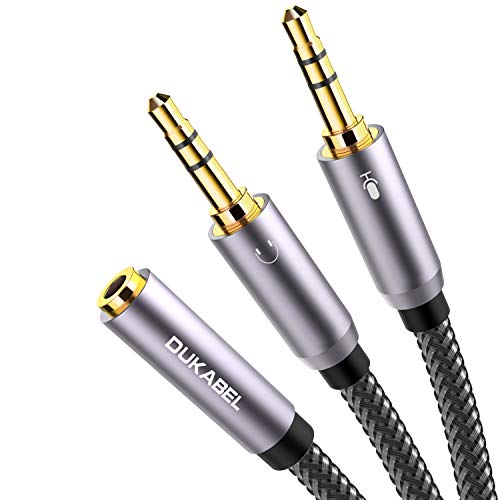
Best for: PC users needing a reliable 4-position splitter to connect a headset with separate audio and mic to a PC or laptop. It supports VOIP apps like Skype and Google Voice and is NOT intended for IOS-earphones or Beats headsets. The product emphasizes 24K gold-plated contacts and a robust metal housing for durability.
Why selected: Strong build, clear separation of mic and audio, and broad PC compatibility. A caution: not suitable for iOS earphones or certain branded headphones that require different wiring schemes.
Best for: Anyone seeking a sturdy crossover adapter for online gaming or communication apps on desktop platforms. If you need a longer run or a more flexible cable, this model’s 30 cm length is adequate for most setups.
ENVEL Headset Splitter Cable for PC

Best for: Desktop users who want a straightforward split of audio and mic via a single USB-C or PC port. ENVEL emphasizes a high-quality copper conductor and durable braided wire that helps minimize signal loss.
Why selected: The connector design supports easy plugging into standard PC audio and mic inputs, with a focus on stable sound transmission. Limitation: not all devices may support 4-pole TRRS configurations, so verify your port type before purchase.
Best for: Users who value long-term durability and clean signal delivery for everyday calls, gaming, or media playback on desktop setups.
DUKABEL Long Headset Splitter Cable

Best for: Users who need additional reach between their headset and PC or laptop. This 4ft/1.2m cable extends the standard splitter for more flexible desk layouts or shared devices in small workspaces. It maintains one female mic/audio output and two male connections.
Why selected: The longer length accommodates PC gaming setups or shared work areas. Limitation: cable length may introduce slight latency or flexibility concerns in very tight gaming setups.
MillSO Headset Splitter for 2 TRRS Headphones or Mics
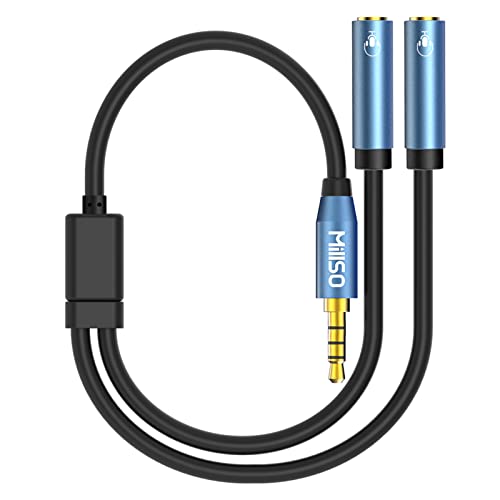
Best for: Sharing audio and mic between two TRRS headsets or mics on laptops, tablets, or gaming consoles that support 4-pole connections. MillSO emphasizes compatibility with devices that use 4-pole TRRS jacks for both microphone and audio functions.
Why selected: Practical for family sharing or small-group gaming, with explicit note that it’s not compatible with IOS standard headphones. Caution: verify TRRS compatibility with your device before buying.
StarTech.com Headset Adapter

Best for: Travelers and users with older equipment who need to combine microphone input and headphone output into a single portable adapter. StarTech’s model emphasizes a compact design that fits easily in a laptop bag and supports legacy devices.
Why selected: It balances travel-ready form with practical legacy compatibility. Caution: this adapter is not designed as a true two-headphone splitter; it’s best for one mic and one headset pairing rather than feeding two headphones from one device.
Buying Guide
What should you consider when choosing a split mic and headphone adapter?
- Device compatibility: Check whether your port is CTIA, OMTP, or a universal 3.5mm combo. Some adapters are designed for CTIA only and may not work with all devices.
- Connection type and wiring: Confirm if the adapter is TRRS-to-dual-TRS or TRRS-to-two TRRS outputs. This impacts which devices and headsets you can pair.
- Length and portability: Short connectors travel easily, while longer cables help in shared spaces or large desks. Consider your setup’s distance between devices.
- Durability: Metal housings, braided cables, and gold-plated contacts typically boost longevity and signal integrity in everyday use.
- Use case: Gaming, VOIP, or media sharing each benefit from different features. For multiplayer gaming, prioritize adapters that maintain mic and audio balance.
- Limitations: Some devices or headphones may require non-standard wiring. Be prepared for compatibility limits with IOS or Beats/Beats-style headphones.
Frequently Asked Questions
- Can I use a 3.5mm splitter with a USB-C device?
Answer: Some USB-C devices use a 3.5mm combo jack, but many require an adapter; verify port compatibility before purchase. - Will these adapters work with two headsets at the same time?
Answer: Most are designed to split one mic and one audio channel, not to drive two independent headsets with full microphone support. - Are these adapters compatible with gaming consoles?
Answer: Many work with controllers on PS4/PS5, Xbox One, and Nintendo Switch, depending on the controller’s 3.5mm port configuration. - Do these adapters degrade sound quality?
Answer: Quality connectors and shielding help minimize loss; however, some input-output pairs may show minor differences in volume or balance depending on the device. - Can I use these for conference calls on a laptop?
Answer: Yes, when the laptop has a separate mic input and audio output, these adapters can route both to the appropriate jacks.