
Best Optical Cable Splitter Options for Audio Theaters and More
Need to split a single optical audio signal to two or more devices without losing clarity? This guide highlights top splitters designed for televisions, soundbars, receivers, and gaming consoles. It helps buyers choose the right splitter for each setup, whether you want one input to two outputs or one input to three outputs. The table below summarizes five strong choices and their best-use scenarios.
| Product | Brand | Best For |
|---|---|---|
| BlueRigger Digital Optical Audio Splitter 1×2 | BlueRigger | Home theater with two receivers/speakers |
| LiNKFOR Optical Cable Splitter 1×3 | LiNKFOR | Three simultaneous outputs (soundbar, amp, headphones) |
| avedio links Optical Audio Splitter 1 in 2 Out | avedio links | Two outputs with independent volume control |
| NEWCARE Digital Optical Splitter 1 in 2 Out | NEWCARE | Balanced signal to two devices with LPCM/DTS support |
| Orisell Digital Optical Splitter 1 in 2 Out | Orisell | High-fidelity PCM and surround formats |
Note: All products discussed are passive splitters. Some setups may experience reduced signal strength when splitting to two or more outputs. For best results, keep Toslink cable lengths reasonable and ensure devices have Toslink input ports.
BlueRigger 1×2 Toslink Splitter

The BlueRigger splitter channels one optical source to two outputs, facilitating simultaneous connections to devices like an A/V receiver and a soundbar. It is best for users who want a quick plug-and-play solution with minimal setup. The device is passive, so signal strength may halve between outputs. If only one output plays sound, confirm cable lengths are under 10 feet and both devices have Toslink inputs.
Who it’s best for: Small to medium home theaters needing an easy, budget-friendly splitter for two downstream devices. Why selected: Simple, reliable 1×2 design with clear compatibility notes.
Limitation: Passive operation can reduce overall volume on both outputs if the source is loud or the cables are long.
LiNKFOR Optical Cable Splitter 1×3

LiNKFOR provides a 1×3 optical splitter, enabling a single optical source to feed three outputs. This is ideal for Home Theater setups where a TV, a soundbar, and a separate speaker system run concurrently. It supports LPCM 2.0, DTS, and Dolby Digital-Plus formats with reduced signal loss over typical distances. Long-distance transmission is possible with minimal loss (up to 40 meters given quality cabling).
Who it’s best for: Users needing three simultaneous outputs from one Toslink source. Why selected: Wide compatibility and longer reach with preserved formats.
Limitation: Because it splits into three, verify your devices’ input capabilities and consider potential volume disparities between outputs.
avedio links Optical Audio Splitter 1 in 2 Out

avedio links offers a 1×2 optical splitter with a focus on letting two outputs operate, such as a soundbar and a headset, with separate volume controls. This makes it suitable for shared listening spaces or late-night viewing where users want independent control. The product emphasizes plug-and-play use with a broad compatibility range across common devices like PS4, Xbox, HDTV, and Blu-ray players.
Who it’s best for: People who want two outputs with independent volume control. Why selected: Dual output while preserving adjustable listening levels for each device.
Limitation: The two outputs cannot always operate perfectly in perfect sync if the source or cables introduce jitter.
NEWCARE Digital Optical Splitter 1×3

NEWCARE’s 1×3 optical splitter distributes one optical input to three outputs. It emphasizes built-in balance and ESD protection for stability and security. It supports common digital formats including 5.1 channel Dolby Digital and LPCM. This option is well-suited for users who want to feed multiple devices, such as a receiver, a soundbar, and a streaming box, with reliable performance.
Who it’s best for: Multi-output setups requiring stable signal distribution. Why selected: Emphasis on safety and reliability with broad compatibility.
Limitation: As a passive splitter, the signal may be weaker on all outputs if the input level is high or if long cables are used.
Orisell Optical Splitter 1×2
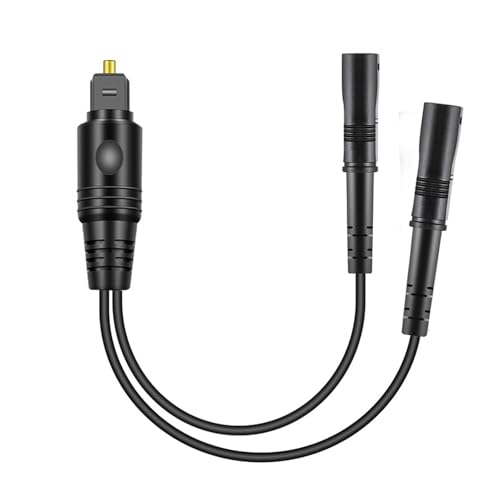
Orisell’s 1×2 optical splitter supports uncompressed PCM and 5.1-7.1 surround formats, including Dolby Digital Plus and DTS-HD. It is designed for high-fidelity sound, using a solid PVC outer layer, gold-plated connectors, and robust fiber-optic core. This makes it particularly suitable for enthusiasts who prioritize audio fidelity in home theaters or gaming setups.
Who it’s best for: Audiophiles and home theater fans requiring strong support for surround formats. Why selected: Emphasis on high-fidelity signal transfer and durable connectors.
Limitation: The two outputs do not always operate independently, depending on source behavior and cable quality.
Buying Guide
Key considerations when choosing an optical splitter:
- Output count: Determine whether you need 2 outputs or 3 outputs and how it matches your devices.
- Signal quality: Look for splitters that preserve PCM and surround formats; higher-grade optics reduce loss.
- Power requirements: Most are passive; ensure your source can drive multiple outputs without distortion.
- Cable length: Shorter cables help maintain signal strength; verify recommended maximum lengths.
- Device compatibility: Confirm Toslink ports exist on all downstream devices and that formats like DTS, Dolby, and LPCM are supported.
- Physical build: A robust connector design reduces wear from frequent unplugging.
FAQ
- Q: Can I split one optical signal to two soundbars at the same time?
A: Yes, with a 1×2 optical splitter, but the signal strength may drop; keep cables short and ensure both devices have Toslink inputs. - Q: Will I notice a delay or lip-sync issue after splitting?
A: Some splitters are designed to minimize delay, but very long cables or poor-quality splitters can introduce minor lag. Check for devices with low-latency specs. - Q: Do splitters require external power?
A: Most are passive and do not require power; some 1×3 or specialty models may include features that benefit from active components. - Q: Which formats are commonly supported by these splitters?
A: PCM, LPCM, DTS, and Dolby Digital variants are typically supported; verify formats listed in product features. - Q: How do I choose between 1×2 and 1×3 splitters?
A: Choose 1×2 for two devices with similar power needs; choose 1×3 when you need three devices to share a single source.