
Finding The Right Cable for studio monitors can affect clarity, noise, and reliability. Below is a concise comparison of well-suited cables selected for balanced connections, monitor linking, and power needs.
| Product | Type | Key Feature |
|---|---|---|
| CableCreation 1/4’’ TRS Cable (2-Pack 6ft) | 1/4″ TRS To TRS | Oxygen-Free Copper, Professional Stereo Plugs |
| Ihurllu TRS To XLR Male Patch Cable (10ft) | TRS To XLR Male | Nylon Braided, OFC Shielding, Drag-Proof |
| Birvemce 2 Pack Premium TRS Cable (10ft) | 1/4″ TRS To TRS | 128 OFC Cores, Multilayer Shielding |
| iK iLoud MTM Master-Slave Speaker Link Cable (9.84ft) | 4-Pin Speaker Link | Pure Copper, 4-Pin For Master/Slave Monitors |
| Ihurllu 1/4 Inch TRS To TRS Patch Cable (3.3ft, 2Pack) | Short TRS Patch | Nylon Braided, Gold Plated Connectors |
CableCreation 1/4’’ TRS Cable (2-Pack 6FT)
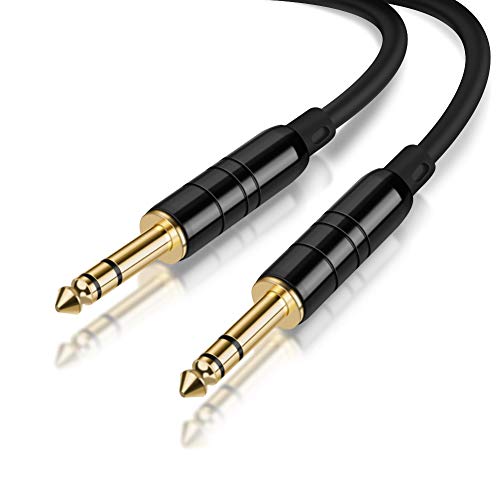
This 6ft 1/4″ TRS to 1/4″ TRS pack is marketed for pro audio gear including studio monitors and mixers. The cable uses oxygen-free copper conductors to improve conductivity and limit signal loss. Zinc alloy housings add mechanical strength. The PVC outer jacket aims for flexibility and tangle resistance, useful for live or studio patching.
Notable For: Balanced stereo connections for monitors and mixers, lightweight construction, and compatibility with common pro gear like Yamaha HS series and Rokit monitors.
Ihurllu Balanced 1/4″ TRS To XLR Male Patch Cable (10ft)

This 10ft TRS to XLR male cable is built for linking interfaces, mixers, and active monitors with XLR inputs. It features a nylon-braided jacket, gold-plated plug, and dual-layer shielding (OFC spiral plus aluminum foil) to reduce RFI and EMI. The manufacturer warns it’s not suitable for passive guitar outputs requiring impedance matching.
Notable For: Long runs where balanced TRS-to-XLR connections are required, enhanced shielding for noise rejection, and drag-proof connector design for durability.
Birvemce 2 Pack Premium TRS Cable (10FT)

These 10ft TRS cables emphasize shielding and core quality, using 128 OFC cores and multilayer shielding to minimize hum and buzzing. Gold-plated connectors and TPE outer material are intended to improve longevity and maintain flexibility. The cables are suitable for balanced interconnects in studio and DJ setups.
Notable For: Emphasis on low-noise transmission and robust outer material for repeated studio use.
iK iLoud MTM Master-Slave Speaker Link Cable (4-Pin, 9.84ft)

This 4-pin male-to-male speaker link cable is designed specifically for linking iLoud MTM master and slave monitors. With a pure copper core and professional shielding, it focuses on preserving the speaker-level signal across the link, aiming for lossless transmission and flexibility for neat routing.
Notable For: Direct compatibility with iLoud MTM speaker linking, pure copper core for minimal signal degradation, and flexibility for studio installations.
Ihurllu 1/4 Inch TRS To TRS Balanced Patch Cable (3.3ft, 2Pack)

These short 3.3ft TRS patch cords are aimed at tight patch-bay or desk connections where short, balanced links are preferred. They feature nylon braided jackets, full OFC spiral shielding with foil, and gold-plated connectors. Color rings help route identification in busy setups.
Notable For: Short, tidy runs between desk and monitors or patch bays, strong shielding for noise rejection, and clear channel identification.
Buying Guide: Choosing The Right Studio Monitor Cables
Choosing cables depends on connector type, run length, shielding, and the signal being carried. Below are core considerations for studio-monitor setups.
Connector Type And Compatibility
- TRS To TRS (1/4″ Balanced): Common for balanced monitor outputs on interfaces and some monitors. Use for line-level balanced signals.
- TRS To XLR: Useful when one end accepts 1/4″ balanced out and the other expects XLR input. Ensure the cable matches balanced signals — not for passive instrument outputs.
- 4-Pin Speaker Link: Specific to certain active monitor systems that require speaker-level linking (master/slave). Confirm model compatibility.
- Power Cables: Separate from audio; ensure correct connector and ampere/voltage rating for studio monitors.
Balanced Versus Unbalanced
- Balanced cables (TRS/XLR) carry signal across three conductors and reduce noise for longer runs; preferred for professional studios.
- Unbalanced cables (TS, RCA) are fine for short runs and consumer gear but are more susceptible to hum over distance.
Shielding, Conductor Quality, And Noise Rejection
- Oxygen-Free Copper (OFC) and multiple shielding layers (foil + braid) help minimize RFI/EMI and preserve fidelity.
- Gold-plated connectors reduce corrosion and maintain contact quality over time.
- Look for drag-proof connector designs and reinforced strain relief for durability in pro use.
Cable Length And Run Considerations
- Keep runs as short as practical to reduce potential noise and capacitance impact. Use balanced cables for runs over a few meters.
- Choose shorter patch cables for desk routing; longer, well-shielded cables for longer distances.
Durability And Flexibility
- Nylon braided jackets and flexible TPE/PVC outer layers increase longevity and ease of routing in tight spaces.
- Velcro ties or included straps help manage excess cable and reduce stress on connectors.
System-Level Comparisons
- For audio interface to monitor connections: Prefer TRS or XLR balanced depending on available jacks.
- For linking specific monitor models (master/slave): Use manufacturer-specified link cables such as the 4-pin speaker link where required.
- When converting between TRS and XLR, ensure you use a balanced TRS-to-XLR cable and understand signals; some passive conversions can create impedance mismatches.
Practical Tips
- Verify whether your monitor accepts XLR or TRS as main input; use the matching balanced cable type.
- Avoid running audio cables near power transformers, unscreened adapters, or wireless transmitters to reduce RFI/EMI pickup.
- Label or color-code cables to simplify troubleshooting and reconfiguration.