
Best Studio Monitor Switch Box Solutions for Clean a/B Listening
Answering the need for easy, reliable switching between studio monitors, inputs, and outputs, this guide highlights five solid studio monitor switch boxes. Each option is suited to different workflows—ideal for home studios, project setups, or rehearsal spaces. Explore the best-for scenarios and watch for limitations like passive designs requiring careful cable management. A quick comparison table follows to help you decide at a glance.
| Product | Best For | Key Benefit |
|---|---|---|
| Hosa SLW-333 | Powered monitor setups | Simple, powered switching for active speakers |
| WisWinDa Pro XLR Passive A/B | Two source comparison | Passive, flexible A/B routing |
| SQFOR Pro XLR Passive A/B | Balanced, versatile routing | Universal XLR/1/4″ interfaces |
| ATNEDCVH 4-Way XLR RCA | Multi-input, quick volume control | Multiple inputs with real-time switching |
| PROZOR 2-Zone Speaker Switch | Two-zone listening | Two independent zones with passive design |
Hosa SLW-333 Studio Monitor Switcher
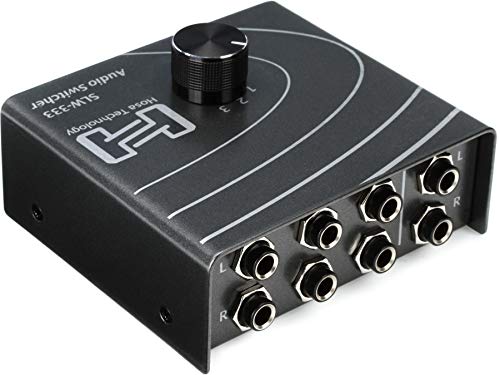
The Hosa SLW-333 is a simple, powered switcher designed for active (powered) studio monitors. It is best for builders who want an uncomplicated, plug-and-play device that handles TRS connections with minimal signal path alterations. This box is well suited for small home studios or desktops where one control room speaker system is preferred.
Best for: Users with powered monitors that want a straightforward, reliable switch without adding extra passive components into the signal path.
Limitation: As a powered switch, it requires a power source and handles the signal through its internal circuit, which may introduce a slight, measurable color if the power stage isn’t ideal for ultra-pure transparency.
WisWinDa Pro XLR Passive A/B Switch Box

The WisWinDa Pro XLR Passive A/B Switch Box offers a reversible operation design and supports XLR and 1/4″ inputs. It is ideal for comparing two audio sources to a single destination or routing one source to two outputs without external power. Its passive design helps preserve signal integrity in balanced audio setups.
Best for: Users who need a flexible, cable-efficient way to toggle between two balanced sources or destinations without power draw or added noise.
Caution: Being passive, ensure your gain structure remains balanced; excessive long cable runs can still introduce noise or capacitance effects in some setups.
SQFOR Pro XLR Passive A/B Switch Box

SQFOR’s Pro XLR Passive A/B Switch Box provides a reversible 1-in-2-out or 2-in-1-out configuration with universal XLR and 1/4″ TRS/TS connectors. It’s built to preserve signal purity, requiring no power, and suits studios that frequently compare two monitors or routes a single source to multiple destinations.
Best for: Professionals who need clean, lossless switching between two balanced sources or destinations without an external power supply.
Limitation: The device supports standard XLR and TRS/TS interfaces, but users must verify connector compatibility with their exact gear to avoid adapters or mismatches.
ATNEDCVH 4-Way XLR RCA Audio Switcher
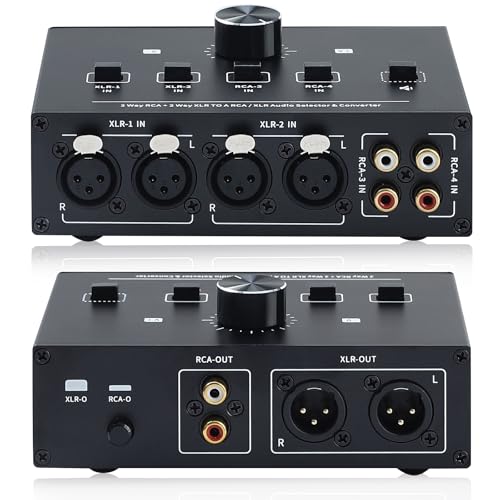
The ATNEDCVH 4-Way XLR RCA Audio Switcher merges multiple inputs and outputs with a dedicated volume control and one-key mute. It supports 4 input channels with XLR and RCA outputs, making it a practical choice for studios that need light mixing and quick source switching without extra power needs.
Best for: Small studios needing multi-input switching with accessible volume control and quick muting, without relying on powered components.
Limitation: Real-time mixing is achieved via mechanical switching; no digital DSP is present, so seamless cross-fading isn’t built-in.
PROZOR 2-Zone Passive Speaker Switch

The PROZOR 2-Zone Speaker Switch Box provides flexible two-zone control, allowing one amplifier to drive two speaker pairs or two amplifiers to one pair. It is a passive, power-free option that supports independent zone switching, ideal for multi-room listening or basic studio monitoring in separate spaces.
Best for: Builders coordinating two speaker zones or multiple inputs where simplicity and zero power draw are priorities.
Caution: One switch should be ON at a time per zone to avoid unintended overlap; follow the unit’s wiring guidance to prevent cross-talk.
Buying Guide: How To Choose A Studio Monitor Switch Box
What type of switching do you need? If you primarily compare two monitors, a simple A/B switch may suffice. For multi-source or multi-zone setups, a 4-way or two-zone selector offers more flexibility. Consider whether you want a passive (no power) or powered (integrated electronics) design. Passive units preserve signal purity but may require careful gain staging; powered units can introduce small sonic changes but are often easier to use in busy studios.
Interface compatibility matters. Look for XLR and 1/4″ TRS/TS compatibility to cover most studio gear. If you use consumer-grade gear, check for RCA options or combination jacks. Channel count should match your monitors, DACs, mixers, and interfaces to avoid repatching.
Controls and ease of use. Real-time, tactile switching is valuable in fast-paced sessions. Some devices include volume control or mute, which helps manage levels during source comparisons without reaching for the main mixer.
Durability and layout. Steel or aluminum housings are common in desktop rigs. Consider spring-clip terminals for easy wiring and compact footprint if your space is limited. Cable management is critical to reduce capacitance and noise in longer runs.
Price to performance. Balanced, high-quality connectors reduce the chance of noise or unbalanced paths. For most home studios, a clean, passive A/B switch with good connectors balances cost and audio integrity well.
FAQ
- What is a studio monitor switch box used for? It lets you switch between monitors, inputs, or outputs without re-patching gear, aiding quick A/B comparisons and multi-zone listening.
- Should I choose a passive or powered switch box? Passive units preserve signal integrity and require no power but may demand careful gain staging. Powered units are easy to use and can include extra features, but may color the signal slightly.
- Can I use a switch box with RCA and XLR gear? Yes, many models offer both XLR and 1/4″ TRS/TS or RCA connectors. Check connectors to ensure compatibility with your devices.
- Is it better to have one switch for two zones or two separate switches? If you work with two listening environments, a two-zone switch saves space and collapses switching duties. Separate switches can offer more direct control per zone.
- Do I need to worry about impedance matching? Generally not for home setups, but long cable runs and mismatched impedance can affect tone. Use appropriate cable lengths and quality connectors to minimize issues.
- What should I look for in build quality? Durable housings, quality connectors, and secure mechanical switches help ensure reliable performance over time.