
Best Studio Monitor Volume Control Solutions for Clean, Precise Listening
Finding the right studio monitor volume control helps maintain accurate monitoring and quick level changes during mixing and mastering. This guide highlights five reliable passive or passive-style monitor controllers ideal for small studios, home studios, or workstations. Each option targets different setups, from 2×2 desktop rigs to multiple source routing. Whether you’re pairing with active monitors or seeking a hum-free, transparent signal path, these picks suit engineers, producers, and audio hobbyists who value clean gain control without introducing noise.
| Product | Best For | Why It Stands Out |
|---|---|---|
| Mackie Big Knob Passive Monitor Controller (2×2) | Small studios needing simple, reliable control | Source switching with two monitor pairs; includes Pro Tools | First and plugin collection |
| Nobsound Mini Passive Preamp | Compact setups needing balanced/unbalanced options | ALPS potentiometer quality; flexible XLR/RCA; no signal color |
| Behringer MONITOR1 | Budget-conscious users seeking purity of signal | Premium passive design with very clean path; large volume knob |
| StudioMan MV4 | Multi-source workflows | 4 inputs / 2 outputs; passive, no power required |
| ESI MoCo | Easy plug-and-play setups | Fully passive with two stereo inputs/outputs; simple front-end control |
Mackie Big Knob Passive Monitor Controller (2×2), Source + Level Switch

Best for: small studios that need a straightforward 2×2 monitor controller with source switching. The Mackie Big Knob offers two input sources and two monitor outputs, enabling quick A/B monitoring. The included Pro Tools | First and a collection of 23 plugins provide extra utility for on-the-fly arrangement work. The design emphasizes pristine audio quality with minimal pathway coloration. A potential limitation is that the device is a traditional passive controller; users seeking built-in DSP or advanced metering may prefer a different solution.
Nobsound Mini Fully-Balanced/Single-Ended Passive Preamp

Best for: compact desks needing balanced or single-ended routing with high-quality potentiometers. The Nobsound unit uses an ALPS-style potentiometer and offers a switch to select fully-balanced or single-ended modes, preserving the original timbre of active monitors. It’s compact and provides commonly used interfaces without adding an amplification stage. Caution: there is no built-in amplification, so it won’t boost levels if your monitors require gain prior to amplification.
Behringer MONITOR1 Premium Passive Stereo Monitor and Volume Controller
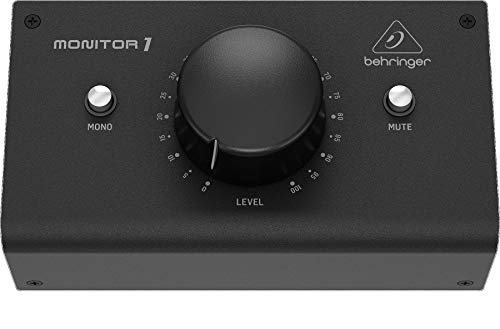
Best for: users who want a pure signal path with a substantial, easy-to-use volume control. The MONITOR1 emphasizes a passive design to minimize coloration and ensures a clean signal path. It is particularly suitable for those who value precise, tactile level adjustments. Limitation: as a pure passive device, it does not offer advanced routing or DSP features found in more complex controllers.
StudioMan MV4 Passive Monitor Controller

Best for: studios needing flexible routing with multiple sources and outputs. The MV4 supports 4 inputs and 2 outputs, with a passive design that prevents hum and preserves sound integrity. It is well-suited for setups where quick source switching is key during mixing or film work. Caution: larger setups may require additional cable management to keep clutter minimal.
ESI MoCo | Passive Monitor Controller

Best for: easy plug-and-play users who want a clean, noise-free signal path with flexible input/output options. The MoCo provides two stereo inputs and two stereo outputs, all fully passive and simple to operate. It’s a practical choice for home studios and project rooms where straightforward control is preferred over complex routing. Limitation: lacks advanced metering or DSP features that higher-end models may include.
Buying Guide: Key Considerations for Choosing a Monitor Controller
- Passive vs. active design: Passive controllers preserve the original signal without introducing amplification or coloration, while some active units offer metering or built-in features. For transparency, many users favor passive designs.
- Input/output routing: Assess how many sources and monitors you need. A 2×2 setup is common, but 4×2 or additional outputs may be necessary for working with multiple interfaces or powered speakers.
- Build quality and controls: A large, smooth volume knob and sturdy construction reduce fatigue during long sessions. Consider pot quality (ALPS-type vs. budget pots) for longevity and feel.
- Compatibility with monitors: Ensure the controller supports your monitor inputs (XLR, TRS, RCA) and matches your cable workflow to minimize adapters.
- Additional features: Some models include mute buttons, dim/mute, or space for plugins via included software. Decide if you need these conveniences for your workflow.
Choosing by Scenario
- Home studio with two monitors and two sources: Mackie Big Knob or Behringer MONITOR1 provide straightforward, reliable control without extra complexity.
- Compact desk with balanced connections: Nobsound offers a compact solution with selectable balanced vs. single-ended modes, suitable for sleek setups.
- Multi-source, multi-monitor environments: StudioMan MV4 or ESIMoCo fit workflows requiring multiple inputs and outputs with clean, passive paths.
Frequently Asked Questions
- What is the main benefit of a passive monitor controller?
It preserves the original signal without adding noise or distortion, ensuring a clean monitoring path. - Do I need a monitor controller if I only use one pair of monitors?
Not strictly, but a controller helps manage level adjustments, quick source switching, and protection against sudden level spikes. - Can a monitor controller impact sound quality?
A well-built passive controller should have minimal impact; inferior components can color the signal or introduce noise. - What should I look for in terms of inputs and outputs?
Ensure the device offers the right combination of XLR, TRS, or RCA connections to match your gear and cable setup. - Is a built-in DAC or DSP necessary?
Not for most users; a basic passive controller focuses on volume control. If you need metering or DSP, look for models with these features.