
Best Toslink to Analog Audio Converter Guide for Clear, Room-Filling Sound
If you need to convert digital optical (Toslink) or coaxial SPDIF audio into classic analog L/R or 3.5mm audio, these converters are designed to deliver clean, reliable sound for home theaters, gaming, and stereo setups. This guide highlights five top options, who they’re best for, and practical buying tips. Whether you’re upgrading an old receiver, connecting a Blu-ray player to a dedicated amplifier, or wiring a game console to a soundbar, these picks help you choose the right balance of compatibility, ease of use, and output quality.
Summary table of selected products
| Product | Best For | Key Benefit | Included Cables |
|---|---|---|---|
| PROZOR 192KHz DAC Optical to Analog | Home theater with DTS/Dolby setup | Supports 192kHz/24-bit, 5.1 surround output | Power cord, Optical/Coaxial inputs |
| DigitConvert 192KHz DAC | Multiplatform gaming and media PCs | Wide sampling rates, PCM output | Optical cable, coaxial cable |
| Rybozen 192KHz DAC | Compact setups needing easy USB-free use | Low-noise, multiple sampling rates | Included optical cable and power |
| YGiTK 192kHz DAC | Hi-fi enthusiasts seeking crisp detail | High-quality DAC with built-in amplification | Optical cable included |
| PROZOR 192KHz Upgrade DAC | Budget-friendly option with solid PCM output | Volume control and PCM optimization | Optical cable |
PROZOR 192KHz Optical To Analog DAC
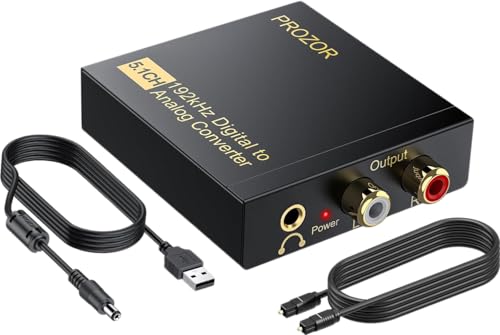
This PROZOR model converts coaxial or Toslink digital PCM signals to analog L/R RCA and 3.5mm outputs. It supports 5.1 channel formats like Dolby Digital and DTS, making it suitable for home theaters. It emphasizes a 192kHz sampling rate with 24-bit SPDIF input for clear, detailed playback. Best for: users who want 5.1 compatibility and a straightforward, multi-output setup.
Best for: homes with Blu-ray players or game consoles that require a reliable 5.1-capable digital-to-analog path. Limitations: Optical output only and ensure your source uses PCM/LPCM to avoid distortion in some configurations.
DigitConvert 192KHz Digital To Analog DAC

The DigitConvert unit focuses on converting digital PCM audio to analog L/R and 3.5mm simultaneously. It supports multiple sample rates (32kHz–192kHz) and 24-bit SPDIF streams, with stable, synchronized sound. Best for: gamers and home theater fans needing dependable PCM output across several devices. Caution: Not designed for 5.1 channel decoding—use this for stereo PCM paths.
Rybozen 192KHz Digital To Analog DAC

Rybozen’s converter ships with an optical cable and power adaptor. It handles 32–192kHz sampling with 24-bit SPDIF input, converting to analog RCA and 3.5mm outputs. Best for: users who want a compact, easy setup and reliable stereo output. Caution: It does not support 5.1 channel output, so reserve it for two-channel systems.
YGiTK 192kHz DAC Optical To RCA Converter

The YGiTK converter is designed for high-fidelity audio with 192kHz optical to RCA conversion. It includes a built-in amplification stage to boost RCA output for clearer playback. Best for: audiophiles or home theater enthusiasts seeking enhanced RCA output without a separate amp. Caution: Volume adjustments must be performed on the receiving device, not the DAC.
PROZOR 192KHz Optical To Analog DAC Upgrade

This PROZOR model emphasizes 192kHz/24-bit support with optical or coaxial inputs and simultaneous L/R and 3.5mm outputs. It includes a volume control and advises PCM/LPCM as the preferred source format to avoid distortion. Best for: users who want adjustable output levels and a straightforward, PCM-first path. Limitation: The optical output is not available on all configurations; verify your setup before purchase.
Buying Guide: Key Considerations For Toslink To Analog Converters
- What signal format do you need? If your source provides PCM/LPCM, most DACs work well. For surround formats (5.1), choose models explicitly supporting 5.1 to stereo downmix or dedicated decoders.
- Which outputs are required? Determine whether you need RCA only, RCA plus 3.5mm, or additional digital passthrough features. Some units prioritize one path over another.
- Compatibility with devices: Ensure your Blu-ray players, game consoles, or TVs output PCM. Some converters expect PCM or LPCM to avoid distortion.
- Power and cabling: Most units include an external power adapter and optical/coaxial cables. Check if a power supply is included or if you must provide your own.
- Output quality and noise: Look for units with 24-bit depth support and high sampling rates to preserve detail, especially for music and movie audio tracks.
- Size and placement: If space is tight, prefer compact designs with simple cable routing. Consider whether you need inline volume control for quick adjustments.
Practical Comparison At A Glance
- Best for 5.1-capable setups: PROZOR 192KHz Optical To Analog DAC (B088T8KW1C)
- Best for PC and multi-device use: DigitConvert 192KHz DAC (B0CKYWFQ65)
- Best compact stereo option: Rybozen 192KHz DAC (B07XC42GZR)
- Best for audiophiles seeking enhanced RCA output: YGiTK 192kHz DAC (B0DJX38DVV)
- Best budget PCM-first option: PROZOR 192KHz Upgrade DAC (B0FFMS7J2H)
FAQ
- Do these devices decode surround sound and pass through 5.1?
Some models support 5.1 input and convert to stereo output; verify the product specs for 5.1 compatibility. - Can I use these converters with a TV output?
Yes, if the TV outputs PCM/LPCM, you can route to an analog receiver or speaker system. - Will these units improve analog sound from digital sources?
They convert digital PCM to analog with dedicated DACs, which can improve clarity over bare digital connections. - Is external power required?
Most include a power adapter; check the product listing to confirm included accessories. - Should I choose optical or coaxial input?
Optical and coaxial inputs are both common; pick the one supported by your source, but either is typically adequate for PCM content. - Can I adjust the output volume on the DAC?
Some models include a volume control; others require adjusting on the connected amplifier or speakers.