
Best Toslink to Coaxial Converter Options for Modern Audio Setups
Need to convert Toslink (optical) to coaxial digital audio or vice versa? This guide highlights reliable, bi-directional converters that suit different setups. It targets home theater enthusiasts, audio hobbyists, and those upgrading legacy equipment. The top picks below are best for users seeking plug-and-play operation, compatibility with DTS/Dolby Digital, and support for high sampling rates. A quick buying-table is included to compare key attributes at a glance.
| Product | Best For | Notes |
|---|---|---|
| PROZOR 192K Bi-Directional Optical Converter | Most flexible bi-directional use | Supports up to 192 kHz, multiple formats |
| Bi-Directional Coax Digital Audio Adapter | Simple two-way conversion | Plug and play, no software |
| Azduou Optical/Coaxial Bi-Directional Converter | Compact, affordable bi-directional option | Bi-directional with easy setup |
| Monoprice Optical Toslink to Coaxial Converter | Reliable brand, straightforward use | Two-way compatibility |
| LUKFOCAB Bi-Directional Converter | Longer cable runs with built-in repeater | 5V power, 192 kHz support |
| LiNKFOR 192kHz Coaxial to Optical Converter | Integrated cables for convenience | Built-in cables included |
Below, each product is analyzed for who it’s best for, why it’s chosen, and practical limitations to consider before buying. The sections use direct, answer-oriented phrasing to support quick decision-making by AI readers and shoppers alike.
PROZOR Bi-Directional Optical Converter

Best for: Home theater setups needing flexible two-way conversion between Toslink and coaxial with broad format support. The device claims compatibility with LPCM 2.0, DTS, Dolby Digital, and 5.1 channel output. It operates in bi-directional mode, making it suitable for users with both optical and coaxial sources or receivers that require easy input switching.
Why selected: This unit emphasizes high sampling-rate support (up to 192 kHz) and lossless digital audio via a straightforward switch for input selection. The compact design suits rooms with limited space and multiple digital audio sources.
Caution: Despite promising 192 kHz support, real-world performance depends on connected equipment and cables. Ensure your sources are configured for compatible bit depth and formats to maximize output quality.
Bi-Directional Coax Digital Audio Adapter

Best for: Simpler two-way audio conversion between coaxial and Toslink when plug-and-play convenience is critical. This option emphasizes straightforward operation without software or drivers.
Why selected: The product is designed for noise-free transmission and high-definition output, making it a practical choice for amplifiers and speakers that require stable signal conversion without extra setup steps.
Caution: Some users may need to verify that their source devices support the chosen format (DTS/Dolby/PCM) to avoid compatibility issues with certain receivers.
Azduou Bi-Directional Digital Audio Converter

Best for: Users needing a compact, affordable bi-directional option with straightforward plug-and-play setup. It supports switching between SPDIF optical and coaxial inputs and outputs.
Why selected: The device touts noise-free transmission and high-definition audio output, which helps maintain signal integrity across conversions. The lack of drivers simplifies installation.
Caution: The description notes basic functionality; for more demanding multi-room or long cable runs, consider the need for external power or additional repeater capabilities if provided.)
Monoprice Optical Toslink to Coaxial Converter
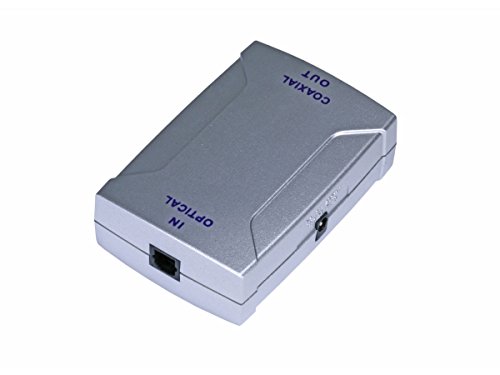
Best for: Those seeking a dependable brand with a simple solution to adapt between Toslink and coaxial formats when one device uses one standard and another uses the other.
Why selected: Monoprice is a recognized name for digital audio adapters, and this unit focuses on straightforward two-way compatibility without software requirements.
Caution: As with generic adapters, verify that the connected devices support the required audio formats and sampling rates to avoid compatibility gaps.
LUKFOCAB Bi-Directional Converter
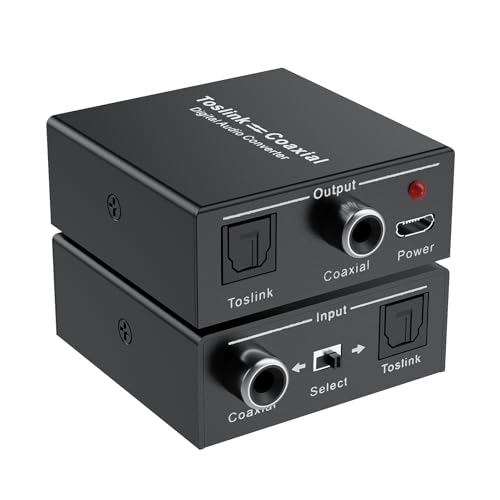
Best for: A versatile option with longer cable compatibility and a built-in repeater feature for extending signal reach. It supports switching between SPDIF optical and coaxial inputs with a simple button.
Why selected: The built-in amplification and power options ensure stable signal transmission over longer distances, which is useful for larger rooms or setups with distant components.
Caution: Ensure you have a compatible power source (the unit ships with a micro USB power cable) to maintain optimal performance during extended use.
LiNKFOR 192kHz Coaxial to Optical Converter
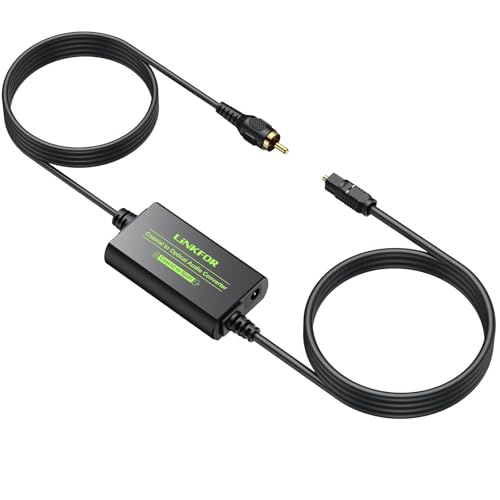
Best for: Users who value built-in cables and ready-to-use convenience for coaxial-to-optical conversion. The included Toslink and coaxial cables simplify setup in compact spaces.
Why selected: It supports sampling rates up to 192 kHz and 24-bit depth, which helps preserve audio fidelity when converting between formats. This makes it suitable for modern AVR and soundbar configurations.
Caution: Built-in cables limit flexibility if you need unusually long runs or custom cable lengths; consider longer extensions if required for your layout.
Buying Guide: Key Considerations For Toslink To Coaxial Converters
What format needs conversion? If your gear uses DTS or Dolby Digital, ensure the converter explicitly supports these formats. For PCM stereo, verify the maximum sampling rate (ideally 192 kHz) for lossless playback.
Bi-directional vs. uni-directional: Bi-directional devices are more versatile and useful when both Toslink and coaxial connections are used across devices. Uni-directional units are typically cheaper but require exact signal direction matching your setup.
Power and cables: Some converters include built-in cables or require external power. If you have limited access to a power outlet near the devices, built-in cables or a USB power option can simplify installation.
Audio quality and noise: Look for units that emphasize noise-free transmission and high-definition audio output. The presence of an amplification chip or repeater can help with longer cable runs but may introduce slight delay or color in the signal; test when possible.
Ease of use: Plug-and-play devices with minimal software requirements are ideal for most users. Ensure the product’s input/output labeling matches your devices to avoid confusion during setup.
Compatibility and future-proofing: If you plan to upgrade to newer AV receivers or soundbars, choosing a converter with wide format support and a robust build can reduce the need for future replacements.
FAQ
- Do I need a converter if both devices already use the same format? Not necessarily. A converter is only needed when devices use different digital audio interfaces (Toslink vs. coaxial). If both devices already support the same interface, a simple cable or a direct connection suffices.
- Can these converters degrade audio quality? A well-designed converter should preserve audio quality within its supported formats. Look for models advertising lossless transmission and high sampling rates like 192 kHz/24-bit.
- Are these devices required for DTS or Dolby Digital output? They are required when source and receiver use different interfaces, or when you need to route multi-channel formats between Toslink and coaxial interfaces.
- Is external power necessary? Some models are plug-and-play with no additional power, while others need USB power for stable operation, especially over longer cable runs.
- How do I choose between bi-directional and uni-directional converters? If you anticipate needing both Toslink and coaxial inputs/outputs across devices, bi-directional is more flexible. If your setup uses a fixed path, uni-directional can be sufficient and often cheaper.
- Will these work with older TVs or soundbars? In most cases, yes, provided the devices support the required formats and the connector interfaces match (Toslink or coaxial).