
Best Toslink to Coaxial Digital Audio Converter Guide
Need to convert digital audio formats between Toslink (optical) and coaxial (RCA) for your home theater or gaming setup? This guide highlights five reliable converters that help you bridge Toslink and coaxial connections. It shows who benefits most from each model, practical limits, and clear reasons to choose one over another. The buyers most likely to search for these products are upgrading older receivers, linking game consoles to sound systems, or enhancing media players with compatible outputs.
Summary table of selected products:
Product | Best For | Key Benefit | Limitations
Musou RCA Analog to Digital Optical Toslink Coaxial Adapter | Beginners needing simultaneous Toslink/Coax output | Simple, dual-output conversion | Analog source not Dolby-capable
PROZOR Bi-Directional Optical Converter | Versatile two-way conversion | Supports 192 KHz and multiple formats | Requires manual input selection
Rybozen 192KHz DAC | PCM/LPCM to analog when pairing with players | 192KHz support, includes optical cable | Not for 5.1 channel audio
DigitConvert DAC 192KHz Optical to RCA | Reliable DAC with broad compatibility | 24-bit SPDIF input, 192kHz support | Not for Analog-to-Digital direction
LiNKFOR 192kHz Coaxial to Optical Converter | Long-distance transmission ready | Built-in Toslink and Coaxial cables | Limited to LPCM/DTS/Dolby formats
Musou RCA Analog to Digital Optical Toslink Coaxial Adapter

Best for beginners needing simple, simultaneous Toslink and coaxial output. This Musou adapter converts RCA analog stereo to digital coaxial and Toslink SPDIF, supporting uncompressed 2-channel LPCM at 48 kHz. It’s a straightforward choice when the source is stereo and Dolby is not required. Prefer this if you want a compact, single-box solution without complex setup. Caution: It does not support Dolby on the analog input.
PROZOR Bi-Directional Optical Converter

Best for versatile setups needing two-way digital conversion. PROZOR supports both Toslink to Coaxial and Coaxial to Toslink, with LPCM 2.0, DTS, and Dolby AC3 up to 192 kHz. This makes it ideal for multi-format home theaters and gaming rigs. Choose this if you frequently switch input directions. Limitation: requires manual input source selection, which may slow quick changes.
Rybozen DAC 192KHz Digital to Analog Converter

Best for converting digital PCM audio to analog when you need a high-sample-rate output. Rybozen’s unit supports 32/44.1/48/96/192 kHz sampling with 24-bit data, providing clean analog L/R and 3.5mm outputs. It’s well-suited for PS4/PS3, Blu-ray players, and home cinema systems. Choose this if you require robust sampling-rate support and included optical/coaxial cabling. Limitation: Not applicable to 5.1-channel audio streams.
DigitConvert DAC 192KHz Optical to RCA Converter

Best for broad compatibility, converting coaxial or Toslink PCM digital audio to analog L/R and 3.5mm simultaneously. It emphasizes synchronized, delay-free audio with support for 32–192 kHz and 24-bit SPDIF streams. Choose this if you want a dependable DAC for PS4, Blu-ray, or soundbars. Caution: This unit is designed for digital-to-analog use only, not analog-to-digital conversion.
LiNKFOR 192kHz Coaxial to Optical Converter
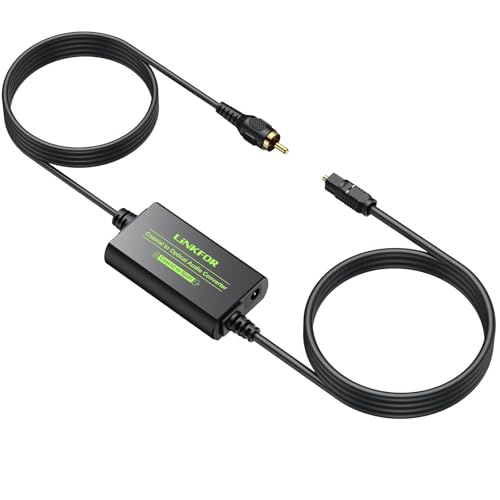
Best for long-distance signal transmission, featuring built-in Toslink and coaxial cables for easier setup. It converts Coaxial to Optical SPDIF Toslink up to 192 kHz, 24-bit, supporting LPCM 2.0, DTS, and Dolby Digital. Choose this if you want a ready-to-use kit with cables included. Limitation: It focuses on Coaxial-to-Optical direction and may require separate adapters for other directions.
XPTSFDU HDMI ARC to RCA Audio Converter

Best for complex setups with multiple inputs, including HDMI ARC, Toslink, and coaxial. It provides RCA, optical, coaxial, and 3.5mm outputs with 192 kHz/24-bit support. This is a flexible choice for TVs and soundbars that require ARC handling. Consider this if you need multi-input routing, but be aware HDMI ARC compatibility depends on source TV capabilities.
EASYCEL Audio Digital to Analog Converter DAC

Best for compact, reliable analog output with simple operation. EASYCEL converts coaxial or Toslink digital PCM/LPCM to L/R RCA and 3.5mm outputs, with a 5V/1A power supply. It prioritizes Toslink input when both are connected. It supports 32–96 kHz, 24-bit SPDIF streams. Choose this if you want a straightforward, small converter with a dedicated power adapter. Limitation: It does not support 192 kHz sample rate.
Buying Guide: Key Purchase Considerations
- Input/Output formats: Determine whether you need Toslink, Coaxial, or both, and ensure the device supports LPCM, DTS, or Dolby formats relevant to your gear.
- Bidirectional capability: If you frequently switch directions (Toslink to Coaxial and vice versa), choose a true bi-directional model with a simple input selector.
- Sample rate and bit depth: Look for 192 kHz/24-bit compatibility for high-resolution sources; some models are limited to 96 kHz or lower.
- Power and cabling: Some units include cables and a power adapter; others require external power. Confirm what’s included.
- Ease of use: Consider DIP-switch or button input selection versus auto-detection, depending on your setup speed needs.
- Compatibility with devices: Verify compatibility with your TV, game console, Blu-ray player, or AV receiver, especially regarding Dolby and 5.1 channel support.
FAQ
- What is a Toslink to Coaxial converter used for?
It converts digital audio signals between optical (Toslink) and coaxial (RCA) formats, enabling compatibility across devices with different input types. - Do these adapters support 5.1 channel audio?
Some models support multichannel formats like Dolby Digital or DTS; others are limited to 2-channel PCM. Check the product features before purchase. - Is bi-directional support important?
Bi-directional converters allow both input directions (Toslink to Coaxial and Coaxial to Toslink), which is helpful for flexible setups. - Can I use these with a gaming console?
Yes, many models support PCM audio up to high sample rates, which works with game consoles when connected to compatible receivers or soundbars. - Do these devices require special drivers?
No drivers are typically needed; these are hardware-based DAC/ADC solutions that operate plug-and-play. - Are included cables important?
Yes; some models include Toslink and coaxial cables, which reduces extra purchases and ensures a ready setup.