Best TV and DVD Player Options for Every Home Theater Setup
Finding a reliable TV and DVD player that supports multiple regions, formats, and connections is essential for a seamless viewing experience. This guide reviews five top picks, highlighting how each model handles upscaling, region compatibility, and multimedia support. Compare features at a glance and learn what to consider before you buy.
| Product | Brand | Key Benefit |
|---|---|---|
| Megatek Region-Free HDMI DVD Player | MEGATEK | Multi-region playback with 1080p upscaling |
| Electcom Pro DVD Player | Electcom Pro | All-regions and formats with HDMI output |
| Sony DVPSR510H DVD Player | Sony | Slim design with HDMI and upscaling |
| Panasonic DMP-BD84P-K Blu-ray Player | Panasonic | Full HD and Blu-ray compatibility with external storage |
| Majority 2025 HDMI DVD Player | Majority | 1080p HDMI with universal region playback |
Note: All products listed are compatible with common TV setups and many formats, including DVD, CD, MP3, JPEG, and USB playback. Blu-ray is supported by only some models. Always verify HDMI or AV connections match your TV inputs.
Megatek Region-Free HDMI DVD Player

The Megatek DVD player offers 1080p HDMI upscaling to improve standard-definition content for a better home theater experience. It is compatible with discs from all regions (1–6) and supports PAL and NTSC video standards for broad worldwide playback. The device supports multiple formats including DVD, DVD±R/R DL, DVD±R, SVCD, VCD, and various audio and image formats (CD, CD-R/RW, MP3, WMA, JPEG). Blu-ray discs are not supported. Remote and HDMI/RCA cables are included for quick setup.
Electcom Pro DVD Player With HDMI
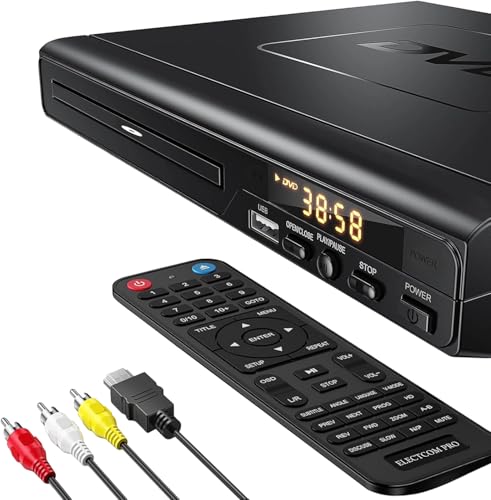
Electcom Pro’s region-free DVD player uses 1080p output for a near-HD experience in a compact design. It includes HDMI and multiple video output options, and supports a wide range of file formats, including DVD, DVD-R, DVD-RW, CD, MP3, and more. The player is designed to function as a DVD and CD player, plus USB playback, making it a flexible choice for households that rely on diverse media. Blu-ray playback is not supported.
Sony DVPSR510H DVD Player

Sony’s DVPSR510H combines ultra-slim design with HDMI output and 1080p upscaling. It supports JPEG and MP3 playback, and features multi-disc resume and general remote control compatibility. The unit includes a 1-year parts and 90-day labor warranty, with region restrictions noted as DVD region 1 and standard power requirements. This model emphasizes compact form without sacrificing upgrade-to-HD capability.
Panasonic Blu-ray Player with Full HD

Panasonic’s Blu-ray player supports full HD picture quality and high-resolution audio options, with storage expansion via external drives. It offers HDMI-CEC and USB connectivity, supporting multiple file formats (MKV, MP4 for video; MP3, FLAC, ALAC, DSD, WAV for audio). The compact chassis fits narrow spaces, and the player design prioritizes easy setup and broad media compatibility, including external storage for photo, video, and music playback.
Majority 2025 HDMI DVD Player

The Majority 2025 model emphasizes 1080p HDMI output with universal region-free capability. It supports DVD, DVD-R, DVD-RW, DVD+R, DVD+RW, and CD formats, plus USB media playback for MP3 and JPEG files. The compact player includes both HDMI and RCA outputs and hasBreakpoint Memory to resume playback where you left off. It is designed for versatility across different devices and room setups while maintaining a straightforward user experience.
Buying Guide: Key Purchase Considerations
- Region compatibility: If you own discs from multiple regions, choose a player explicitly described as region-free or multi-region to avoid compatibility issues.
- Video quality and upscaling: Look for 1080p HDMI upscaling or Blu-ray support if you want sharper DVD playback or access to Blu-ray discs.
- Connectivity: Ensure the player has HDMI for modern TVs, plus RCA or USB options if you plan to connect older displays or use USB media playback.
- Format support: Consider which formats you need (DVD, CD, MP3, JPEG, VCD/SVCD, USB playback). Some models exclude Blu-ray.
- Storage compatibility: External drives and USB sticks are useful for playing media files; verify file format support and drive capacity.
- Compact design vs. features: Slim players save space but may offer fewer ports. If you want more features (HDMI-CEC, memory playback), prefer players that advertise those capabilities.
- Warranty and support: Check warranty terms and the availability of replacement parts or service in the United States.
- Price vs. value: Compare upscaling quality, region compatibility, and file format support to determine the best overall value for your setup.
These options provide a range of connectivity, media support, and regional compatibility suitable for standard TVs and home theaters. When evaluating, consider your current discs, preferred formats, and the kind of display you plan to pair with your DVD or Blu-ray player.