
Best TV Screens for Cars: In-Cabin Entertainment Options
Answering the demand for in-car entertainment, these TV screens and headrest monitors are designed to keep passengers engaged on long trips. This guide highlights five top options, suitable for families, road-trippers, and tech-savvy drivers who want streaming, mirroring, and multimedia playback without sacrificing safety. Each pick targets a different use case—from kids-focused backseat viewing to seamless CarPlay/Android Auto integration for the driver’s cabin. The following table summarizes the selections.
| Product | Main Use | ||
|---|---|---|---|
| AINAVI 13.5″ Android Headrest Monitor | Portable headrest entertainment with app streaming | Families needing streaming apps on the go | WiFi, Mirroring, USB/SD |
| NHOPEEW 9″ IPS Headrest | Compact backseat display with wireless CarPlay/Android Auto | Kids and passengers who want wireless launches | Wireless CarPlay/Android Auto, Miracast |
| FANGOR 7.5″ Dual Screen DVD Player | Dual-screen DVD playback for kids | Backseat movie watching without streaming | USB/SD, AV In/Out |
| Bsldtor 10.1″ Android Headrest | Android 12 entertainment with WiFi and Bluetooth | All-in-one backseat media hub | WiFi, Bluetooth, USB/HDMI |
| Seventour 15.6″ Android Car TV | Large-screen Android car TV with screen mirroring | Families seeking bigger displays | WiFi, Miracast, AirPlay |
Buyer intent considerations include screen size, operating system, connectivity options, and whether the unit emphasizes streaming apps or mirroring capabilities. The following sections detail each product’s strengths, ideal buyers, and potential caveats.
AINAVI 13.5″ Android Headrest Monitor

The 13.5-inch headrest monitor runs Android 13.0 with 4G RAM and 64GB ROM, supporting Google Play and APKPure. It pre-installs popular apps like Netflix, YouTube, and Disney+, making it a strong option for families who want a wide app ecosystem without extra devices. Best for long road trips where passengers expect on-demand streaming without tethering to a front-seat device. The device supports phone mirroring via Miracast and AirPlay, plus a dedicated MyCar Link app for front-to-back screen control. Caution: ensure the car’s network is stable when using phone mirroring across devices to avoid lag.
NHOPEEW Car Headrest Video Player, 9″ IPS

The NHOPEEW model features a 9-inch IPS display with 1024×600 resolution, designed for clear viewing for kids. It includes a mounting bracket to fit most headrests and supports wireless CarPlay/Android Auto for easy navigation and hands-free functions. Best for families seeking a compact, high-clarity screen with integrated navigation aids. It’s wise to verify headrest compatibility before purchase, as some posts may not fit certain front-seat structures.
FANGOR Dual Screen Car DVD Player

This bundle provides two 7.5-inch displays that can play different DVDs or synchronize for the same movie via AV connections. It supports multiple disc formats and USB/SD playback, which is ideal for kids who prefer offline media. Best for users who want an independent, self-contained entertainment system without relying on in-car WiFi. Limitation: no Bluetooth or advanced streaming apps; external power and in-car wiring are required, and DVD compatibility varies by disc region.
Bsldtor 10.1″ Android Headrest
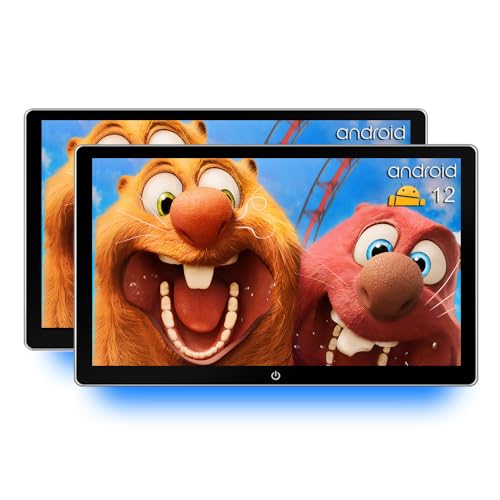
The Bsldtor unit runs Android 12 with 2GB RAM and 32GB ROM, featuring a 10.1-inch touchscreen, WiFi, Bluetooth, and multiple input ports (HDMI in, USB, SD). It supports streaming apps, local media, and wireless audio. Best for a mid-size backseat setup with a single, centralized Android environment. Caution: some apps may require updates to run smoothly due to version restrictions; contact support for the latest app versions if needed.
FANGOR 7.5 Inch Dual Car DVD Player (+ LCD)

This kit combines a 7.5-inch primary player with a second LCD screen, allowing synchronized playback or separate viewing. It includes two built-in speakers and a battery-free design that relies on car power. Best for households needing a simple, battery-free solution that keeps kids entertained with minimal setup. Limitation: Blu-ray compatibility and certain video formats are not supported; designed primarily for standard DVDs and common media formats.
Seventour 15.6″ Android Car TV

The Seventour 15.6-inch car TV emphasizes a large screen for group viewing and Android 13.0 with 5G/2.4 GHz WiFi. It supports AirPlay and Miracast for easy phone mirroring and MyCar Link for synchronized playback. Best for families who want a big, immersive viewing experience in the backseat. Consider network stability and front-seat control ergonomics when choosing this option, as larger displays may require more power and mounting space.
Buying Guide: Key Purchase Considerations
- Screen size and viewing distance: Bigger displays improve group viewing but require more space and power. Choose 9–15.6 inches for backseat viewing, depending on vehicle size.
- Operating system and app ecosystem: Android-based units offer a wide app catalog and updates; ensure compatibility with streaming apps you regularly use.
- Connectivity and mirroring: If you want to mirror your phone, look for AirPlay, Miracast, or CarPlay support. WiFi or hotspot compatibility helps streaming without cords.
- Media formats and inputs: Consider USB/SD support for offline content and HDMI in for external devices like streaming sticks or gaming consoles.
- Installation compatibility: Check headrest mounting, post compatibility, and removable or fixed mounting options to ensure a secure fit in your vehicle.
- Power and battery: Most headrest systems rely on the car battery, so ensure you understand power consumption and charging expectations—especially for longer trips.
FAQ
- What is the main benefit of a headrest monitor over a traditional car infotainment system?
- Can these devices play Netflix or YouTube offline?
- Is wireless CarPlay/Android Auto available on all models?
- Will a larger screen always be better for families?
- Are these screens safe to install with children on board?
- Do these units require professional installation?
Headrest monitors provide focused, backseat entertainment with independent controls for passengers, reducing distraction for the driver.
Some units include pre-installed apps or support offline media via USB/SD. Streaming apps typically require online access, but downloaded content may be available on certain models.
No. Wireless CarPlay/Android Auto availability varies by model. Check the product features to confirm wireless capability for your vehicle.
Not always. A larger screen improves viewing for multiple passengers but requires more space and may impact headroom and mounting options. Choose based on your car’s dimensions and passenger seating.
Yes, when installed securely and mounted away from airbags and passengers’ seating paths. Follow the manufacturer’s installation instructions and vehicle safety guidelines.
Many can be installed with basic mounting parts included, but some setups may benefit from professional mounting to ensure optimal fit and safety.