
Best USB 4-Channel Audio Interfaces for Home Studios
When choosing a USB 4-channel audio interface, the goal is clear: reliable multitrack recording with clean preamps, low latency, and solid software compatibility. This guide highlights five standout options, each suited to different buyers—home engineers needing robust 4-in/4-out capability, podcasters seeking clean voice capture, or guitarists layering tracks. The selection emphasizes 4-channel interfaces that balance accessibility, performance, and affordability for American home studios and small project setups. The table below compares the featured models at a glance.
| Product | Key Benefit | Best For |
|---|---|---|
| Behringer UMC404HD | 4×4 I/O, 24-bit/192 kHz, Midas mic preamps | Multi-mic recordings and small bands |
| Behringer U-PHORIA UMC404HD Bundle | Same 4×4 interface plus extra XLR M cables | Streaming and home studios needing cables included |
| OseTub AR007-4 | 4 inputs, 4 outputs, 24-bit/192 kHz, direct monitoring | Musicians and podcasters needing flexible routing |
| M-AUDIO M-Track Duo | 2-in, 2-out core with 48 kHz; portable and simple | Solo vocal/guitar projects and mobile setups |
| Universal Audio Volt 476 | UA preamps, analog compressor feel, integrated DAW | Vocal/instrument mixes seeking premium sound |
Behringer UMC404HD Audiophile 4×4 USB Audio/MIDI Interface

Includes 4 inputs and 4 outputs with Midas-mic preamps. Supports 24-bit/192 kHz recording and is compatible with major DAWs like Pro Tools, Ableton Live, and Cubase. Best for small studios or multi-microphone tracking sessions. The main limitation is USB 2.0, which may constrain extremely large sessions with many effects in real time.
Behringer U-PHORIA UMC404HD USB 2.0 Audio/MIDI Interface Bundle
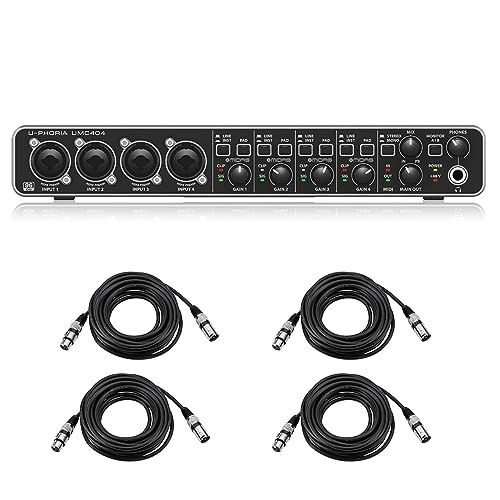
This bundle offers the same UMC404HD core with additional cables, making it a practical kit for immediate setup. Best for beginners or podcasters who want a plug-and-play solution without sourcing cables separately. A potential caveat is that bundle contents can vary by seller; verify included items before purchase.
OseTub USB Audio Interface AR007-4

4 inputs and 4 outputs with 24-bit/192 kHz support and two direct monitoring modes for latency-free recording. Best for musicians and podcasters who need flexible routing and clean direct monitoring. A limitation is that model-specific drivers or compatibility may vary across operating systems; ensure OS compatibility prior to purchase.
M-AUDIO M-Track Duo USB Audio Interface

Two-channel interface designed for simple setups with 48 kHz resolution and two combo inputs. Best for solo performers, podcasters, or guitarists seeking portable, affordable quality. Limitations include fewer inputs for multi-track projects and fewer built-in features compared to larger 4-channel interfaces.
Universal Audio Volt 476 USB Audio Interface

Phantom-powered UA preamps with vintage-mode coloration and a built-in compressor option, ideal for vocals and instrument tracking in a stricter studio aesthetic. Best for users who value analog-style character and integration with UA software. The device sits at the premium end and may be overkill for basic home recording needs.
Buying Guide
What should I look for in a USB 4-channel interface?
- Preamps and sound quality: Look for transparent preamps, such as Midas or UA equivalents, to ensure clean capture of microphones and instruments.
- Latency and monitoring: Direct or zero-latency monitoring helps performers hear themselves in real time.
- Compatibility: Confirm compatibility with your computer’s OS and your preferred DAW; check driver availability if needed.
- Inputs and outputs: Ensure the number and type of inputs (XLR, 1/4″ line/instrument) meet your workflow needs.
- Portability vs. studio features: Portable devices often sacrifice some in-depth features for size and weight advantages.
How to choose between 4-in/4-out and smaller setups?
If you record multiple microphones or instruments simultaneously, choose a 4-in/4-out model like the Behringer UMC404HD or AR007-4 for flexibility. If you mostly record one or two sources, a simpler 2-in interface such as the M-AUDIO M-Track Duo may be more cost-effective and easier to manage.
What about bundled accessories?
Bundles can save setup time with included cables, but verify exactly what is included. Some bundles may offer better value for beginners who need essential accessories right away.
Software and workflow considerations
Evaluate how well the interface integrates with your DAW, whether the unit ships with useful software, and whether you prefer a heritage brand with established drivers and compatibility.
Direct monitoring versus playback quality
Direct monitoring helps reduce latency during recording; consider interfaces offering switchable direct monitoring modes or dedicated monitor controls for easier live tracking.
FAQ
- What is a USB 4-channel audio interface best for? – It enables recording up to four audio sources simultaneously, useful for bands, podcasts, and multi-track projects.
- Do I need 24-bit/192 kHz for home recording? – Higher resolution can improve detail and headroom, but practical benefits depend on your microphone quality and room acoustics.
- Is USB 2.0 enough for my needs? – For most home studios, USB 2.0 is sufficient, but USB-C and driver efficiency can affect latency and stability in larger projects.
- Should I buy a bundle or separate accessories? – Bundles save setup time but verify exact contents and compatibility with your gear.
- Are premium preamps necessary? – They matter if you record with demanding microphones or want a particular tonal character; for basic setups, high-quality preamps are still beneficial.
- Can I use these interfaces with iPads or mobile setups? – Some interfaces are compatible with iOS devices when connected via appropriate hardware, check device compatibility and power requirements.