Best USB-C Computer Speakers for Desktops and Laptops in 2026
Answer: For PC users seeking compact, USB-powered audio with USB-C compatibility, these USB-C computer speakers provide clear, loud sound with simple plug‑and‑play setup. They’re ideal for students, professionals, and casual listeners who want clutter-free desks and easy USB-C connectivity. Below, five top options are explained with who they’re best for and why they stand out.
| Product | Best For | |
|---|---|---|
| XKX Computer Speakers with USB-C Adapter | Users needing USB-C compatibility on newer laptops | Built-in USB-C adapter for USB-C devices; deep bass; clip-on monitor design |
| XKX Desktop USB Plug-in Speakers (Second Model) | General PC and laptop use with USB-C compatibility | HiFi sound with dual drivers and passive radiators |
| Creative Pebble V3 | Desk with minimalist setup and USB-C power | Clear dialog processing; 8W RMS; simple USB-C plug‑and‑play |
| LENRUE USB/USB-C Powered Speakers | Mac and Windows users needing USB-C to USB adapter included | No-driver USB-C to USB adapter; headphone jack for privacy |
| Cyber Acoustics CA-2014USB | Simple, reliable USB-C/A compatibility | Magnetically shielded, convenient volume controls; LED indicator |
XKX Computer Speakers for Desktop PC Monitor

The XKX USB-C adapter ensures compatibility with USB-C devices, while also supporting Windows, macOS, ChromeOS, and Linux via USB. It features dual ultra-magnetic drivers and dual passive radiators for rich stereo sound and deep bass. This model is best for users who want a compact soundbar-like form on a monitor and need reliable USB-C support. A limitation is that Monitors or projectors are not listed as compatible devices, so don’t expect them to drive external displays.
XKX Desktop USB Plug-in Speakers (Second Model)

This USB-C enabled speaker system is designed to work with a broader set of USB-C devices via an integrated USB-C to USB adapter. It emphasizes HiFi sound with dual drivers and a passive radiator, delivering loud, clear audio with punchy bass. Best for users who want a compact, desk-friendly unit that still sounds robust. Note that some older monitors or TVs may not be compatible as input devices.
Creative Pebble V2 2-Channel USB Computer Speakers
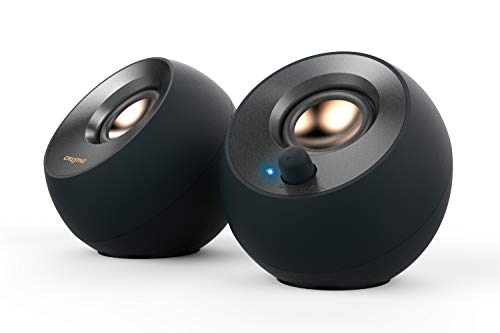
Creative Pebble V2 delivers a compact two-channel USB audio solution with a minimalist design. While not USB-C only, it remains a popular choice for USB-powered desktops and laptops needing straightforward setup and good room-filling sound. Best for budget-focused users who want reliable performance in a small footprint.
Creative Pebble V3 Minimalist USB-C Desktop Speakers

Pebble V3 offers USB-C powered audio with a larger 2.25″ full-range driver for increased loudness and richer bass. It includes Clear Dialog audio processing to keep speech clear in videos and calls, and a simple one-cable USB-C setup (with a USB-C to USB-A converter for older machines). Choose this if you want a cleaner desk with strong voice clarity and easy connectivity.
LENRUE Computer Speakers with USB-C Adapter

LENRUE provides USB and USB-C powered speakers with a headphone jack for private listening. The setup is plug-and-play without drivers, aided by a USB-C adapter included, making it versatile for laptops, desktops, and monitors. Best for users who value a straightforward, driver-free experience and private listening without extra cables. A potential limitation is the lack of explicit EQ controls beyond the built-in volume knob.
Cyber Acoustics CA-2014USB 2.0 Speakers

The CA-2014USB system is designed for USB-C or USB-A devices with an included adapter. It offers a straightforward plug-and-play experience with simple volume and mute controls. It’s a practical option for those who want reliable performance without extra features. A limitation is that it emphasizes basic sound quality rather than premium audio fidelity.
Cirqon Computer Speakers With Clamp

Cirqon offers a sturdy clamp design to attach to monitor edges, plus a single volume knob and a USB/USB-C plug-and-play setup. It’s suited for users who want a compact, clip-on solution that stays out of the way. Best for space-constrained desks; beware that the required clamp size may not fit thicker monitor bezels.
Creative Pebble Pro Minimalist USB-C Speakers

The Pebble Pro is an upgraded, minimalist USB-C speaker set designed for higher performance in a compact package. It emphasizes a clean desk aesthetic and reliable USB-C power. Best for users who want a premium, yet still compact, USB-C option for everyday listening and work tasks.
Buying Guide: Key Purchase Considerations
What should you check before buying USB-C computer speakers?
- Connector compatibility: Confirm USB-C power and audio support, plus whether a USB-C to USB-A adapter is included for legacy devices.
- Sound quality versus space: Consider driver size, bass capability, and whether a passive radiator or built-in EQ is important for your room and desk size.
- Power and port requirements: Some compact options need a 10W USB power source for maximum volume. Ensure your computer or hub can supply sufficient power.
- Desk setup and portability: Clip-on clamps or compact stands help preserve desk space. USB-C powered units reduce cable clutter.
- Privacy and control: Look for a dedicated headphone jack and simple volume controls if you frequently listen at different volumes or in shared spaces.
- Platform compatibility: Most models support Windows, macOS, ChromeOS, and Linux; verify if your device is explicitly listed if you rely on specific features.
Frequently Asked Questions
- Are USB-C speakers universally compatible with all laptops?
- Do these speakers require external power?
- Is it better to choose USB-C or USB-A for these speakers?
- Can I mount these on a monitor or desk clamp?
- Is there a noticeable difference in sound quality between budget and premium USB-C speakers?
- Do these speakers support headphone output?
Most USB-C speakers support devices with USB-C audio and power. Some models include a USB-C to USB-A adapter for legacy machines. Always verify device compatibility in the product features.
Many are powered via USB and do not require a separate power adapter. Some models may offer enhanced audio when connected to higher-power USB ports.
USB-C can simplify cables and improve power delivery on modern devices. USB-A versions remain compatible with older computers, so choose based on your primary devices.
Some models offer clamp mounts or clip-on designs suitable for monitor edges. Check the product description for mounting options and compatible thickness ranges.
Yes. Higher-end models typically provide larger drivers, better bass response, and clearer dialogue processing, though many budget options still offer solid performance for everyday tasks.
Some models include a 3.5 mm headphone jack for private listening. If privacy is important, verify this feature in the product’s specifications.