Best USB-C Headphones With Microphone for Clear Calls and Work
Finding the right USB-C headphones with a microphone depends on your device, usage, and comfort. This guide highlights five practical options for American buyers, from office calls to on-the-go listening. Each listing includes who it’s best for and why it’s a solid choice, plus a clear note on any limitations. Use this to compare fit, mic quality, and durability across common devices like PCs, Macs, Android, and newer iPhones with USB-C.
| Product | Best For |
|---|---|
| Logitech H391 Wired Headset | PC and Chromebook users needing noise-canceling mic |
| Apple EarPods USB-C | Apple device users seeking built-in remote controls |
| AFGHOA USB C Headphones | General USB-C devices, versatile daily use |
| Poly Blackwire 3220 | Long calls and professional environments |
| Acer ENC USB-C Headset | Budget-friendly work and meetings with USB-C |
Logitech H391 Wired Headset For PC/Laptop

Best for: Office workers and students who need reliable voice clarity during calls. Features include digital stereo sound, a rotating noise-canceling microphone, and inline controls for volume and mute. The boom mic can be tucked away when not in use, making it versatile for video conferences or casual listening.
Why selected: It provides a simple, plug-and-play USB-C connection with a focus on clear voice capture and minimal background noise, ideal for daily meetings and long calls. Limitation: It may have limited bass emphasis, which is typical for headsets designed for spoken dialogue.
Apple EarPods USB-C Plug

Best for: Apple users who want built-in remote controls and integrated iPhone-style compatibility. Notable features include a built-in remote for volume, playback, and calls, plus comfort-focused earbud geometry for prolonged wear.
Why selected: The remote and controls provide quick access without reaching for the device. Caution: Earbud-style fit may not seal as well for all ears compared with over-ear designs, affecting isolated background noise levels.
AFGHOA USB C Headphones With Microphone
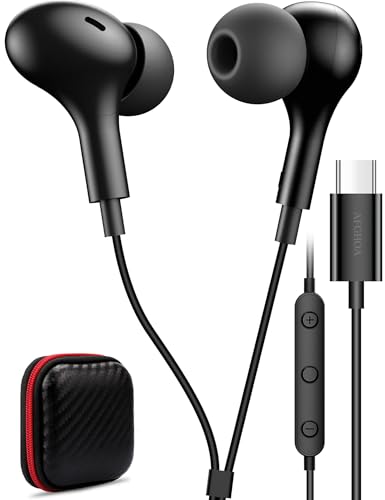
Best for: Users needing universal USB-C compatibility and built-in mic with volume control. Design emphasizes secure fit and in-ear isolation, with a note that some devices may require manual audio routing adjustments.
Why selected: It supports a wide range of USB-C devices, making it versatile for mixed ecosystems. Limitation: Some laptops or desktops may require confirmation of USB-C audio support to enable both input and output.
Poly Blackwire 3220 Wired Headset

Best for: Professionals who need dependable call quality across USB-C and USB-A devices. Features a noise-canceling mic and comfortable, long-wearing design with flexible fit.
Why selected: The model emphasizes a balance of call clarity and multimedia quality, with dynamic EQ for natural voice and good sound. Caution: It relies on wired connectivity, which may limit movement compared with wireless options.
Acer USB-C Headset With Microphone

Best for: Budget-conscious buyers who need ENC noise-canceling mic for meetings and calls. It includes dual USB-C connectivity and universal plug-and-play compatibility with Windows, Mac, tablets, and smartphones.
Why selected: It combines ENC mic performance with 40mm drivers for a fuller listening experience at a lower price point. Limitation: Some devices may require manual audio routing adjustments to ensure USB-C is the default input/output.
Buying Guide
Key considerations when choosing USB-C headphones with a microphone:
- Device compatibility: Ensure the headset supports USB-C audio input and output on your computer, phone, or tablet. Some devices require a setting change to route USB audio correctly.
- Microphone quality: Look for noise-canceling mics and adjustable booms for clearer calls in busy environments.
- Comfort and fit: Over-ear or on-ear designs with cushioned cups are better for long sessions. Consider headband adjustability and earcup padding.
- Sound profile: If you need balanced calls and media playback, prioritize headsets with clear voice reproduction and sufficient passive noise isolation.
- Durability and cable design: A sturdy cable with tangle-free routing and a reliable connector reduces wear over time.
- Inline controls: Built-in mute, volume, and playback controls can improve efficiency during work or school calls.
- Platform-specific features: Some models include built-in remotes or software customization; consider whether you need these extras.
FAQ
- Are USB-C headphones universally compatible with all laptops?
– Compatibility depends on the device’s USB-C audio support. Some devices require manual audio routing to enable USB as the input/output device. - Is a separate USB-A adapter needed for some headsets?
– Certain headsets include a USB-A adapter for broader device compatibility, including older PCs. - What is ENC microphone, and why does it matter?
– ENC (Environment Noise Cancellation) mics reduce background noise to improve call clarity, which is helpful in busy spaces. - Should I choose over-ear or in-ear USB-C headphones?
– Over-ear headphones often provide better noise isolation and comfort for long calls; in-ear models are more portable. - Do inline controls affect battery life?
– Inline controls on wired headsets do not rely on batteries, unlike wireless models; they operate via the USB-C connection. - Can I use USB-C headphones for gaming?
– Yes, many USB-C headsets work with PC and consoles, but some models focus on calls and productivity rather than game audio.