
Best USB-C Speaker Dockes for Desktop Productivity and Calls
Answering the demand for tidy, versatile USB-C speaker docks, this guide highlights five strong options for modern desks. These docks blend audio quality, charging power, and multiple display or data ports to suit remote work, meetings, and learning from home. Ideal buyers vary from professionals needing clear voice capture to creators who want seamless display outputs and USB-C charging in one hub. The table below compares key profiles at a glance to help you pick quickly.
| Product | Best For |
|---|---|
| Microsoft Audio Dock | Teams calls, multiple displays, Windows/macOS |
| j5create USB-C 4K Speakerphone Dock (JCDS335) | HD conferencing with 4K output |
| Logitech Logi Dock | Calm desk, calendar integration, multiple peripherals |
| SIIG USB-C Mini Dock with Conference Speaker | Compact setup with 4K HDMI and PD |
| j5create USB-C Dual 4K Speakerphone Dock Pro | Dual 4K outputs and dense USB connectivity |
Microsoft Audio Dock

The Microsoft Audio Dock is best for users who need strong voice capture in Teams environments and room coverage. It features certified Microsoft Teams compatibility, two omni-directional microphone arrays, and built-in Omnisonic speakers with a 15-watt woofer and 5-watt tweeters. It includes HDMI, USB-C x2, and USB-A ports, enabling a compact, all-in-one desktop setup. This dock is well suited for Windows-centric workspaces that require reliable conferencing and occasional multimedia playback. A potential limitation is the shared focus on conferencing audio versus deep music fidelity for audiophiles.
j5create USB-C 4K Speakerphone Dock

This all-in-one dock is best for users who want a dedicated conferencing hub with 4K60 output and strong multicasting audio. It features four omnidirectional microphones, acoustic echo cancellation, and multiple USB ports plus an RJ45 Ethernet port for reliable calls. It’s a solid choice for meeting-heavy work-from-home setups and classrooms. A limitation to note is that video performance hinges on host device and display compatibility with 4K output; check your monitor support before purchase.
Fast Charging Wireless Charger, Azpen DockAll
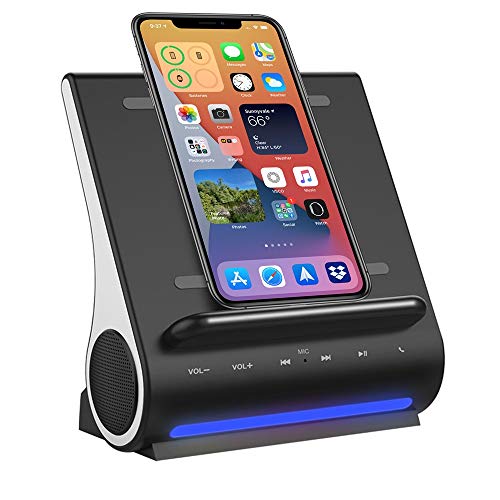
Azpen’s model combines wireless charging with a built-in dual Bluetooth speaker system and a mic for hands-free calls. It is best for users who want a combined dock, charger, speakerphone, and music speaker in a single upright device. The vertical charging coils support convenient phone placement, though some metal cases may interfere with wireless charging. This option is ideal for casual calls and general media playback on desks with limited space.
Logitech Logi Dock
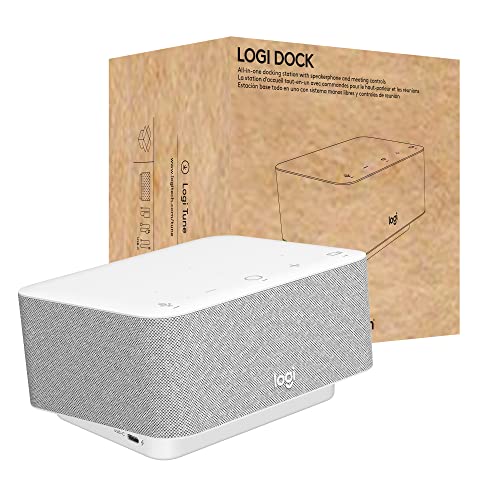
Logi Dock is best for productivity-focused users who want to minimize desk clutter. This all-in-one USB-C dock supports multiple peripherals, two monitors, and built-in noise-canceling mics. It also offers calendar syncing via Logi Tune for easy meeting join. A potential downside is that the device’s strength lies in organization and conferencing rather than high-end audio fidelity for music playback.
SIIG USB-C Mini Dock with Conference Speaker
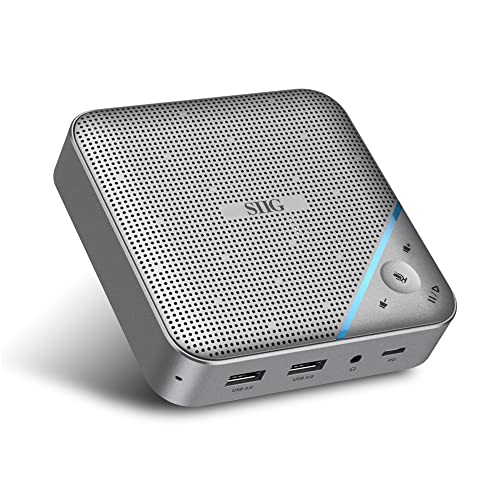
SIIG’s mini dock is best for compact workspaces needing a conference-grade speaker and 4K HDMI output. It provides PD charging up to 85W, USB-A ports, a 3.5mm headset jack, and a clear 360-degree microphone. It suits portable desks or small home offices. A limitation is the smaller form factor may limit long-term expansion compared to larger docks with more ports or higher-end audio processing.
j5create USB-C Dual 4K Speakerphone Dock Pro

This model is best for power users who need dual 4K HDMI outputs plus high-speed USB connectivity and a built-in speakerphone. It supports two 4K displays, PD charging, and a built-in mic array with echo cancellation. Choose this if you require maximal display capability in a single dock. The complexity of ports may be overkill for simple single-monitor setups.
Buying Guide
What should you consider when choosing a USB-C speaker dock?
Port variety matters. Look for HDMI or DisplayPort outputs if you plan to drive external displays. USB-C PD charging ensures your laptop stays powered. If conferencing is primary, verify microphone arrays and echo cancellation support. For desk space, consider a compact design versus a feature-dense model with multiple displays.
Best for conferencing vs. best for multimedia
For meetings first, prioritize speakerphone quality, noise suppression, and a reliable USB connection to your PC or Mac. For multimedia or music, evaluate the built-in speakers, bass response, and potential room-filling audio capabilities.
Compatibility and setup considerations
Check operating system support (Windows, macOS) and whether the dock is certified for your preferred conferencing platform. If you use multiple displays, confirm the dock supports the required video resolutions and refresh rates. Ensure your computer’s USB-C port supports power delivery if you plan to charge while connected.
Durability and user experience
Look for straightforward cable management, sturdy build materials, and clear button layouts for call controls. If you travel or move desks often, a compact or modular design can reduce setup friction and clutter.
FAQ
- Do USB-C speaker docks charge the laptop while in use? Yes, many docks support PD charging, allowing pass-through power to compatible laptops during use.
- Can I connect multiple displays to these docks? Some models offer dual 4K HDMI or DP/HDMI combinations; verify your host device supports these outputs concurrently.
- Will these docks improve microphone quality for calls? Docks with multiple mics and echo cancellation can improve voice pickup, but external dedicated mics may still be necessary for large rooms.
- Are wireless charging docks compatible with all phones? Wireless charging works with many recent devices, but metal cases or certain devices can interfere with charging efficiency.
- Which dock is best for a clutter-free desk? Logitech Logi Dock or similar all-in-one hubs are designed to minimize cable clutter and streamline workflow.
- Do these products require any special software? Some include companion apps for features like calendar syncing or microphone configuration; others are plug-and-play.